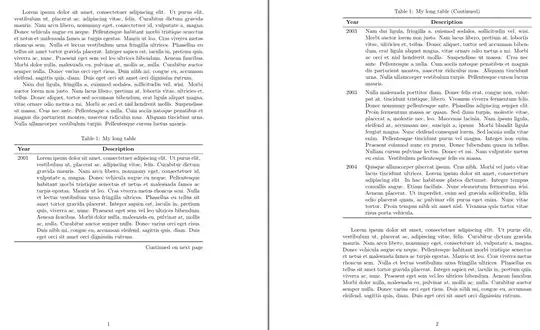
At long tables people usually add column headers on the top each table part as well repeat caption and ad information about table continuations. This enable each package supporting long table, however using tabularray package, adding this is very simple (and with short code):
\documentclass{article}
\usepackage{microtype}
\usepackage{tabularray}
\UseTblrLibrary{booktabs}
\usepackage{lipsum}
\begin{document}
\lipsum[1-2]
\begin{longtblr}[
caption = {My long table},
  label = {tab:longtblr?}
                ]{colspec = {lX[j]},
                  rowhead = {1},
                  row{1}  = {font=\bfseries, c}
                  }
    \toprule
 Year & Description \
    \midrule
 2001 &  \lipsum[1] \
 2003 &  \lipsum[2] \
 2003 &  \lipsum[3] \
 2004 &  \lipsum[4] \
    \bottomrule
\end{longtblr}
\lipsum[1]
\end{document}
Addendum
Using `long table you should be aware that long table can only be broken between pages only between rows. This can cause that below table parts will be empty space (as is visible at above MWE).
In your case, when your table more remain to a list than table, that may be better to use solution provided by @Fran (+1) or simple use enumitem package:
\documentclass{article}
\usepackage{enumitem}
\usepackage{lipsum}
\begin{document}
\lipsum[1-2]
    \begin{itemize}[labelindent=0em,leftmargin=!]
\item[2001] \lipsum[1]
\item[2002] \lipsum[2]
\item[2003] \lipsum[3]
\item[2004] \lipsum[4]
    \end{itemize}
\lipsum[1-2]
\end{document}
In such cases looks of your document will be nicer:


\\almost all tables usinglXare better set as a list, then page breaking can happen naurally within the lipsum text,\item[2001] \lipsum \iem[2003]\lipsum....– David Carlisle Mar 24 '22 at 20:59