The manual of the package prettyref says:
11 \def\prettyref#1{\@prettyref#1:}
\@prettyref The internal macro \@prettyref does all the work. It takes two arguements delimited by :. The first arguement is the format name. If the format has not been defined, a warning is issued and \ref is used. Otherwise, the reference is formatted. \@prettyref uses the LaTeX macros \ref and \pageref to access the \newlabel data structure. Hopefully this makes the package robust enough to use with various other pacakges.
12 \def\@prettyref#1:#2:{%
13 \expandafter\ifx\csname pr@#1\endcsname\relax%
14 \PackageWarning{prettyref}{Reference format #1\space undefined}%
15 \ref{#1:#2}%
16 \else%
17 \csname pr@#1\endcsname{#1:#2}%
18 \fi%
19 }
So \prettyref internally uses two :-delimited arguments for splitting that part of the argument that denotes the formatting.
LaTeX strips off curly braces surrounding an entire argument.
It also does so with delimited arguments.
Thus curly braces surrounding an entire delimited argument can be used for hiding instances of a delimiter occurring inside the delimited argument so that TeX's mechanism for grabbing the delimited argument won't be applied to these instances of the delimiter.
This implies:
Instead of \prettyref{Formatting:RemainderOfLabelName} you can do
\prettyref{{Formatting}:RemainderOfLabelName} or
\prettyref{Formatting:{RemainderOfLabelName}} or
\prettyref{{Formatting}:{RemainderOfLabelName}}.
Thus in your case for hiding : from TeX's mechanism for grabbing :-delimited arguments/for having things working out, just wrap that entire part of \prettyref's argument into curly braces that denotes the formatting, i.e., instead of
\prettyref{diag:seq:FirstExportedDiagram}
do
\prettyref{{diag:seq}:FirstExportedDiagram}
or
\prettyref{{diag:seq}:{FirstExportedDiagram}}.
The MWE
\documentclass[a4paper]{article}
\usepackage{graphicx}
\usepackage{prettyref}
\newrefformat{diag:cla}{Class Diagram \ref{#1}}
\newrefformat{diag:seq}{Sequence Diagram \ref{#1}}
\begin{document}
Behold: \prettyref{{diag:seq}:FirstExportedDiagram}.
\begin{figure}[h]
    %\includegraphics[scale=0.5]{sequencediagram1.pdf}
    \includegraphics[scale=0.5]{example-image.pdf}
    \caption{The first sequence diagram.}
    \label{diag:seq:FirstExportedDiagram}
\end{figure}
\end{document}
yields:

Explanation:
\prettyref{{diag:seq}:FirstExportedDiagram} yields:
\@prettyref{diag:seq}:FirstExportedDiagram:, which in turn yields:
  \expandafter\ifx\csname pr@diag:seq\endcsname\relax
    \PackageWarning{prettyref}{Reference format diag:seq\space undefined}%`
    \ref{diag:seq:FirstExportedDiagram}%`
  \else
    \csname pr@diag:seq\endcsname{diag:seq:FirstExportedDiagram}%`
  \fi
So it seems you actually don't need to redefine anything. With \prettyref's argument just use additional curly braces here and there for hiding instances of : from TeX's mechanism for grabbing :-delimited arguments.
If you don't want to insert curly braces into your auto-generated code manually, and the presence of more than one colon not nested in curly braces always means that only/exactly the first two :-separated components represent the formatting specification, then you can do something like this which splits at colons not nested in curly braces and which does not remove/strip curly braces:
\documentclass[a4paper]{article}
\usepackage{prettyref}
\usepackage{hyperref}
\makeatletter
@ifdefinable\UD@stopromannumeral{\chardef\UD@stopromannumeral=`^^00}%
\newcommand\UD@firstofone[1]{#1}%
\newcommand\UD@firstoftwo[2]{#1}%
\newcommand\UD@secondoftwo[2]{#2}%
\newcommand\UD@Exchange[2]{#2#1}%
\newcommand\UD@PassFirstToSecond[2]{#2{#1}}%
%%=============================================================================
%% Check whether argument is empty:
%%=============================================================================
%% \UD@CheckWhetherNull{<Argument which is to be checked>}%
%%                     {<Tokens to be delivered in case that argument
%%                       which is to be checked is empty>}%
%%                     {<Tokens to be delivered in case that argument
%%                       which is to be checked is not empty>}%
%%
%% The gist of this macro comes from Robert R. Schneck's \ifempty-macro:
%% <https://groups.google.com/forum/#!original/comp.text.tex/kuOEIQIrElc/lUg37FmhA74J>
\newcommand\UD@CheckWhetherNull[1]{%
  \romannumeral\expandafter\UD@secondoftwo\string{\expandafter
  \UD@secondoftwo\expandafter{\expandafter{\string#1}\expandafter
  \UD@secondoftwo\string}\expandafter\UD@firstoftwo\expandafter{\expandafter
  \UD@secondoftwo\string}\expandafter\UD@stopromannumeral\UD@secondoftwo}{%
  \expandafter\UD@stopromannumeral\UD@firstoftwo}%
}%
%%=============================================================================
%% Extract first inner undelimited argument:
%%
%%   \UD@ExtractFirstArg{ABCDE} yields  {A}
%%
%%   \UD@ExtractFirstArg{{AB}CDE} yields  {AB}
%%
%% Due to \romannumeral-expansion the result is delivered after two
%% expansion-steps/after "hitting" \UD@ExtractFirstArg with \expandafter
%% twice.
%%
%% \UD@ExtractFirstArg's argument must not be blank.
%% This case can be cranked out via \UD@CheckWhetherBlank before calling
%% \UD@ExtractFirstArg.
%%
%% Use frozen-\relax as delimiter for speeding things up.
%% I chose frozen-\relax because David Carlisle pointed out in
%% <https://tex.stackexchange.com/a/578877>
%% that frozen-\relax cannot be (re)defined in terms of \outer and cannot be
%% affected by \uppercase/\lowercase.
%%
%% \UD@ExtractFirstArg's argument may contain frozen-\relax:
%% The only effect is that internally more iterations are needed for
%% obtaining the result.
%%
%%.............................................................................
@ifdefinable\UD@RemoveTillFrozenrelax{%
  \expandafter\expandafter\expandafter\UD@Exchange
  \expandafter\expandafter\expandafter{%
  \expandafter\expandafter\ifnum0=0\fi}%
  {\long\def\UD@RemoveTillFrozenrelax#1#2}{{#1}}%
}%
\expandafter\UD@PassFirstToSecond\expandafter{%
  \romannumeral\expandafter
  \UD@PassFirstToSecond\expandafter{\romannumeral
    \expandafter\expandafter\expandafter\UD@Exchange
    \expandafter\expandafter\expandafter{%
    \expandafter\expandafter\ifnum0=0\fi}{\UD@stopromannumeral#1}%
  }{%
    \UD@stopromannumeral\romannumeral\UD@ExtractFirstArgLoop
  }%
}{%
  \newcommand\UD@ExtractFirstArg[1]%
}%
\newcommand\UD@ExtractFirstArgLoop[1]{%
  \expandafter\UD@CheckWhetherNull\expandafter{@firstoftwo{}#1}%
  {\UD@stopromannumeral#1}%
  {\expandafter\UD@ExtractFirstArgLoop\expandafter{\UD@RemoveTillFrozenrelax#1}}%
}%
@ifdefinable\UD@GobbleToColon{\long\def\UD@GobbleToColon#1:{}}%
@ifdefinable\UD@KeepToColon{\long\def\UD@KeepToColon#1:{{#1}}}%
\newcommand\UD@SplitColon[4]{%
  % #1 Tokens to prepend to {<Already splitted stuff>{<stuff splitted in this iteration>}}{<New remainder to split>}
  %    if <Remainder to split> does contain colon.
  % #2 Tokens to prepend to <Already splitted stuff>{<Remainder to split>}
  %    if <Remainder to split> does not contain colon.
  % #3 Already splitted stuff.
  % #4 Remainder to split.
  \expandafter\UD@CheckWhetherNull\expandafter{\UD@GobbleToColon#4:}%
  {#2#3{#4}}{%
    \expandafter\UD@PassFirstToSecond\expandafter{\UD@GobbleToColon#4}{%
      \expandafter\UD@PassFirstToSecond\expandafter{%
        \romannumeral
        \expandafter\UD@Exchange\expandafter{%
          \romannumeral
          \expandafter\expandafter\expandafter\expandafter
          \expandafter\expandafter\expandafter
          \UD@stopromannumeral
          \expandafter\UD@ExtractFirstArg\expandafter{\UD@KeepToColon#4}%
        }{\UD@stopromannumeral#3}%
      }{#1}%
    }%
  }%
}%
\renewcommand\prettyref[1]{%
  \UD@SplitColon{%
    \UD@SplitColon{% Here you could nest more \UD@SplitColon.
      \expandafter\UD@prettyref@morethanonecolon\UD@firstofone
    }{%
      \UD@prettyref@onecolon
    }%
  }{%
    \PackageWarning{prettyref}{No referencing format specified}\ref
  }{}{#1}%
}%
\newcommand\UD@prettyref@onecolon[2]{%
  \expandafter\ifx\csname pr@#1\endcsname\relax
    \PackageWarning{prettyref}{Reference format #1\space undefined}%
    \ref{#1:#2}%
  \else
    \csname pr@#1\endcsname{#1:#2}%
  \fi
}%
\newcommand\UD@prettyref@morethanonecolon[3]{%
  \expandafter\ifx\csname pr@#1:#2\endcsname\relax
    \PackageWarning{prettyref}{Reference format #1:#2\space undefined}%
    \ref{#1:#2:#3}%
  \else
    \csname pr@#1:#2\endcsname{#1:#2:#3}%
  \fi
}%
\makeatother
% In order to create hyperlinks, you can use
%
% \hyperref[{<referencing label>}]{<textual phrase which shall be a hyperlink>}
%
% As components of <textual phrase which shall be a hyperlink> you can use starred
% referencing-commands \ref/\pageref which themselves don't produce hyperlinks.
% This avoids errors due to nesting hyperlinks within hyperlinks.
\newrefformat{diag}{\hyperref[{#1}]{Diagram \ref{#1}}}
\newrefformat{diag:cla}{\hyperref[{#1}]{Class Diagram \ref{#1}}}
\newrefformat{diag:seq}{\hyperref[{#1}]{Sequence Diagram \ref*{#1}}}
\newcounter{democounter}
\begin{document}
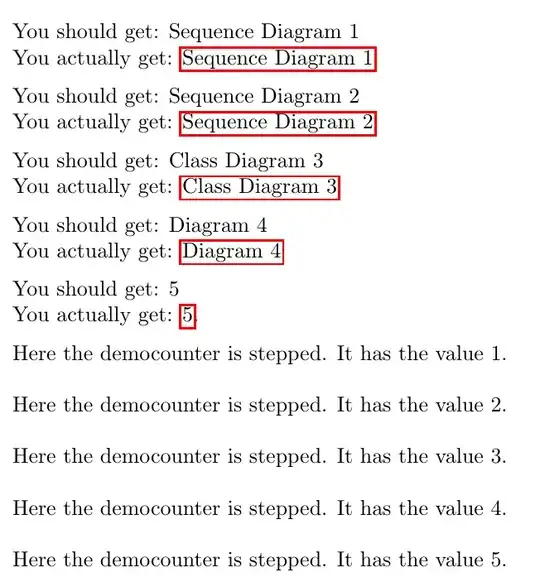
You should get: Sequence Diagram 1\par
You actually get: \prettyref{diag:seq:FirstExportedDiagram:x:Y}
\medskip
You should get:  Sequence Diagram 2\par
You actually get: \prettyref{diag:seq:FirstExportedDiagram}
\medskip
You should get: Class Diagram 3\par
You actually get: \prettyref{diag:cla:FirstExportedDiagram}
\medskip
You should get: Diagram 4\par
You actually get: \prettyref{diag:FirstExportedDiagram}
\medskip
% You should get: 5 plus a warning "No referencing format specified" \par
% You actually get: \prettyref{FirstExportedDiagram}
% \medskip
You should get: 5\par
You actually get: \ref{FirstExportedDiagram}.
\medskip
Here the democounter is stepped. It has the value \refstepcounter{democounter}\thedemocounter.
\label{diag:seq:FirstExportedDiagram:x:Y}%
\bigskip
Here the democounter is stepped. It has the value \refstepcounter{democounter}\thedemocounter.
\label{diag:seq:FirstExportedDiagram}%
\bigskip
Here the democounter is stepped. It has the value \refstepcounter{democounter}\thedemocounter.
\label{diag:cla:FirstExportedDiagram}%
\bigskip
Here the democounter is stepped. It has the value \refstepcounter{democounter}\thedemocounter.
\label{diag:FirstExportedDiagram}%
\bigskip
Here the democounter is stepped. It has the value \refstepcounter{democounter}\thedemocounter.
\label{FirstExportedDiagram}%
\bigskip
\end{document}


Package prettyref Warning: Reference format diag undefined on input line 20.. In the pdf-file you getBehold: 1instead ofBehold: Sequence Diagram 1. That's because the formatting-component still is obtained by splitting at the first:. Delimited arguments can be wrapped into curly braces, however... ;-) – Ulrich Diez May 10 '22 at 09:52\newrefformat{diag}{Diagram \ref{#1}}, and I assumed that the OP wants to get the diag format for the three part label. – Ulrike Fischer May 10 '22 at 09:56:. But it seems the OP wants parts to be combined for denoting the formatting-information. That's why in the question it is\newrefformat{diag:seq}{Sequence Diagram...}and not\newrefformat{diag}{...}. There are "sub-types" ofdiag. ||| Still your example, compiled as is, yields the warning about the formatting not being defined. – Ulrich Diez May 10 '22 at 10:00:instead of two, then about four:instead of two... ;-) I would not do this splittng at all. Instead I'd just define a\prettyref-command that has two undelimited arguments, one denoting the formatting, the other denoting the cross-referencing-label. ;-) – Ulrich Diez May 10 '22 at 10:06