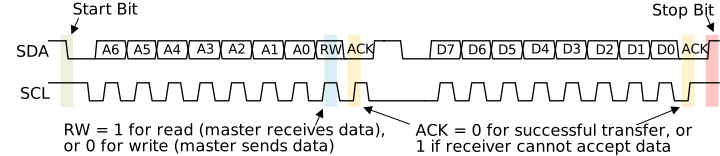
I am currently creating technical documentation that depicts through a tikzpicture the data flow across something called the I2C bus (example-like graphic). I initially started doing this by hand with the following result:

As it is shown, my depiction uses a line cross pattern drawn around each text element. I eventually stopped doing this by hand (i.e. this graphic is incomplete as shown) in hopes that I could create a macro function to do this for an arbitary list of text elements with consistent spacing.
I came up with the following (broken) example:
\documentclass{article}
\usepackage[utf8x]{inputenc}
\usepackage{tikz}
\usepackage{graphicx,pgf}
\usepackage{listofitems}
\begin{document}
%   @brief          Creates a test graphic.
%   @param[in] #1   The x-coordinate of the graphic.
%   @param[in] #2   The y-coordinate of the graphic.
%   @param[in] #3   A comma separated list of strings.
\newcommand{\CreateTestGraphic}[3]
{%
    \begin{tikzpicture}
    \readlist*\mylist{#3}                   % Read the comma separated input array.

    \newcommand{\CrossHorDistance}{15pt}    % The horizontal distance of the cross.
    \newcommand{\SeparationDistance}{15pt}  % The horizontal distance to separate each text element by.

    \edef\NextTextCenterX{#1}               % Keeps track of the text's center x-coordinate.
    \edef\NextTextCenterY{#2}               % Keeps track of the text's center y-coordinate.

    \foreachitem \x \in \mylist
    {%
        \settowidth{\strwidth}{\x}      % The width of the string at the current font and size in
                                        % point (pt) units.
        \settoheight{\strheight}{\x}    % The height of the string at the current font and size in
                                        % point (pt) units.

        \coordinate (NextPosition) at (\NextTextCenterX, \NextTextCenterY); % The center coordinate position
                                                                            % to place the next text element at.

        % For testing only: Place a dot to show where the center coordinate is on screen.
        %\node at (NextPosition) [circle,
        %                         fill,
        %                         inner sep=1.5pt]{};

        % Paint the text to the page.
        \node[] (NextNode) at (NextPosition) {\x};

        \draw[color=black]  ([yshift=5pt] NextNode.north west) --
                            ([yshift=5pt] NextNode.north east) --
                            ([yshift=-5pt, xshift=\CrossHorDistance] NextNode.south east);

        \draw[color=black]  ([yshift=-5pt] NextNode.south west) --
                            ([yshift=-5pt] NextNode.south east) --
                            ([yshift=5pt, xshift=\CrossHorDistance] NextNode.north east);

        % Update the variables that track the x and y coordinates of where to place the next text.
        %\pgfmathparse{\NextTextCenterX + (\strwidth - 20pt)}
        \pgfmathparse{\NextTextCenterX + 5pt} % This doesn't work when using \strwidth...
        \edef\NextTextCenterX{\pgfmathresult}
    }

\end{tikzpicture}

}
\CreateTestGraphic{0pt}{0pt}{apple, blueberry, banana}
\end{document}
(This was compiled on Overleaf.com using the XeLaTeX compiler.)
This code produces the following (broken and incomplete) results:
 Although, errors appear in the editor despite the graphical output:

I've spent a lot of time researching to try and bridge the gap in my knowledge with the TeX engine. Here are the major questions I have:
How can I create a numerical variable that I can update by an arbitary value (like normal programming languages)? I've tried using
\edef,\newcommand, etc. but nothing seems to work the way I expect.
Example:double var = 15pt; var += 73pt
Context: Nodes are drawn in tikz at a center coordinate. If I want to position each text element equidistant away to allow the crossing lines to flow consistently, I need to update the next node's center coordinate.How the heck do I get the width and height in units of points (pt) for text?
Context: As noted in the above question, because I need to continuously keep track of the next node's center coordinate, I need to understand the dimensions of the incoming text. I have tried bothwidth("\x")and\settowidth{\wvar}{\x}, but I haven't had much luck using these in arthemtic when I try and dowidth("\x") * 0.5pt, etc. I also need to get the maximum height of the text, so I can draw the line at the correct height for all the graphics.
In the sample code, I was unsuccessfully using the \strwidth variable in the following express: \pgfmathparse{\NextTextCenterX + (\strwidth * 0.5pt)}. I am at a loss here on how I can actually maintain updatable variables and how I can get the numerical width and height of text that I can then use in a variable to manipulate.
Is anyone able to help put me back on the right track and answer my above questions?
Update After Accepting Answer (5/18/2022):
Thanks to @Tom's answer below, the desired graphic output was achieved! I did make a slight modification though. As shown in the initial picture to my question, I was looking to add an arrow, which would not be enclosed, to show the direction of movement in the graph. So, I modified @Tom's answer slightly and the final, example code was created:
\documentclass{article}
\usepackage{tikz}
\usepackage{graphicx,pgf}
\usepackage{listofitems}
\usetikzlibrary{arrows,calc}
%   @brief          Creates a test graphic.
%   @param[in] #1   The x-coordinate and y-coordinate of the graphic.
%   @param[in] #2   A comma separated list of strings.
\newcommand{\CreateTestGraphic}[2]
{%
    \newcommand{\CrossHorDistance}{15pt}    % The horizontal distance for each cross.
\begin{tikzpicture}

    \begin{scope}[shift={(#1)}]

        %
        %   Create a blank node and draw the initial starting cross and direction arrow.
        %
        \coordinate (NextNode) at (0,0);

        \node[inner sep=0pt,
              minimum size=1cm,
              align=center,
              right=\CrossHorDistance] (NextNode) at (NextNode.east) {};

        \draw [-stealth] ([xshift=-15pt-\CrossHorDistance] NextNode.west) --
                         ([xshift=0pt-\CrossHorDistance] NextNode.west);

        \draw[color=black]  ([yshift=5pt] NextNode.north west) --
                            ([yshift=-5pt, xshift=-\CrossHorDistance] NextNode.south west) --
                            ($([yshift=-5pt, xshift=-\CrossHorDistance] NextNode.south west) + (-5pt, 0pt)$);

        \draw[color=black]  ([yshift=-5pt] NextNode.south west) --
                            ([yshift=5pt, xshift=-\CrossHorDistance] NextNode.north west) --
                            ($([yshift=5pt, xshift=-\CrossHorDistance] NextNode.north west) + (-5pt, 0pt)$);

        % Reset the 'NextNode' in preparation for painting all of the nodes.
        \coordinate (NextNode) at (0,0);

        \foreach \content in {#2}
        {%
            \node[text depth=.3\baselineskip,
                  text height=.7\baselineskip,
                  inner sep=0pt,
                  minimum size=1cm,
                  align=center,
                  right=\CrossHorDistance] (NextNode) at (NextNode.east) {\content};

            \draw[color=black]  ([yshift=5pt] NextNode.north west) --
                                ([yshift=5pt] NextNode.north east) --
                                ([yshift=-5pt, xshift=\CrossHorDistance] NextNode.south east);

            \draw[color=black]  ([yshift=-5pt] NextNode.south west) --
                                ([yshift=-5pt] NextNode.south east) --
                                ([yshift=5pt, xshift=\CrossHorDistance] NextNode.north east);
        }

        \draw[color=black]  ([yshift=-5pt, xshift=\CrossHorDistance] NextNode.south east) --
                            ($([yshift=-5pt, xshift=\CrossHorDistance] NextNode.south east) + (5pt, 0pt)$);

        \draw[color=black]  ([yshift=5pt, xshift=\CrossHorDistance] NextNode.north east) --
                            ($([yshift=5pt, xshift=\CrossHorDistance] NextNode.north east) + (5pt, 0pt)$);

    \end{scope}

\end{tikzpicture}

}
\begin{document}
\CreateTestGraphic{0pt, 0pt}{apple, blueberry, banana}
\end{document}
(This was compiled on Overleaf.com using the XeLaTeX compiler.)
Final Output:

Update #2 After Accepting Answer (5/18/2022):
I have spent some time exploring how I might be able to color each individual cell. In order to do this, it required me to change how things were drawn to the screen. To anyone who might be interested, here is a working solution example:
\documentclass{article}
\usepackage{tikz}
\usepackage{graphicx,pgf}
\usepackage{listofitems}
\usepackage{ifthen}
\usepackage{pgfplots}
\pgfplotsset{compat=1.11}
\usepgfplotslibrary{fillbetween}
\usetikzlibrary{intersections}
\pgfdeclarelayer{bg}
\pgfsetlayers{bg,main}
\usetikzlibrary{arrows,calc}
%   @brief          Creates a test graphic.
%   @param[in] #1   The x-coordinate and y-coordinate of the graphic.
%   @param[in] #2   A comma separated list of colors.
%   @param[in] #3   A comma separated list of strings.
\newcommand{\CreateTestGraphic}[3]
{%
    \newcommand{\CrossHorDistance}{15pt}    % The horizontal distance for each cross.
\begin{tikzpicture}

    \begin{scope}[shift={(#1)}]

        %
        %   Create a blank node and draw the initial starting cross and direction arrow.
        %
        \coordinate (NextNode) at (0,0);

        \node[inner sep=0pt,
              minimum size=1cm,
              align=center,
              right=\CrossHorDistance] (NextNode) at (NextNode.east) {};

        \draw [-stealth] ([xshift=-15pt-\CrossHorDistance] NextNode.west) --
                         ([xshift=0pt-\CrossHorDistance] NextNode.west);

        \draw[color=black]  ([yshift=0pt, xshift=-\CrossHorDistance/2] NextNode.west) --
                            ([yshift=-5pt, xshift=-\CrossHorDistance] NextNode.south west) --
                            ($([yshift=-5pt, xshift=-\CrossHorDistance] NextNode.south west) + (-5pt, 0pt)$);

        \draw[color=black]  ([yshift=0pt, xshift=-\CrossHorDistance/2] NextNode.west) --
                            ([yshift=5pt, xshift=-\CrossHorDistance] NextNode.north west) --
                            ($([yshift=5pt, xshift=-\CrossHorDistance] NextNode.north west) + (-5pt, 0pt)$);

        % Reset the 'NextNode' in preparation for painting all of the nodes.
        \coordinate (NextNode) at (0,0);

        \readlist*\colors{#2}

        \foreach \content [count=\i] in {#3}
        {%
            \ifthenelse{\equal{\colors[\i]}{none}}
            {%
                \def\NextColor{none}
            }
            {%
                \def\NextColor{\colors[\i]!100}
            }

            \node[text depth=.1\baselineskip,
                  text height=.7\baselineskip,
                  inner sep=0pt,
                  minimum size=1cm,
                  align=center,
                  right=\CrossHorDistance] (NextNode) at (NextNode.east) {\content};

            \begin{pgfonlayer}{bg}
                \draw  [color= black,
                        fill = \NextColor,
                        fill opacity=0.5]   ([yshift=5pt] NextNode.north west) --
                                            ([yshift=5pt] NextNode.north east) --
                                            ([yshift=0pt, xshift=\CrossHorDistance/2] NextNode.east) --
                                            ([yshift=-5pt, xshift=0pt] NextNode.south east) --
                                            ([yshift=-5pt] NextNode.south west) --
                                            ([yshift=0pt, xshift=-\CrossHorDistance/2] NextNode.west) --
                                            ([yshift=5pt, xshift=0pt] NextNode.north west);
            \end{pgfonlayer}
        }

        \draw[color=black]  ([yshift=0pt, xshift=\CrossHorDistance/2] NextNode.east) --
                            ([yshift=-5pt, xshift=\CrossHorDistance] NextNode.south east) --
                            ($([yshift=-5pt, xshift=\CrossHorDistance] NextNode.south east) + (5pt, 0pt)$);

        \draw[color=black]  ([yshift=0pt, xshift=\CrossHorDistance/2] NextNode.east) --
                            ([yshift=5pt, xshift=\CrossHorDistance] NextNode.north east) --
                            ($([yshift=5pt, xshift=\CrossHorDistance] NextNode.north east) + (5pt, 0pt)$);

        \node [] at ([xshift=\CrossHorDistance + 2.5pt] NextNode.east) {\ldots};

    \end{scope}

\end{tikzpicture}

}
\begin{document}
\CreateTestGraphic{0pt, 0pt}{orange, none, red}{apple, blueberry, banana}
\end{document}
(This was compiled on Overleaf.com using the XeLaTeX compiler.)
Final Output:


tikz-timingpackage. But I don't know if it can serve you. – Ignasi May 18 '22 at 09:26\newcommandstuffs in the preamble will be better? Also the\usepackage[utf8x]{inputenc}was not needed anymore. – Tom May 18 '22 at 19:32\newcommandout into the preamble. I do have a question related to your implementation. I noticed you set the width of each cell to a set value (via argument#2) (e.g.2cm). Is there anyway to base each cell's width directly on the length of text for each element? That would mean some cells would be wider than others depending on the length of text per cell. – Code Doggo May 18 '22 at 19:47