0

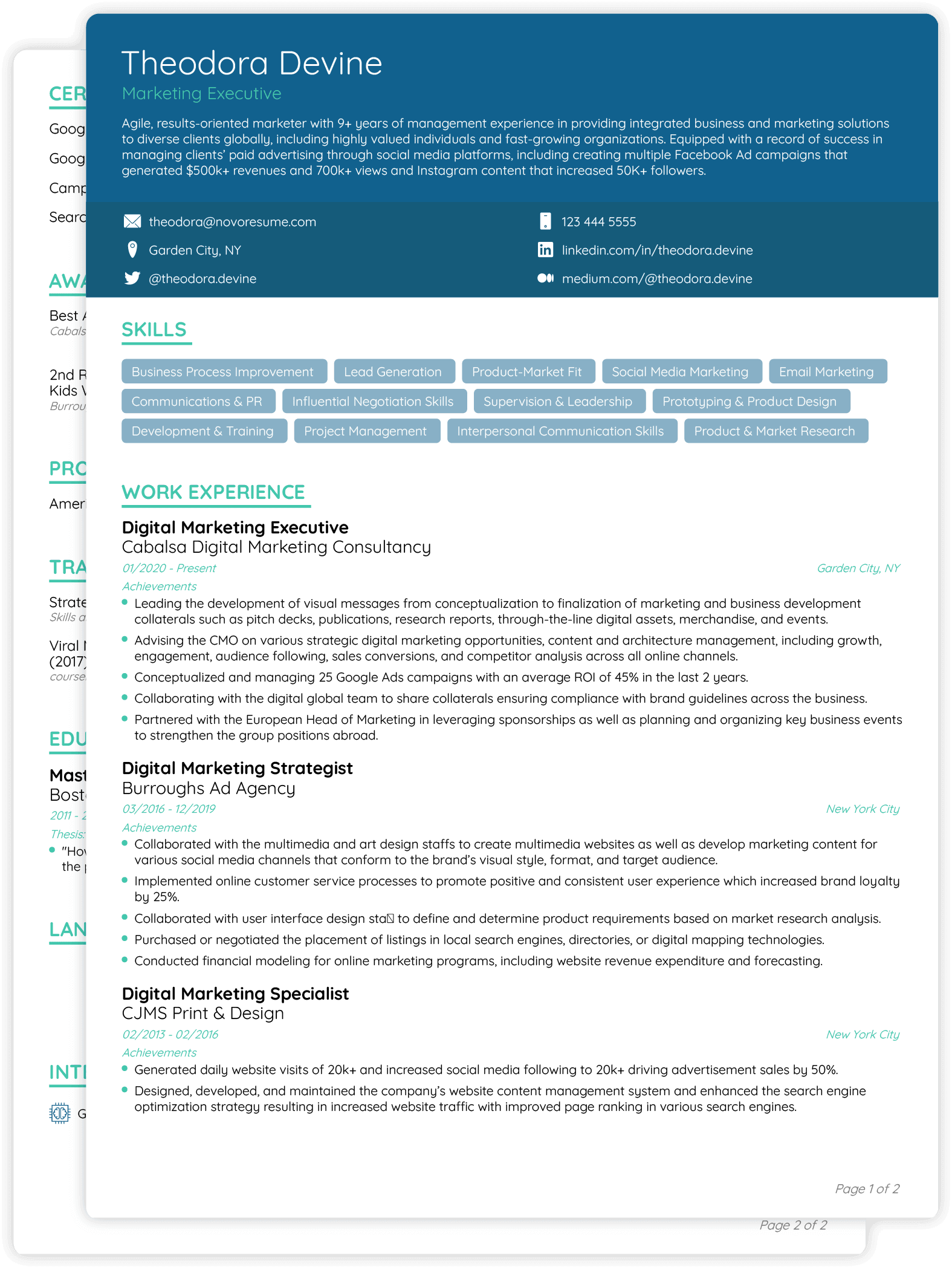
Can anybody please help me to add round boxes like below for skills for the Resume? I'm using this as source. Reference to below can be found here. Also, how to add dual tone header like novoresume is a bonus?

Thanks!!

Skill Round boxes

Edit#1: Adding the source from external link as suggested by @Miyase.

        \documentclass[10pt,a4paper,ragged2e]{altacv}
\geometry{left=2cm,right=10cm,marginparwidth=6.8cm,marginparsep=1.2cm,top=1.25cm,bottom=1.25cm}
\ifxetexorluatex
  \setmainfont{Carlito}
\else
  \usepackage[utf8]{inputenc}
  \usepackage[T1]{fontenc}
  \usepackage[default]{lato}
\fi
\definecolor{VividPurple}{HTML}{000000}
\definecolor{SlateGrey}{HTML}{2E2E2E}
\definecolor{LightGrey}{HTML}{2E2E2E}
\colorlet{heading}{VividPurple}
\colorlet{accent}{VividPurple}
\colorlet{emphasis}{SlateGrey}
\colorlet{body}{LightGrey}
\renewcommand{\itemmarker}{{\small\textbullet}}
\renewcommand{\ratingmarker}{\faCircle}
\addbibresource{sample.bib}

\begin{document} \name{JAYDEEP SINGH} \tagline{Jaypee University of Engineering and Technology} \personalinfo{% \email{jd7june1999@gmail.com} \location{Guna, Madhya Pradesh - India} \linkedin{https://www.linkedin.com/in/jaydeep-singh-4ab1a3162/} }

%% Make the header extend all the way to the right, if you want. \begin{fullwidth} \makecvheader \end{fullwidth}

\cvsection{TECHNICAL SKILLS} \smallskip \begin{itemize} \item MATLAB, Xilinx ISE 12.1, MS Office, Proteus, Arduino \smallskip \item C,C++,Java,Python(Beginner) \smallskip \end{itemize} \clearpage

\nocite{*}

\end{document}

Edit#2: Dual tone header reference:Dual tone header reference

  • It's difficult when you don't show any code. Please read about Minimal Working Example to know how to format a question here. It's better to avoid external links that could break in the future. – Miyase Jun 24 '22 at 17:59
  • 1
    One last advice: notice the "Minimal" in "Minimal Working Example". You'll probably have more people willing to help if they don't have to spend time cleaning up the code remove everything that isn't necessary to see the problem and answer the question. – Miyase Jun 24 '22 at 18:20

2 Answers2

2

Below code is working for me. I'm using this. The macro \inoval is provided by OpTeX.

\fontfam[Heros]

\colordef\mygrey{.6\Black} \ovalparams={\fcolor=\mygrey \lcolor=\mygrey} \def\myframe#1{\inoval{\lower.3em\vbox to1.2em{}\White,#1,}\hskip.5em}

\vbox{\mygrey\hbox{\typosize[15/]\bf AREAS OF EXPERTISE} \kern.3em \hrule height2pt}

{\noindent \raggedright \typosize[/22] \myframe{Business Process Improvement} \myframe{Laed Generation} \myframe{Product-Market Fit} \myframe{Eamil Marketing} \myframe{Communicatins & PR} \myframe{Influential Negotiation Skills} \par}

\bye

The result is exactly the same as in your example-image.

wipet
  • 74,238
0

Below code is working for me, introducing option arc:

\begin{tcolorbox}[width=1.5cm,height=.75cm, halign=center, valign=center,colframe=black, colback=lightgray, boxsep=-7pt,
 arc=2mm,% <<<
nobeforeafter]
C/C++
\end{tcolorbox}
\nolinebreak
\hspace{.1cm}
\begin{tcolorbox}[width=1.5cm,height=.75cm, halign=center, valign=center,colframe=black, colback=lightgray, boxsep=-7pt, arc=2mm,nobeforeafter]
Java 8
\end{tcolorbox}
\nolinebreak
\hspace{.1cm}
\begin{tcolorbox}[width=1.5cm,height=.75cm, halign=center, valign=center,colframe=black, colback=lightgray, boxsep=-7pt, arc=2mm,nobeforeafter]
J2EE
\end{tcolorbox}
\nolinebreak
\hspace{.1cm}
\begin{tcolorbox}[width=2.5cm,height=.75cm, halign=center, valign=center,colframe=black, colback=lightgray, boxsep=-7pt, arc=2mm,nobeforeafter]
HTML/CSS
\end{tcolorbox}

enter image description here

For dual tone header, below code helped me:

\begin{titlepage}
\AddToShipoutPictureBG*{\AtPageLowerLeft{%
 \color{lightgray}\rule{\paperwidth}{\paperheight}}}

\AddToShipoutPictureBG*{\AtPageLowerLeft{% \color{gray}\rule{\paperwidth}{.91\paperheight}}}

\AddToShipoutPictureBG*{\AtPageLowerLeft{% \color{white}\rule{\paperwidth}{.89\paperheight}}} \end{titlepage}

enter image description here

MS-SPO
  • 11,519