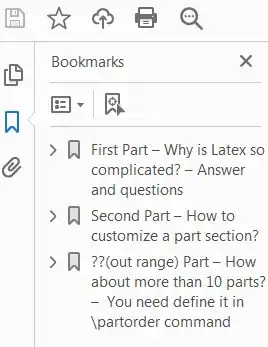
To fully customize the toc behaviors, you probably need to redefine the \l@part and \@part command. To understand how these internal commands defined, you need take a look the book.cls file. I add a new counter to represent the order of the part in "First, Second, Third...etc". I only define the case up to 10 parts. If you need more than 10, you need extend the definition in command \partorder. You didn't mention if you want the page number to be follow after the part entry in toc. I will assume you do. Also right now the part title in document are still in the original form (e.g. Part I title...). I am not sure if you want those are also in the form "First Part title...", so I didn't change it. I load the hyperref package because you have hidelinks option in your \documentclass. If you don't load hyperref package, this option is useless. And because you wanna manually line break in the part title, you could do that by putting \\ in the title. However if hyperref loaded, the \\ are not allowed in the PDF bookmarks. You need use \texorpdfstring{}{} to tell latex how this title will be typed in the PDF bookmarks.
\documentclass[hidelinks,12pt,twoside,openright,a4paper]{book}
\setcounter{secnumdepth}{3}
\setcounter{tocdepth}{3}
\usepackage{setspace}
\usepackage{lipsum}
\usepackage{tocloft}
\setlength{\cftbeforechapskip}{3pt}%espace entre chapitres
\renewcommand{\cftchapleader}{\cftdotfill{\cftdotsep}} % for chapters
\makeatletter
\renewcommand\l@part[2]{%
  \ifnum \c@tocdepth >-2\relax
    \addpenalty{-@highpenalty}%
    \addvspace{2.25em @plus\p@}%
    \setlength@tempdima{3em}%
    \begingroup
      \parindent \z@ \rightskip @pnumwidth
      \parfillskip -@pnumwidth
      {\hfill\parbox{0.6\linewidth}{\centering\large \bfseries #1}\hfill
       \hb@xt@@pnumwidth{\hss #2%
                          \kern-\p@\kern\p@}}\par
       \nobreak
         \global@nobreaktrue
         \everypar{\global@nobreakfalse\everypar{}}%
    \endgroup
  \fi}
\newcounter{partorder}
\newcommand{\partorder}{%
\ifcase\value{partorder}\or First\or Second\or Third\or Fourth\or Fifth\or Sixth\or Seventh\or Eighth\or Ninth\or Tenth\else ??(out range)\fi%
} % If you have more than 10 parts, you need extend this define
\def@part[#1]#2{%
    \ifnum \c@secnumdepth >-2\relax
      \refstepcounter{part}\stepcounter{partorder}%
      \addcontentsline{toc}{part}{\texorpdfstring{\partorder\space\partname\#1}{\partorder\space\partname\ --\ #1}}%
    \else
      \addcontentsline{toc}{part}{#1}%
    \fi
    \markboth{}{}%
    {\centering
     \interlinepenalty @M
     \normalfont
     \ifnum \c@secnumdepth >-2\relax
       \huge\bfseries \partname\nobreakspace\thepart
       \par
       \vskip 20\p@
     \fi
     \Huge \bfseries #2\par}%
    @endpart}
\makeatother
%%%%%%%%%%%%%%%%%%%%%%%%%%%%%%%%
\usepackage{fancyhdr}
\pagestyle{fancy}
% We don’t want chapter and section numbers
\renewcommand{\chaptermark}[1]{\markboth{#1}{}}
\renewcommand{\headrulewidth}{0pt}
\fancyhf{} % sets both header and footer to nothing
\fancyfoot{}
\fancyhead[LE,RO]{\thepage}
\fancyhead[CE]{\textit{A title}} % even pages: chapter title
\fancyhead[CO]{\textit\leftmark} % odd pages: book title
\setlength{\headheight}{15pt}
\usepackage{hyperref}
%%%%%%%%%%%%%%%%%%%%%%%%%%%%%%%%%%%%%%
\begin{document}
\title{A title}
\author{A name}
\date{}
\maketitle
\tableofcontents
\frontmatter
\part{\texorpdfstring{Why is Latex so complicated?\Answer and questions}{Why is Latex so complicated?\ --\ Answer and questions}}
\chapter{A chapter}
\lipsum
\mainmatter
\part{How to customize a part section?}
\chapter{Another chapter}
\lipsum
\setcounter{part}{10}
\setcounter{partorder}{10}
\part{\texorpdfstring{How about more than 10 parts?\You need define it in \textbackslash partorder command}{How about more than 10 parts?\ -- \ You need define it in \textbackslash partorder command}}
\chapter{Another chapter}
\backmatter
\end{document}