1

I'd like to caption my model with "model 4.1: A beautiful equation".

I could manage to write "model 1: A beautiful equation" with the following code i found in the forum Caption for align environment:

\documentclass{article}
\usepackage{amsmath,lipsum}
\newcounter{equationset}
\newcommand{\equationset}[]{% \equationset{<caption>}
    \refstepcounter{equationset}% Step counter
    \noindent\makebox[\linewidth]{model~\theequationset: #1}}% Print caption
\begin{document}
    \begin{align}
        f(x) &= ax^2 + bx + c \\
        &= g(x)
    \end{align}
    \equationset{A beautiful equation.}
\medskip

\end{document}

My supervisor is very strict, which is why it has to be called 4.1. The code is copied and I don't understand it enough, so I don't know how to adapt it. I haven't even figured out how to at least change it to "model 4:". Does anyone know a solution? (Can also be something completely different, the main thing is that it works).

Torbjørn T.
  • 206,688
Céline
  • 21
  • 2

1 Answers1

1

You probably need to get familiar with float, a package for custom floats, define your own float as model, define a label for it, e.g. Model and get access to a list of your folats

See the example
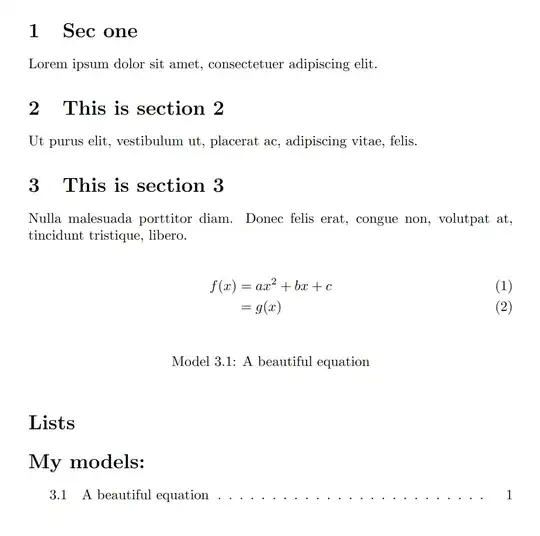
enter image description here

The following redefines equation numbers to include sections

\numberwithin{equation}{section}

which I haven't included in the code but should be placed in your preamble.

\documentclass{report}
\usepackage{etoolbox}
\usepackage{amsmath,lipsum}
\usepackage[colorlinks]{hyperref}
\usepackage{cleveref}

% \pretocmd{@startsection}{\protect\setcounter{modelc}{0}}{}{} \newcounter{modelc} \numberwithin{equation}{chapter} \numberwithin{modelc}{chapter} \crefname{modelc}{model}{models} \Crefname{modelc}{Model}{Models} % \crefformat{modelc}{model~#2(#1)#3} % Custom formatting -> model (C.M) % \Crefformat{modelc}{Model~#2(#1)#3} % -> Model (C.M)

\NewDocumentEnvironment{model}{O{} m +b}{% % #1 - label (optional) % #2 - caption \refstepcounter{modelc} \notblank{#1}{\label{#1}}{}

#3
%%% Increase a counter and set the label if provided
%%% Formatting a caption
\settowidth{\dimen0}{Model \themodelc}%
\settowidth{\dimen1}{#2}%
\ifdim \dimen1 &gt; \dimexpr(\textwidth - \dimen0 - 1em)
    \dimen1=\dimexpr(\textwidth - \dimen0 - 1em)\fi
\begingroup
    \centering
    \parbox[t]{\dimexpr(\dimen0 + 1em)}{Model \themodelc: }%
    \parbox[t]{\dimexpr(\dimen1)}{#2}%
    \vspace{\baselineskip}
    \par
\endgroup

}{} \makeatother

\begin{document} \chapter{The first chapter} \lipsum[1][1-2]

\section{This is a section} \lipsum[1][1]

\chapter{The second chapter} \label{chap:second} \section{This is a section with a model} \lipsum[1][2] \begin{model}[mod:beq]{A very very long description of a extremely beautiful equation spanning multiple lines} \begin{align} % Only caption f(x) &= ax^2 + bx + c \label{eq:eq1} \ &= g(x) \label{eq:eq2} \end{align} \end{model}

\lipsum[1][3-5]

\chapter{The final chapter} \lipsum[1][3-5]

\chapter{This is a star variant section} \lipsum[1][6]

\section{This is a section with another model} \lipsum[1][5] \begin{model}{A beautiful equation} % Caption + label \begin{align} f(\mathbf{x}) &= x_1 - x_2 \end{align} \end{model}

Reference to \Cref{mod:beq} on \cpageref{mod:beq} in \cref{chap:second}. \end{document}

Celdor
  • 9,058
  • Thank you, this works well. But now I get a bar with the heading instead of just a normal label at the bottom. What am I doing wrong? – Céline Jul 05 '22 at 15:40
  • @CélineMeister I don't get any bar anywhere. The screenshot is what the result is. Have you compiled my example in a separate file or have you copied it to existing code and then tried to compile everything together? – Celdor Jul 05 '22 at 15:57
  • I tried to compile everything together.. it works separately. No idea, where i made the mistake, looks right to me! But never mind, i'll just leave it like that... at least the numeration is correct :-) Thank you! – Céline Jul 05 '22 at 16:34
  • It's hardly possible to get the idea without the full code. Are you getting any error? Sometimes the order of loaded packages matters so you could try to move \usepackage{float} upwards, even right after \documentclass.. and see if that helps. – Celdor Jul 05 '22 at 16:44
  • @CélineMeister I edited the answer. There's a variant of the solution with a custom environment. Because it's not based on floats, you cannot have a list of models. – Celdor Jul 05 '22 at 18:20
  • yes i get that, but it's a huge document and i have no idea where the mistake is :-). Thank you so much for your effort! I'm going to try the edited answer right away! – Céline Jul 07 '22 at 06:40
  • works perfectly! thank you so much! – Céline Jul 07 '22 at 06:46
  • one last question... it now displays "4.2.1" since it's under section 4.2. Is it possible that it still starts on 4.1? Should have mentioned this earlier, i'm sorry. – Céline Jul 07 '22 at 06:51
  • @Céline In lines starting from \numberwithin, change section to chapter. – Celdor Jul 07 '22 at 08:36
  • perfect, thank you :-) – Céline Jul 08 '22 at 09:41