I am using lscape to include a figure in the middle of my text on a landscape page. However, instead of breaking to the landscape page at the point where I start the landscape environment, I would like to simply have the figure appear automatically on the next available page. Here's an illustration.
Right now, my document looks like this:
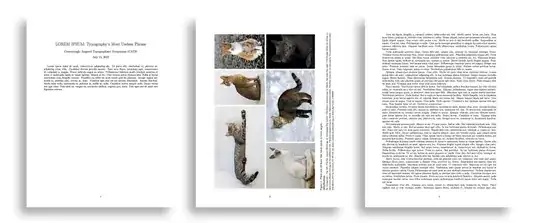
I want it to look like this (for the image, I split up my text above and below the landscape environment manually, which is not desirable):

Here is the source for the document (the first image shown above):
\documentclass[10pt,letterpaper]{article}
\usepackage[utf8]{inputenc}
\usepackage[T1]{fontenc}
\usepackage[english]{babel}
\usepackage{amsmath,amsfonts,amssymb,graphicx,lscape}
\usepackage[left=2.50cm, right=2.50cm, top=2.50cm, bottom=2.50cm]{geometry}
\title{LOREM IPSUM: Typography's Most Useless Phrase}
\author{Concerningly Angered Typographists' Symposium (CATS)}
\begin{document}
    \maketitle
Lorem ipsum dolor sit amet, ...

\begin{landscape}
    \begin{figure}
        \includegraphics[width=\linewidth]{/tmp/cat123.jpg}
        \caption{These cats all know that lorem ipsum is Latin jargon. \\ \textbf{Attribution:} \\ {\footnotesize By Alvesgaspar - Top left: File:Cat August 2010-4.jpg by AlvesgasparTop middle: File:Gustav chocolate.jpg by Martin BahmannTop right: File:Orange tabby cat sitting on fallen leaves-Hisashi-01A.jpg by HisashiBottom left: File:Siam lilacpoint.jpg by Martin BahmannBottom middle: File:Felis catus-cat on snow.jpg by Von.grzankaBottom right: File:Sheba1.JPG by Dovenetel, CC BY-SA 3.0, https://commons.wikimedia.org/w/index.php?curid=17960205}}
    \end{figure}
\end{landscape}

Nam dui ligula...

\end{document}

landscapeyou want a float so usesidewaysfigurefromrotatingpackage – David Carlisle Jul 15 '22 at 21:49sidewaysfigurebreakshyperref, by the way. – Ben Zelnick Jul 16 '22 at 20:39autorefto reference asidewaysfigure, it gives you the section number reference instead (as if thelabelwas written right belowsection,subsection, etc. and not in the figure itself). Do I need to put afigureenvironment inside of thesidewaysfigureenvironment to prevent this? – Ben Zelnick Jul 17 '22 at 20:12labelbelow everything else. It wasn't working becauselabelwas at the beginning of thesidewaysfigureenvironment, not the end. – Ben Zelnick Jul 28 '22 at 19:44