4

Example:

\documentclass[10pt]{article}

\usepackage[utf8]{inputenc} \usepackage{mwe} \usepackage{graphicx} \usepackage{tabularray} \UseTblrLibrary{varwidth}

\newcommand{\mymacro}{This macro expands \ onto two lines}

\begin{document}

\begin{center} \begin{tblr}{ measure=vbox, width=0.9\linewidth, colspec={X[l,m] X[2,c,m]}, hlines, vlines } { A single line of text \ Some additional text \ \mymacro } & \includegraphics[width=\linewidth, height=0.3\linewidth]{example-image} \end{tblr} \end{center}

\end{document}

The image may have variable aspect ratio; my immediate case is a wider one. Also showing h/vlines for illustration I don't need them.

Text left of image, vertically misaligned

To be precise, I want the two cells to align their bounding boxes on vertical centers, independent of contents.

I managed to figure out the macro expansion (this doesn't need expand, it needs varwidth!), but I can't find anything that controls image alignment. Wrapping the image in a \begin{tblr}{c}...\end{tblr} nearly works, but it spams a zillion warnings, and the h-spacing is wrong. (I don't see anything about nested tblrs, is this even allowed ever?)

Possibly related: tabularray, including \linewidth graphics in X columns causes large vertical space (Is adjustbox fixing it?)

  • 1
    move the graphics down: \raisebox{-0.5\height}{\includegraphics[width=\linewidth]{...}} – Ulrike Fischer Aug 09 '22 at 18:38
  • @UlrikeFischer Close, but not exact; they're still off by, oh, maybe 4pt? I can at least hack it with this for now -- thanks – Tim Williams Aug 09 '22 at 18:44
  • "broken" isn't how I'd describe this, your image shows that you got exactly the alignment you specified. – David Carlisle Aug 09 '22 at 18:57
  • 1
    Hi @DavidCarlisle - the docs say middle vertical alignment, which I take to mean centering the contents. What do I actually want? – Tim Williams Aug 09 '22 at 19:01
  • actually there my be some weirdness in the second column what you show is m aligned first column (ref point in the centre) aligned with the image (ref point on its base) I hadn't noticed you use m in the second coumn as well, you might hope that vertically centred the ref point but single row m columns are tricky (even in classic tabular) so I'm not exactly surprised. – David Carlisle Aug 09 '22 at 19:08
  • 1
    @DavidCarlisle Well to be fair all user problems are caused by they specifying the wrong command to the computer versus what they think it should do... – user202729 Aug 10 '22 at 02:07

2 Answers2

4

very interesting. I guess this is some unintended behavior because of how tabularray computes the center.

a really good fix is only possible by the author updating the package (or someone providing a patch, but then letting the author updating package is better)

in short, I think the cause is the following...

first, to center the array you need to put the content in a box, then measure the height and the depth of the box. But if you do just that, the baseline of a character with descender (e.g. y) will be above the baseline of a character without (e.g. a).

so, I'm not sure how tabularray implements the center alignment exactly (the source code is surely dense.), but experimentally this snippet:

\begin{tblr}{width=0.9\linewidth, colspec={X[m] X[2,m]}}
    {
        A line of text \\
        Some additional text \\
    } &
    {
    aa\includegraphics[width=\linewidth, height=0.3\linewidth]{example-image}
    \\
    bb\includegraphics[width=\linewidth, height=0.3\linewidth]{example-image}
}
\end{tblr}

gives the output

output

so I can guess that it takes the midpoint of (the top of a strut at the first line) and (the bottom of a strut at the last line).

in this case it appears that it might be better to take max(the top of the strut at the first line, the actual top of the first line) instead. Not sure if there's any case that this will give worse result than the current.

currently

\begin{tblr}{width=0.9\linewidth, colspec={X[m] X[2,m]}}
    some text & \rule{2pt}{15pt} other text with a tall column \rule{2pt}{15pt}
\end{tblr}

provides

output

with the change, the baseline will no longer be aligned. Would that be desired...?

More practically, there are exceptionally tall inline formulas such as $5^{2^2}$, same issue. That having said this one in particular already skew the baselineskip whenever it's used so maybe that's not an issue...?


anyway, given the explanation of how I guess it works above, I can think of one workaround (which, if you understood the above, you should be able to understand why this one works as well).

\begin{tblr}{
        measure=vbox,
        width=0.9\linewidth,
        colspec={X[l,m] X[2,c,m]},
        hlines, vlines
    }
    {
        A single line of text \\
        Some additional text \\
        \mymacro
    } &
    {
        random text here \\
        \includegraphics[width=\linewidth, height=0.3\linewidth]{example-image} \\
        random text here
    }
\end{tblr}

the random text are only for demonstration. Replace with \strut or whatever invisible you want.

Disadvantage, this will only work if the first cell is taller than the second cell, which is unfortunately not the case here.


I come across https://tex.stackexchange.com/a/112977/250119 which mentions adjustbox package, thinking about it the midpoint of strut top (0.7\baselineskip) and the strut bottom (-0.3\baselineskip) is 0.2\baselineskip, so you can use m-type valign of adjustbox like this

\def\adjboxvcenter{0.2\baselineskip}

\begin{center} \begin{tblr}{ measure=vbox, width=0.9\linewidth, colspec={X[l,m] X[2,c,m]}, hlines, vlines } { A single line of text \ Some additional text \ \mymacro } & \adjustbox{valign=m}{\includegraphics[width=\linewidth, height=0.3\linewidth]{example-image}} \end{tblr} \end{center}

if all of my guesses above are correct, this should be perfectly centered.
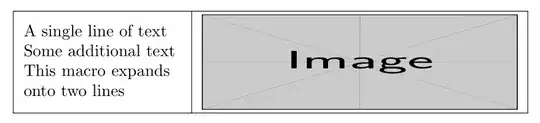
output

side note, instead of "assuming" the height, adjustbox (presumably) measure the height instead, so it's just a bit more convenient...

and yes, if you use m-type valign it might be simpler to just use tabular instead but • you need something-else to make multiple lines • \linewidth is the large linewidth, not the cell width:

    \begin{tabular}{ll}
        \adjustbox{valign=m}{\begin{tabular}{l}
                A single line of text \\
                Some additional text \\
                \mymacro
        \end{tabular}} &
        \adjustbox{valign=m}{\includegraphics[width=0.6\linewidth, height=0.2\linewidth]{example-image}}
    \end{tabular}
user202729
  • 7,143
  • 1
    Very good point -- the problem is basically that my use-case is too simple! It makes sense to keep baselines aligned, even if the text on some lines is blown out by some awkwardly sized inline images, or, y'know, formulas or glyphs or boxes or whatever. And that's fine when the images are not-grossly-beyond-inline-sized, but it's simply the wrong approach here. Would, like, plain simple old tabularx or something do this?! Hmm.. – Tim Williams Aug 10 '22 at 02:40
  • 1
    I originally had this done with tabu, which worked fine. But it's broken now. So I figured I'd update it with the next best thing. I hadn't thought of going backwards... – Tim Williams Aug 10 '22 at 02:41
2

Update. It seems setting the first cell to h correctly aligns both elements.


You need to correct the baselines of both items.

I think \SetCell{h} sets the baseline of the text to its first line.

Then, as @UlrikeFischer suggests, use \raisebox{}{} to drag the image downwards by the height of an image minus some correction (e.g. height of one line of text). By doing so you effectively move its baseline upwards.

Then baselines of the two elements will match and you will get the desired alignment.

image

\documentclass[10pt]{article}
\usepackage{graphicx}
\usepackage{tabularray}
    \UseTblrLibrary{varwidth}

\newcommand{\mymacro}{This macro expands\onto two lines}

\begin{document} \centering \begin{tblr}{ colspec={X[h] X[2]}, measure=vbox, width=0.9\linewidth, } {A line of text\Some additional text\\mymacro} & \includegraphics[width=\linewidth]{example-image} \end{tblr} \end{document}

EDIT. Middle vertical alignment

enter image description here

\documentclass[10pt]{article}
\usepackage{graphicx}
\usepackage{tabularray}
    \UseTblrLibrary{varwidth}

\newcommand{\mymacro}{This macro expands\onto two lines}

\setlength{\fboxsep}{0pt}

\begin{document} \centering \begin{tblr}{ colspec={X[h,m] X[2,m]}, measure=vbox, width=0.9\linewidth, } \parbox{\linewidth}{A line of text\Some additional text\\mymacro} & \raisebox{-0.5\totalheight}{\includegraphics[width=\linewidth]{example-image}} \end{tblr} \end{document}

Celdor
  • 9,058
  • To be precise, I want the two cells to align their bounding boxes on vertical centers, independent of contents. \SetCell{h} to the taller one gets close (it's still off by an extra 4pt of space below the image; \raisebox with a \dimexpr handles this), but can it be done without making assumptions about contents? – Tim Williams Aug 10 '22 at 01:13
  • @TimWilliams To achieve middle alignment on vertical centres, add m to column specifications as in your question and lower the image by half of its total height. Every image has its baseline at the bottom edge and \raisebox{}{} simply shifts it. For images, -0.5\totalheight place the baseline at the centre of a bounding box. I'm learning latex so I can't tell you if there's simpler or less involved solution but this should work for every image. – Celdor Aug 10 '22 at 09:18
  • @TimWilliams In my edited answer, which I forgot to mention before, the text is inside \parbox{}{} which by default creates a baseline in a centre of a bounding box. The same would work with tabular etc. Now both elements should be vertically centred. I don't know why tabularray does not do it itself. – Celdor Aug 10 '22 at 09:37
  • 1
    Hmm interesting. Why don't we just parbox both? ... Hey, that does the trick, and doesn't need any dimensional guesswork! – Tim Williams Aug 10 '22 at 15:06
  • I am surprised it's working. I would like to say I understand it but then top alignment doesn't work unless you specify [h] for the first cell. – Celdor Aug 10 '22 at 15:54
  • Looks like [t] works, when [h] is specified for the shorter cell. Oh, also noticed \raisebox doesn't work right with line wraps, I have to collapse white space (end lines with %), or one-line it (as in your example). \parbox doesn't seem to care. – Tim Williams Aug 10 '22 at 16:50