Normally, when there's only one line of text in all columns of a row, the valign specifiers m, t, and b don't make any difference, because these specifiers align one of the baselines of the several lines of text with the overall baseline of the table row. In both your columns, the baseline of the "middle" (= only) line of text is aligned with the other "middle" (= only) baseline of the other, so the two columns share a baseline. The characters are set above that baseline. And the chess characters, when using board commands (like \WhiteKingOnWhite) are set even further up to center them in the board squares. The result is that they extend much higher.
Aligning table contents by their baselines relative to each other's baselines, as the author of the tabularray package points out on page 5 of the documentation is often very unintuitive for those used to Word processor approaches to tables. It therefore provides two other valign specifiers, h or f (header or footer), which just places the contents (not the baseline of the contents) at the top or bottom of the cell. (Since the chess pieces are the taller of the two cells, it doesn't matter which one you use here.)
You can achieve something like aligning the words with the center of the pieces by changing the colspec to X[c,h]X[c,m] or X[c,h]X[c,m], which will align the baseline of the right column with the center of the contents of the left column:
\documentclass[12pt]{article}
\usepackage[T1]{fontenc}
\usepackage[utf8]{inputenc}
\usepackage{xskak}
\usepackage{chessfss}
\usepackage{tabularray}
\begin{document}
\setboardfontsize{50pt}
\begin{center}
    \begin{tblr}{width=1.6in,colspec={X[c,f]X[c,m]}}
    \WhiteKingOnWhite & KING  \
    \WhiteQueenOnWhite & QUEEN  \
    \WhiteRookOnWhite & ROOK  \
    \WhiteKnightOnWhite & KNIGHT  \
    \WhiteBishopOnWhite & BISHOP  \
    \WhitePawnOnWhite & PAWN
\end{tblr}
\end{center}
\end{document}
(I set the width of the table to something narrow just so it's easier to see how the words align with the pieces. This is not part of the answer.)
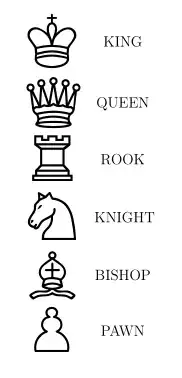
That gives:

As you can see the words are still not completely centered vertically relative to the pieces, which is because the pieces when set in board style are put a little higher than the baseline adding some padding at the bottom. An alternative therefore for this particular table would be to use the more basic figurine commands, as Ulrike suggested in the comments:
\documentclass[12pt]{article}
\usepackage[T1]{fontenc}
\usepackage[utf8]{inputenc}
\usepackage{xskak}
\usepackage{chessfss}
\usepackage{tabularray}
\begin{document}
\begin{center}
    \begin{tblr}{width=1.6in,
    colspec={X[c,h,font={\fontsize{50}{50}}]X[c,m]}}
    \symking & KING  \
    \symqueen & QUEEN  \
    \symrook & ROOK  \
    \symknight & KNIGHT  \
    \symbishop & BISHOP  \
    \sympawn & PAWN
\end{tblr}
\end{center}
\end{document}


{X[c,f]X[c,m]}or{X[c,h]X[c,m]}. As is, they share the same baseline, and the chess pieces extend up from there. – frabjous Oct 08 '22 at 17:49\fontsize{50pt}{50pt}\selectfont \symking– Ulrike Fischer Oct 08 '22 at 18:27{NiceTabular}ofnicematrixinstead of{tblr}, you have directly the expected output. – F. Pantigny Oct 08 '22 at 18:33