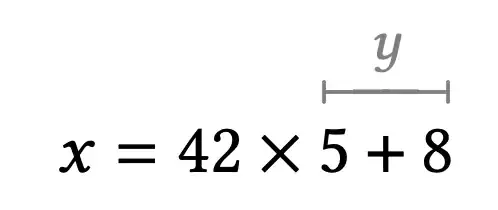
Here are the steps to import the needed symbol.
First look at the definition of \overlinesegment
\DeclareRobustCommand{\overlinesegment}{\mathpalette{\overarrow@\linesegmentfill@}}
This shows that the command uses the same infrastructure as \xrightarrow. OK, now we need \linesegmentfill@
\def\linesegmentfill@{\arrowfill@\leftfootline\relbar\rightfootline}
OK, we need \leftfootline and \rightfootline.
\Decl@Mn@Char\rightfootline          {MnSyA}{\mathrel}
\Decl@Mn@Char\upfootline             {MnSyA}{\mathrel}
\Decl@Mn@Char\leftfootline           {MnSyA}{\mathrel}
\Decl@Mn@Char\downfootline           {MnSyA}{\mathrel}
Well, MnSymbol isn't very friendly, because it just lists the symbols and automatically steps the slot numbers. Not difficult to work around, because we can ask TeX.
\documentclass{article}
\usepackage{MnSymbol}
\show\rightfootline
\show\leftfootline
\stop
and the console will tell you
> \rightfootline=\mathchar"3478
> \leftfootline=\mathchar"347A.
We know need to find MnSyA.
\DeclareSymbolFont{MnSyA}         {U}  {MnSymbolA}{m}{n}
\SetSymbolFont{MnSyA}       {bold}{U}  {MnSymbolA}{b}{n}
\DeclareFontFamily{U}  {MnSymbolA}{}
\DeclareFontShape{U}{MnSymbolA}{m}{n}{
    <-6>  MnSymbolA5
   <6-7>  MnSymbolA6
   <7-8>  MnSymbolA7
   <8-9>  MnSymbolA8
   <9-10> MnSymbolA9
  <10-12> MnSymbolA10
  <12->   MnSymbolA12}{}
\DeclareFontShape{U}{MnSymbolA}{b}{n}{
    <-6>  MnSymbolA-Bold5
   <6-7>  MnSymbolA-Bold6
   <7-8>  MnSymbolA-Bold7
   <8-9>  MnSymbolA-Bold8
   <9-10> MnSymbolA-Bold9
  <10-12> MnSymbolA-Bold10
  <12->   MnSymbolA-Bold12}{}
We have all we need.
\documentclass{acmart}
\DeclareFontFamily{U}  {MnSymbolA}{}
\DeclareFontShape{U}{MnSymbolA}{m}{n}{
    <-6>  MnSymbolA5
   <6-7>  MnSymbolA6
   <7-8>  MnSymbolA7
   <8-9>  MnSymbolA8
   <9-10> MnSymbolA9
  <10-12> MnSymbolA10
  <12->   MnSymbolA12}{}
\DeclareFontShape{U}{MnSymbolA}{b}{n}{
    <-6>  MnSymbolA-Bold5
   <6-7>  MnSymbolA-Bold6
   <7-8>  MnSymbolA-Bold7
   <8-9>  MnSymbolA-Bold8
   <9-10> MnSymbolA-Bold9
  <10-12> MnSymbolA-Bold10
  <12->   MnSymbolA-Bold12}{}
\DeclareSymbolFont{MnSyA}         {U}  {MnSymbolA}{m}{n}
\SetSymbolFont{MnSyA}       {bold}{U}  {MnSymbolA}{b}{n}
\DeclareMathSymbol{\rightfootline}{\mathrel}{MnSyA}{"78}
\DeclareMathSymbol{\leftfootline}{\mathrel}{MnSyA}{"7A}
\makeatletter
\DeclareRobustCommand{\overlinesegment}{\mathpalette{\overarrow@\linesegmentfill@}}
\def\linesegmentfill@{\arrowfill@\leftfootline\relbar\rightfootline}
\makeatother
\newcommand*{\ohat}[2]{%
  \overset{\textcolor{gray}{#1}}{%
    \colorlet{currentcolor}{.}%
    \textcolor{gray}{%
      \overlinesegment{\textcolor{currentcolor}{%
        \vrule height 8pt depth 1pt width 0pt
        #2%
      }}%
    }%
  }%
}
\begin{document}
$x = 42 \times \ohat{y}{5 + 8}$
\end{document}
Note \overset and not \stackrel and the better color management, so the macro will also work if the current color isn't black.