One possible way to add a fancy frame is by using the tcolorbox package.
The size of the box will adjust to its content. It's pretty easy to change colors, text alignment, and other properties.

\documentclass[11pt,a4paper]{article}
\usepackage[utf8]{inputenc}
\usepackage[french]{babel}
\usepackage[left=1.8cm,right=1.8cm,top=2cm,bottom=2cm]{geometry}
% ***************************************** added <<<<<<<<<<<<<<<<
\usepackage[most]{tcolorbox}
\newtcbox{\partbox}[1][]{%
    colback=blue!5!white,colframe=blue!75!black, % colors <<<<<<<<<<<<<<<<<<<<<<
    tikznode= {align =left}, % text align <<<<<<<<<<<<<<<<<<<<<<
    nobeforeafter,
    tcbox raise base}
\makeatletter
\def@part[#1]#2{%
    \ifnum \c@secnumdepth >\m@ne
    \refstepcounter{part}%
    \addcontentsline{toc}{part}{\thepart\hspace{1em}#1}%
    \else
    \addcontentsline{toc}{part}{#1}%
    \fi
    {\parindent \z@ \raggedright%
        \interlinepenalty @M%
        \normalfont
        \partbox{\Large\bfseries \partname~\thepart \[1ex] \huge \bfseries #2}

        \markboth{}{}\par}%
    \nobreak\vskip 3ex@afterheading}
\def@spart#1{%
    {\parindent \z@ \raggedright
        \interlinepenalty @M
        \normalfont
        \partbox{\huge \bfseries #1}\par}%
    \nobreak\vskip 3ex  @afterheading}
\makeatother
% *****************************************
\begin{document}
    \tableofcontents
    \newpage
    \part{Cours}
    \section{test part}
\part{Nouveau matériel}


\part*{La fin}
\end{document}
You can get a vanilla style using
\newtcbox{\partbox}[1][]{% vanilla style
    colback=white, colframe= black,
    sharp corners,
    tikznode= {align =left}, % text align <<<<<<<<<<<<<<<<<<<<<<
    nobeforeafter,  tcbox raise base }
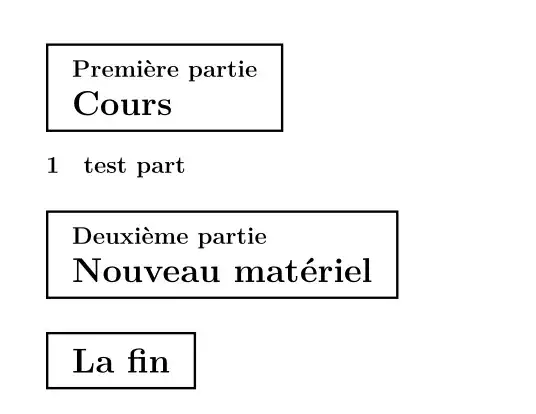
Option
Instead of modifying \@part you can define a new command \fpart and use e.g. as \fpart{Cours}
\newcommand{\fpart}[1]{%
    \refstepcounter{part}%
    \addcontentsline{toc}{part}{\thepart\hspace{1em}#1}%
    \noindent\partbox{\normalfont\Large\bfseries \partname~\thepart \\[1ex] \huge \bfseries #1}
    \markboth{}{}%
}


\partcommand)? – Marijn Nov 09 '22 at 10:31