5

this is my first question here.

I want to make my table look like the block to have a consequent style. Questions:

  • How to create that shaded transition from the table headline to the body (like the block)
  • How to add the shadow. (Different solutions on this forum dont seem to work for my code..)

Here is my minimalistic code which produces the following output:

\documentclass{beamer}  
\usetheme{Berlin}  
\setbeamertemplate{blocks}[rounded][shadow=true]

% Packages  
\usepackage[USenglish]{babel}  
\usepackage{times}  
\usepackage{tikz}  
\usepackage{parskip}  
\usepackage{tabularx}  
\usepackage{booktabs}  
\usepackage{colortbl}

% This is for rounded corners  
\usetikzlibrary{calc}  
\pgfdeclarelayer{background}  
\pgfdeclarelayer{foreground}  
\pgfsetlayers{background,main,foreground}

% Define colors  
\definecolor{TblTitle}{RGB}{38,38,134}  
\definecolor{TblBody}{RGB}{233,233,243}

\begin{document}                                                    

\begin{frame}  
\begin{block}{Block 1}  
\begin{itemize}  
\item item 1  
\item item 2  
\end{itemize}  
\end{block}

\begin{tikzpicture}  
\node(tbl){  
\begin{tabularx}{\textwidth}{p{0.5\textwidth}p{0.5\textwidth}}  
\textcolor{white}{Column 1} & \textcolor{white}{Column 2} \\  
\begin{itemize}  
\item item 3  
\item item 4  
\end{itemize} &   
\begin{itemize}  
\item item 5  
\item item 6  
\end{itemize} \\[-1em]  
\end{tabularx}};  
\begin{pgfonlayer}{background}    
\draw[rounded corners,top color=TblTitle,  
bottom color=TblTitle,draw=white]  
($(tbl.north west)+(0.12,0)$)  
rectangle ($(tbl.north east)-(0.12,0.9)$);  
\draw[rounded corners,top color=TblBody,  
bottom color=TblBody,draw=white]   
($(tbl.south west)+(0.12,0.5)$)  
rectangle ($(tbl.south east)-(0.12,0)$);  
\draw[top color=TblBody,bottom color=TblBody,draw=TblBody]  
($(tbl.north east)-(0.13,0.6)$)  
rectangle ($(tbl.south west)+(0.13,0.2)$);  
\end{pgfonlayer}  
\end{tikzpicture}  
\end{frame}

\end{document}
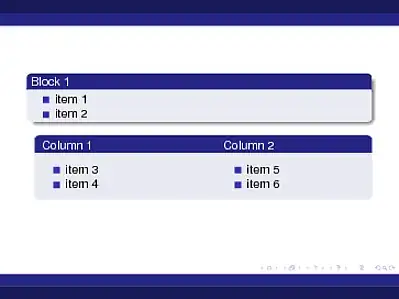
Table and block

Fry
  • 1,599
  • Welcome to LaTeX! As new user without image posting privileges simply include the image as normal and remove the ! in front of it to turn it into a link. A moderator or another user with edit privileges can then reinsert the ! to turn it into an image again until you get more rep points. – percusse Aug 10 '12 at 11:47
  • Why you need TikZ for that? Can't you simply insert your table into the beamer block? Example: \begin{block}{Column 1 \hspace{0.38\textwidth} Column 2}\begin{tabularx}{\textwidth}{p{0.5\textwidth}p{0.5\textwidth}}...\end{tabularx}\end{block}. – Claudio Fiandrino Aug 10 '12 at 14:17
  • @ClaudioFiandrino your code doesn't compile when putting in a new frame of my code extract above. or am I doing something wrong ? But putting a table in a box is a good idea, this is what i did: \begin{frame} \begin{block}{ \begin{center} \begin{tabular}{p{0.45\textwidth}|p{0.45\textwidth}} 1 & 2 \\end{tabular} \end{center}} \begin{center} \begin{tabular}{p{0.45\textwidth}|p{0.45\textwidth}} 3 & 4\\ \hline 5 & 6 \\ \hline 7 & 8 \\end{tabular} \end{center} \end{block} \end{frame} – Fry Aug 11 '12 at 08:22
  • My code does not compile because I inserted ... where you should have put your itemize environments. – Claudio Fiandrino Aug 11 '12 at 08:26

2 Answers2

4

How about this:

\documentclass{beamer}  
\usetheme{Berlin}  
\setbeamertemplate{blocks}[rounded][shadow=true]

% Packages  
\usepackage[USenglish]{babel}  
\usepackage{times}  
\usepackage{tikz}  
\usepackage{parskip}  
\usepackage{tabularx}  
\usepackage{booktabs}  
\usepackage{colortbl}

% This is for rounded corners  
\usetikzlibrary{calc}  
\pgfdeclarelayer{background}  
\pgfdeclarelayer{foreground}  
\pgfsetlayers{background,main,foreground}

% Define colors  
\definecolor{TblTitle}{RGB}{38,38,134}  
\definecolor{TblBody}{RGB}{233,233,243}

\begin{document}                                                    

\begin{frame}[t]

\begin{block}{Block 1}  
\begin{itemize}  
\item item 1  
\item item 2  
\end{itemize}  
\end{block}

\tikzset{blocknode/.style={inner sep=0,text width=0.5\textwidth,below right}}

\begin{block}{\tikz{\node[blocknode] {asdf}; \node[blocknode] at (0.5\textwidth,0) {qwertz};}}
\begin{tikzpicture}
\node[blocknode] {\begin{itemize}\item a\item b\end{itemize}};
\node[blocknode] at (0.5\textwidth,0) {\begin{itemize}\item c\item d\end{itemize}};
\end{tikzpicture}
\end{block}

\begin{block}{\tikz{\node[blocknode] {qwer wert ertz rtzu tzui zuio uiop}; \node[blocknode] at (0.5\textwidth,0) {asdf sdfg dfgh fghj ghjk hjkl yxcv xcvb cvbn vbnm};}}
\begin{tikzpicture}
\node[blocknode] {\begin{itemize}\item asdf sdfg dfgh fghj ghjk hjkl yxcv xcvb cvbn vbnm \item b\end{itemize}};
\node[blocknode] at (0.5\textwidth,0) {\begin{itemize}\item c\item qwer wert ertz rtzu tzui zuio uiop\end{itemize}};
\end{tikzpicture}
\end{block}

\end{frame}

\end{document}

enter image description here

Tom Bombadil
  • 40,123
  • Nice thanks! People interested in adding lines in order to separate the cells may have a look here: http://tex.stackexchange.com/questions/66807/table-looking-like-a-block – Fry Aug 11 '12 at 21:45
2

Instead of trying to make a table look like a block, one could use the sidebyside option of tcolorbox to place the itemizations besides each other (only the spacing in the header is a bit hacky):

\documentclass{beamer}
\usepackage[many]{tcolorbox}

\usetheme{Berlin}
\setbeamertemplate{blocks}[rounded][shadow=true]

\tikzset{beamer@color/.style={fill=none,top color=tcbcolback,bottom color=tcbcolback}}

\tcbset{ tcbeamer/.style={ code={ \usebeamercolor{block body} \usebeamercolor{block title} \usebeamercolor{normal text} }, skin=beamer, boxrule=0mm, titlerule=1mm, drop fuzzy shadow=black, width=\textwidth+7pt, enlarge left by=-3pt, bottom=0pt, top=0pt, left=1pt, right=1pt, arc=4pt, outer arc=4pt, toptitle=0pt, bottomtitle=-1pt, colback=block body.bg, colframe=block title.bg, fonttitle=\usebeamerfont{block title}\color{block title.fg}, } }

\begin{document}

\begin{frame}

\begin{tcolorbox}[tcbeamer,sidebyside,title={\parbox{.45\linewidth}{Column 1}\hfill\parbox{.45\linewidth}{Column 2}},lower separated=false] \begin{itemize} \item item 1 \item item 2 \end{itemize} \tcblower \begin{itemize} \item item 1 \item item 2 \end{itemize} \end{tcolorbox}

% \begin{block}{Test exampleblock} This is a block provided by the \texttt{beamer} class. \end{block}

\end{frame}

\end{document}

enter image description here

The code can be further simplified with the new tcolorbox inner theme (https://www.ctan.org/pkg/beamertheme-tcolorbox )

\documentclass{beamer}
\usepackage[many]{tcolorbox}

\usetheme{Berlin}
\setbeamertemplate{blocks}[rounded][shadow=true]

\useinnertheme[rounded,shadow]{tcolorbox}

\begin{document}

\begin{frame}

\begin{tcolorbox}[sidebyside,title={\parbox{.45\linewidth}{Column 1}\hfill\parbox{.45\linewidth}{Column 2}},lower separated=false] \begin{itemize} \item item 1 \item item 2 \end{itemize} \tcblower \begin{itemize} \item item 1 \item item 2 \end{itemize} \end{tcolorbox}

\begin{block}{Test exampleblock} This is a block provided by the \texttt{beamer} class. \end{block}

\end{frame}

\end{document}