Using \pagestyle{gobble} is not a problem here, because it still increases counter page, only \thepage will result in always the same empty string:
% !TEX TS-program = LuaLaTeX
\documentclass[11pt,twoside,openany]{book}
\pagestyle{plain}
\usepackage[english, russian]{babel}
\usepackage{fontspec}
\setmainfont{EB Garamond}[]
\usepackage{microtype}
\usepackage[shortcuts]{extdash}
\usepackage[pagewise]{lineno}
\linenumbers
\usepackage[
  paperwidth=6.125in,
  paperheight=9.25in,
  inner=0.625in,
  top=15mm,
  outer=20mm,
  bottom=24mm,
  heightrounded
]{geometry}
\setlength{\parskip}{0ex}% Not the best idea, better use package parskip.
\usepackage{graphicx}
\usepackage[dvipsnames]{xcolor}
\usepackage{eso-pic}
\usepackage{fancyhdr}
\fancyhf{}
\renewcommand{\headrulewidth}{0ex}
\fancyfoot[LE,RO]{\thepage}
\pagestyle{fancy}
\fancypagestyle{plain}{%
  \fancyhf{}%
  \renewcommand{\headrulewidth}{0ex}%
  \fancyhf[lef,rof]{\thepage}%
}
\usepackage{titlesec}
\titleclass{\part}{top}
\titleformat{\part}{\vfil\penalty500\vfilneg\centering\normalfont\LARGE}{\thepart.}{8ex}{\LARGE\centering}
\titlespacing{\part}{0ex}{0ex plus 4ex minus 1ex}{-4ex}
\titleclass{\chapter}{straight}
\titleformat{\chapter}{\vfil\penalty500\vfilneg\centering\normalfont\large}{\thechapter.}{8ex}{\large\centering}
\titlespacing{\chapter} {0ex}{4ex plus 4ex minus 1ex}{-2ex}
\usepackage{tocloft}
\addto\captionsrussian{%
  \renewcommand{\contentsname}{\normalfont\Large\textcolor{Black}{TOC}}%
}
\addtocontents{toc}{\cftpagenumbersoff{part}}
\setlength{\cftbeforetoctitleskip}{0ex}
\setlength{\cftaftertoctitleskip}{17ex}
\renewcommand{\cfttoctitlefont}{\hfill\Large\bfseries}
\renewcommand{\cftaftertoctitle}{\hfill}
\renewcommand{\cftpartfont}{\large}
\renewcommand{\cftchapfont}{\normalsize}
\renewcommand{\cftpartpagefont}{\normalfont}
\renewcommand{\cftchappagefont}{\normalfont}
\renewcommand\cftchapleader{\cftdotfill{1}}
\cftsetindents{part}{5.5em}{0em} \cftsetindents{chapter}{1em}{2em}
\renewcommand{\cftchapdotsep}{\cftdotsep}
\begin{document}
\frontmatter
\pagestyle{empty}
\setcounter{page}{0}
\begin{titlepage}
  \centering
  \fontsize{20ex}{20ex}\selectfont\bfseries\textcolor{Black} {TITLE PAGE}\par
\end{titlepage}
\clearpage
\baselineskip=12.5pt
\mainmatter
\pagestyle{plain}
\part[PART 1.]{\textcolor{Black}{PART 1}}
\chapter[CHAPTER 1.]{\textcolor{Black}{CHAPTER 1}}
\chapter[CHAPTER 1.]{\textcolor{Black}{CHAPTER 1}}
\chapter[CHAPTER 1.]{\textcolor{Black}{CHAPTER 1}}
\chapter[CHAPTER 1.]{\textcolor{Black}{CHAPTER 1}}
\chapter[CHAPTER 1.]{\textcolor{Black}{CHAPTER 1}}
\chapter[CHAPTER 1.]{\textcolor{Black}{CHAPTER 1}}
\chapter[CHAPTER 1.]{\textcolor{Black}{CHAPTER 1}}
\chapter[CHAPTER 1.]{\textcolor{Black}{CHAPTER 1}}
\chapter[CHAPTER 1.]{\textcolor{Black}{CHAPTER 1}}
\chapter[CHAPTER 1.]{\textcolor{Black}{CHAPTER 1}}
\chapter[CHAPTER 1.]{\textcolor{Black}{CHAPTER 1}}
\chapter[CHAPTER 1.]{\textcolor{Black}{CHAPTER 1}}
\chapter[CHAPTER 1.]{\textcolor{Black}{CHAPTER 1}}
\chapter[CHAPTER 1.]{\textcolor{Black}{CHAPTER 1}}
\chapter[CHAPTER 1.]{\textcolor{Black}{CHAPTER 1}}
\chapter[CHAPTER 1.]{\textcolor{Black}{CHAPTER 1}}
\chapter[CHAPTER 1.]{\textcolor{Black}{CHAPTER 1}}
\chapter[CHAPTER 1.]{\textcolor{Black}{CHAPTER 1}}
\chapter[CHAPTER 1.]{\textcolor{Black}{CHAPTER 1}}
\chapter[CHAPTER 1.]{\textcolor{Black}{CHAPTER 1}}
\chapter[CHAPTER 1.]{\textcolor{Black}{CHAPTER 1}}
\chapter[CHAPTER 1.]{\textcolor{Black}{CHAPTER 1}}
\part[PART 2.]{\textcolor{Black}{PART 2}}
\chapter[CHAPTER 1.]{\textcolor{Black}{CHAPTER 1}}
\chapter[CHAPTER 1.]{\textcolor{Black}{CHAPTER 1}}
\chapter[CHAPTER 1.]{\textcolor{Black}{CHAPTER 1}}
\chapter[CHAPTER 1.]{\textcolor{Black}{CHAPTER 1}}
\chapter[CHAPTER 1.]{\textcolor{Black}{CHAPTER 1}}
\chapter[CHAPTER 1.]{\textcolor{Black}{CHAPTER 1}}
\chapter[CHAPTER 1.]{\textcolor{Black}{CHAPTER 1}}
\chapter[CHAPTER 1.]{\textcolor{Black}{CHAPTER 1}}
\chapter[CHAPTER 1.]{\textcolor{Black}{CHAPTER 1}}
\chapter[CHAPTER 1.]{\textcolor{Black}{CHAPTER 1}}
\chapter[CHAPTER 1.]{\textcolor{Black}{CHAPTER 1}}
\chapter[CHAPTER 1.]{\textcolor{Black}{CHAPTER 1}}
\chapter[CHAPTER 1.]{\textcolor{Black}{CHAPTER 1}}
\chapter[CHAPTER 1.]{\textcolor{Black}{CHAPTER 1}}
\chapter[CHAPTER 1.]{\textcolor{Black}{CHAPTER 1}}
\chapter[CHAPTER 1.]{\textcolor{Black}{CHAPTER 1}}
\chapter[CHAPTER 1.]{\textcolor{Black}{CHAPTER 1}}
\chapter[CHAPTER 1.]{\textcolor{Black}{CHAPTER 1}}
\chapter[CHAPTER 1.]{\textcolor{Black}{CHAPTER 1}}
\chapter[CHAPTER 1.]{\textcolor{Black}{CHAPTER 1}}
\chapter[CHAPTER 1.]{\textcolor{Black}{CHAPTER 1}}
\chapter[CHAPTER 1.]{\textcolor{Black}{CHAPTER 1}}
\clearpage
 \AddToShipoutPicture{%
  \AtTextLowerLeft{%
   \includegraphics[page=\value{page},width=\textwidth,height=\textheight,keepaspectratio]{example-image-a4-numbered}%
  }
}
\pagenumbering{gobble}

  \tableofcontents
\clearpage
\ClearShipoutPictureBG% If more pages without images follow, it makes sense, to remove the background shipout code.
\end{document}
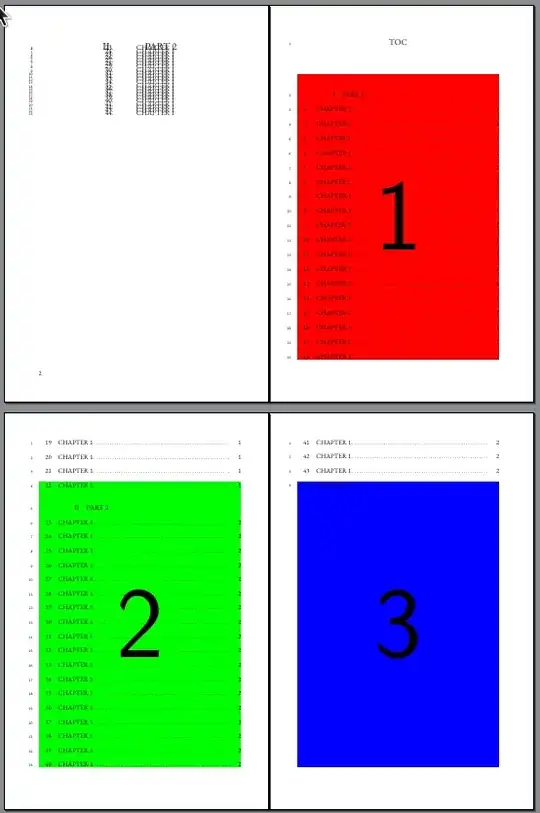
You can alternatively do something like \ifnum \value{page}=…. Following example uses it, to have different files at different positions depending on the page number:
% !TEX TS-program = LuaLaTeX
\documentclass[11pt,twoside,openany]{book}
\pagestyle{plain}
\usepackage[english, russian]{babel}
\usepackage{fontspec}
\setmainfont{EB Garamond}[]
\usepackage{microtype}
\usepackage[shortcuts]{extdash}
\usepackage[pagewise]{lineno}
\linenumbers
\usepackage[
  paperwidth=6.125in,
  paperheight=9.25in,
  inner=0.625in,
  top=15mm,
  outer=20mm,
  bottom=24mm,
  heightrounded
]{geometry}
\setlength{\parskip}{0ex}% Not the best idea, better use package parskip.
\usepackage{graphicx}
\usepackage[dvipsnames]{xcolor}
\usepackage{eso-pic}
\usepackage{fancyhdr}
\fancyhf{}
\renewcommand{\headrulewidth}{0ex}
\fancyfoot[LE,RO]{\thepage}
\pagestyle{fancy}
\fancypagestyle{plain}{%
  \fancyhf{}%
  \renewcommand{\headrulewidth}{0ex}%
  \fancyhf[lef,rof]{\thepage}%
}
\usepackage{titlesec}
\titleclass{\part}{top}
\titleformat{\part}{\vfil\penalty500\vfilneg\centering\normalfont\LARGE}{\thepart.}{8ex}{\LARGE\centering}
\titlespacing{\part}{0ex}{0ex plus 4ex minus 1ex}{-4ex}
\titleclass{\chapter}{straight}
\titleformat{\chapter}{\vfil\penalty500\vfilneg\centering\normalfont\large}{\thechapter.}{8ex}{\large\centering}
\titlespacing{\chapter} {0ex}{4ex plus 4ex minus 1ex}{-2ex}
\usepackage{tocloft}
\addto\captionsrussian{%
  \renewcommand{\contentsname}{\normalfont\Large\textcolor{Black}{TOC}}%
}
\addtocontents{toc}{\cftpagenumbersoff{part}}
\setlength{\cftbeforetoctitleskip}{0ex}
\setlength{\cftaftertoctitleskip}{17ex}
\renewcommand{\cfttoctitlefont}{\hfill\Large\bfseries}
\renewcommand{\cftaftertoctitle}{\hfill}
\renewcommand{\cftpartfont}{\large}
\renewcommand{\cftchapfont}{\normalsize}
\renewcommand{\cftpartpagefont}{\normalfont}
\renewcommand{\cftchappagefont}{\normalfont}
\renewcommand\cftchapleader{\cftdotfill{1}}
\cftsetindents{part}{5.5em}{0em} \cftsetindents{chapter}{1em}{2em}
\renewcommand{\cftchapdotsep}{\cftdotsep}
\begin{document}
\frontmatter
\pagestyle{empty}
\setcounter{page}{0}
\begin{titlepage}
  \centering
  \fontsize{20ex}{20ex}\selectfont\bfseries\textcolor{Black} {TITLE PAGE}\par
\end{titlepage}
\clearpage
\baselineskip=12.5pt
\mainmatter
\pagestyle{plain}
\part[PART 1.]{\textcolor{Black}{PART 1}}
\chapter[CHAPTER 1.]{\textcolor{Black}{CHAPTER 1}}
\chapter[CHAPTER 1.]{\textcolor{Black}{CHAPTER 1}}
\chapter[CHAPTER 1.]{\textcolor{Black}{CHAPTER 1}}
\chapter[CHAPTER 1.]{\textcolor{Black}{CHAPTER 1}}
\chapter[CHAPTER 1.]{\textcolor{Black}{CHAPTER 1}}
\chapter[CHAPTER 1.]{\textcolor{Black}{CHAPTER 1}}
\chapter[CHAPTER 1.]{\textcolor{Black}{CHAPTER 1}}
\chapter[CHAPTER 1.]{\textcolor{Black}{CHAPTER 1}}
\chapter[CHAPTER 1.]{\textcolor{Black}{CHAPTER 1}}
\chapter[CHAPTER 1.]{\textcolor{Black}{CHAPTER 1}}
\chapter[CHAPTER 1.]{\textcolor{Black}{CHAPTER 1}}
\chapter[CHAPTER 1.]{\textcolor{Black}{CHAPTER 1}}
\chapter[CHAPTER 1.]{\textcolor{Black}{CHAPTER 1}}
\chapter[CHAPTER 1.]{\textcolor{Black}{CHAPTER 1}}
\chapter[CHAPTER 1.]{\textcolor{Black}{CHAPTER 1}}
\chapter[CHAPTER 1.]{\textcolor{Black}{CHAPTER 1}}
\chapter[CHAPTER 1.]{\textcolor{Black}{CHAPTER 1}}
\chapter[CHAPTER 1.]{\textcolor{Black}{CHAPTER 1}}
\chapter[CHAPTER 1.]{\textcolor{Black}{CHAPTER 1}}
\chapter[CHAPTER 1.]{\textcolor{Black}{CHAPTER 1}}
\chapter[CHAPTER 1.]{\textcolor{Black}{CHAPTER 1}}
\chapter[CHAPTER 1.]{\textcolor{Black}{CHAPTER 1}}
\part[PART 2.]{\textcolor{Black}{PART 2}}
\chapter[CHAPTER 1.]{\textcolor{Black}{CHAPTER 1}}
\chapter[CHAPTER 1.]{\textcolor{Black}{CHAPTER 1}}
\chapter[CHAPTER 1.]{\textcolor{Black}{CHAPTER 1}}
\chapter[CHAPTER 1.]{\textcolor{Black}{CHAPTER 1}}
\chapter[CHAPTER 1.]{\textcolor{Black}{CHAPTER 1}}
\chapter[CHAPTER 1.]{\textcolor{Black}{CHAPTER 1}}
\chapter[CHAPTER 1.]{\textcolor{Black}{CHAPTER 1}}
\chapter[CHAPTER 1.]{\textcolor{Black}{CHAPTER 1}}
\chapter[CHAPTER 1.]{\textcolor{Black}{CHAPTER 1}}
\chapter[CHAPTER 1.]{\textcolor{Black}{CHAPTER 1}}
\chapter[CHAPTER 1.]{\textcolor{Black}{CHAPTER 1}}
\chapter[CHAPTER 1.]{\textcolor{Black}{CHAPTER 1}}
\chapter[CHAPTER 1.]{\textcolor{Black}{CHAPTER 1}}
\chapter[CHAPTER 1.]{\textcolor{Black}{CHAPTER 1}}
\chapter[CHAPTER 1.]{\textcolor{Black}{CHAPTER 1}}
\chapter[CHAPTER 1.]{\textcolor{Black}{CHAPTER 1}}
\chapter[CHAPTER 1.]{\textcolor{Black}{CHAPTER 1}}
\chapter[CHAPTER 1.]{\textcolor{Black}{CHAPTER 1}}
\chapter[CHAPTER 1.]{\textcolor{Black}{CHAPTER 1}}
\chapter[CHAPTER 1.]{\textcolor{Black}{CHAPTER 1}}
\chapter[CHAPTER 1.]{\textcolor{Black}{CHAPTER 1}}
\chapter[CHAPTER 1.]{\textcolor{Black}{CHAPTER 1}}
\clearpage
\AddToShipoutPicture{%
  \ifnum \value{page}=1

    \AtTextLowerLeft{%
      \includegraphics[page=1,width=.5\textwidth,height=.5\textheight,keepaspectratio]{example-image-a}%
    }%
  \fi
  \ifnum \value{page}=2

    \AtTextCenter{%
      \includegraphics[page=1,width=.5\textwidth,height=.5\textheight,keepaspectratio]{example-image-b}%
    }%
  \fi
  \ifnum \value{page}=3

    \AtTextUpperLeft{%
      \makebox(0,0)[lt]{\includegraphics[page=1,width=.5\textwidth,height=.5\textheight,keepaspectratio]{example-image-c}}%
    }%
  \fi
}
\pagenumbering{gobble}

\tableofcontents
\clearpage
\ClearShipoutPictureBG% If more pages without images follow, it makes sense, to remove the background shipout code.
\end{document}

Similar you can load files with names depending on the page number, e.g., using example-image-\alph{page} (but do not use \thepage!) or similar. You can test this, replacing the three filenames example-image-a, example-image-b and example-image-c in the previous example by example-image-\alph{page}.
Note: If you have \setcounter{page}{0} on the current page, then this page has \value{page}=0 not \value{page}=1.
An absolutely trivial suggestion would be, to write corresponding \AddToShipoutPicture* commands to the toc file. For this, you just have to look into the table of contents, see which chapter or section or subsection is on which page of the table of contents, and add \addtocontents{toc}{…} code at the corresponding position in the document, e.g.:
\documentclass[11pt,openany]{book}
\pagestyle{plain}
\usepackage{eso-pic}
\usepackage{mwe}
\begin{document}
\addtocontents{toc}{% inside the TOC
  \protect\AddToShipoutPicture{% add it only to the next current page
    \protect\put(5cm,8cm){%
      \protect\includegraphics[page=1,width=.5\textwidth,height=.5\textheight,keepaspectratio]{example-image-a}%
    }%
  }%
}%

\blinddocument
\blinddocument
\blinddocument
\blinddocument
\blinddocument
\addtocontents{toc}{% inside the TOC
  \protect\AddToShipoutPicture{% add it only to the next current page
    \protect\put(5cm,12cm){%
      \protect\includegraphics[page=1,width=.5\textwidth,height=.5\textheight,keepaspectratio,angle=45]{example-image-b}%
    }%
  }%
}%

\blinddocument
\blinddocument
\blinddocument
\blinddocument
\addtocontents{toc}{% inside the TOC
  \protect\AddToShipoutPicture*{% add it only to the next current page
    \protect\put(8cm,24cm){%
      \protect\includegraphics[page=1,width=.5\textwidth,height=.5\textheight,keepaspectratio,angle=180]{example-image-c}%
    }%
  }%
}%

\blinddocument
\pagenumbering{gobble}

\tableofcontents
\end{document}
to get the following table of contents:

However, this makes sense only, when the table of contents is final. If you add or remove chapters, sections or subsections, you may have to move the \addtocontents commands, to add the background images to the correct page.
As you can see, there are a lot of possibilities to either add more or less the same code to load different image into the background of different pages or to add individual code to some pages. And gobbling the page number is not a disqualifier, because the page counter is still there and still increased at every page.


eso-pic packagemanual and I can't seem to find the answer about how you managed to achieve the result. How does one\AddToShipoutPicturecode take care of all three pictures? How doespage=\value{page}code refer to a specific page in TOC? As soon as I changeexample-image-a4-numberedto the real file name or evenexample-image, I get a fatal error. Tried replacingpage=\value{page}with\ifnum \value{page}=…- didn't work. And I don't know how to load images with justexample-image-\alph{page}. Should I not usepage=\value{page}in this case? – tryingout Nov 27 '22 at 16:11\value{page}is the page counter of the main document and is increased by every page output. Optionpageselects a page page from an external file. So if the current page number of your document is, e.g,, 10 the\includegraphics[page=\value{page},…]{foo}will include page 10 of filefile. Starting with document page number 1 in my example,page=1,page=2andpage=3are used and so these pages fromexample-image-a4-numberedare included. There is absolutely nothing magic in this. If you get an fatal error, maybe your external file has not the corresponding page. – cabohah Nov 29 '22 at 11:15example-image-a4-numberedplaces 3 different images on every page of the TOC? Please provide more details in your answer code or direct me to the right document to read. – tryingout Nov 29 '22 at 12:39