7

Say I wanted to define a function in TiKz for drawing an eye:

\begin{tikzpicture}

%eye
\pgfmathsetmacro{\eyeSize}{1}
\pgfmathsetmacro{\ex}{0}
\pgfmathsetmacro{\ey}{1}
\pgfmathsetmacro{\eRot}{-10}
\pgfmathsetmacro{\eAp}{-55}
\draw[rotate around={\eRot:(\ex,\ey)}] (\ex,\ey) -- ++(-.5*\eAp:\eyeSize)
     (\ex,\ey) -- ++(.5*\eAp:\eyeSize);
\draw (\ex,\ey) ++(\eRot+\eAp:.75*\eyeSize) arc (\eRot+\eAp:\eRot-\eAp:.75*\eyeSize);

% IRIS
\draw[fill=gray] (\ex,\ey) ++(\eRot+\eAp/3:.75*\eyeSize) % start point
  arc (\eRot+180-\eAp:\eRot+180+\eAp:.28*\eyeSize);

%PUPIL, a filled arc 
\draw[fill=black] (\ex,\ey) ++(\eRot+\eAp/3:.75*\eyeSize) % start point
  arc (\eRot+\eAp/3:\eRot-\eAp/3:.75*\eyeSize);

\end{tikzpicture}

This is too long! How would I define a "function" in TiKz, so that I can call something \eye( \ex, \ey, \rotation, \eyeAperture ) to produce an eye?

bobobobo
  • 4,396

2 Answers2

16

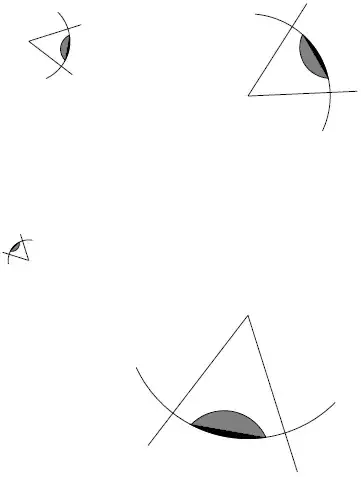
Like this?

\documentclass[parskip]{scrartcl}
\usepackage[margin=15mm]{geometry}
\usepackage{tikz}

\begin{document}

\newcommand{\eye}[4]% size, x, y, rotation
{   \draw[rotate around={#4:(#2,#3)}] (#2,#3) -- ++(-.5*55:#1) (#2,#3) -- ++(.5*55:#1);
    \draw (#2,#3) ++(#4+55:.75*#1) arc (#4+55:#4-55:.75*#1);
    % IRIS
    \draw[fill=gray] (#2,#3) ++(#4+55/3:.75*#1) arc (#4+180-55:#4+180+55:.28*#1);
    %PUPIL, a filled arc 
    \draw[fill=black] (#2,#3) ++(#4+55/3:.75*#1) arc (#4+55/3:#4-55/3:.75*#1);
}

\begin{tikzpicture}
    \eye{1}{0}{1}{-10}
    \eye{2}{4}{0}{30}
    \eye{0.5}{0}{-3}{135}
    \eye{3}{4}{-4}{260}
\end{tikzpicture}

\end{document}

enter image description here

Tom Bombadil
  • 40,123
  • So "variables" can't have better names than #1, #2 etc? – bobobobo Aug 10 '12 at 18:48
  • You can use pgfkeys of xkeyval. There you predefine keys (and probably default values), then you can use specify them by e.g. \eye[radius=4,x=2,y=3,rotation=135] – Tom Bombadil Aug 10 '12 at 19:29
  • You could also do as a first thing in your command definition \pgfmathsetmacro{\radius}{#1}. That way you can use \radius instead of #1, the readability would definitively improve. – Tom Bombadil Aug 24 '12 at 00:14
  • I prefer the iris and pupil replaced by % IRIS \draw[fill=gray] (#2,#3) ++(#4+55/3:.75*#1) arc (#4+180-55:#4+180+55:.28*#1); \draw[fill=gray] (#2,#3) ++(#4+55/3:.75*#1) arc (#4+55/3:#4-55/3:.75*#1); %PUPIL, a filled arc \draw[fill=black] (#2,#3) ++(#4+20/3:.75*#1) arc (#4+180-75:#4+180+75:.085*#1); – skvery Apr 19 '20 at 20:55
4

A complement to Tom's answer. I added pgfkeys stuff

\documentclass[parskip]{scrartcl}
\usepackage[margin=15mm]{geometry}
\usepackage{tikz}

  \makeatletter
\pgfkeys{/eye/.cd,
  x/.code           = {\def\eye@x{#1}},
  y/.code           = {\def\eye@y{#1}},
  rotation/.code    = {\def\eye@rot{#1}},
  radius/.code      = {\def\eye@rad{#1}}
  }

\newcommand{\eye}[1][]{% size, x, y, rotation  
\pgfkeys{/eye/.cd,
  x         = 0,
  y         = 0,
  rotation  = 0,
  radius    = 1
  } 
\pgfqkeys{/eye}{#1}   
   \draw[rotate around={\eye@rot:(\eye@x,\eye@y)}] 
         (\eye@x,\eye@y) -- ++(-.5*55:\eye@rad) 
         (\eye@x,\eye@y) -- ++(.5*55:\eye@rad);
   \draw (\eye@x,\eye@y) ++(\eye@rot+55:.75*\eye@rad) arc (\eye@rot+55:\eye@rot-55:.75*\eye@rad);
  % IRIS
   \draw[fill=gray] (\eye@x,\eye@y) ++(\eye@rot+55/3:.75*\eye@rad) arc (\eye@rot+180-55:\eye@rot+180+55:.28*\eye@rad);
  %PUPIL, a filled arc 
   \draw[fill=black] (\eye@x,\eye@y) ++(\eye@rot+55/3:.75*\eye@rad) arc (\eye@rot+55/3:\eye@rot-55/3:.75*\eye@rad);
}
\makeatother   

\begin{document}

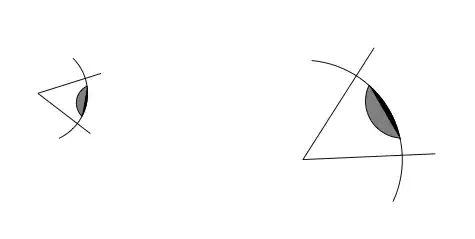
\begin{tikzpicture}
    \eye[radius=1,y=1,rotation=-10]
    \eye[radius=2,x=4,rotation=30] 
\end{tikzpicture}

\end{document} 

enter image description here

Alain Matthes
  • 95,075