4

I would like to use the Tikz decorations library to create some randomly shaped objects. However, I usually obtain open perimeters. Is there a way to obtain a closed path using this approach?

\documentclass{standalone}

\usepackage{tikz} \usetikzlibrary {decorations,decorations.pathmorphing}

\begin{document} \begin{tikzpicture} \foreach \x in {0,1,2,3} \foreach \y in {0,1,2} {\draw [decorate, decoration={random steps, segment length=4pt}] (\x,\y) circle [radius=.3cm];} \end{tikzpicture} \end{document}

enter image description here

tosogoso
  • 107

2 Answers2

7

Interesting!

Here are three workarounds …

  1. Only decorate the circle and close the path yourself.

    \tikz
      \foreach \x in {0,1,2,3}
        \foreach \y in {0,1,2}
          \draw [decoration={random steps, segment length=4pt}]
            (\x,\y) decorate {circle[radius=.3cm]} -- cycle;
    
  2. Use a very small post length and post=lineto (it doesn't really close the path but at least the line ends where it started):

    \tikz
      \foreach \x in {0,1,2,3}
        \foreach \y in {0,1,2}
          \draw [decorate, decoration={
            random steps, segment length=4pt, post length=0.01pt, post=lineto
          }] (\x,\y) circle[radius=.3cm];
    
  3. As 2. but uses a close decoration at its post:

    \pgfdeclaredecoration{close}{initial}{%
      \state{initial}[width=\pgfdecoratedremainingdistance]{\pgfpathclose}%
      \state{final}{}}%
    % …
    \tikz
      \foreach \x in {0,1,2,3}
        \foreach \y in {0,1,2}
          \draw [decorate, decoration={
            random steps, segment length=4pt, post length=0.01pt, post=close
          }] (\x,\y) circle[radius=.3cm];
    

… and a totally different approach:

\tikz
  \foreach \xxx in {0,1,2,3}
    \foreach \yyy in {0,1,2}
      \draw plot [
        sharp cycle,
        samples at = {0,...,9},
        shift={(\xxx,\yyy)}
      ] (360*\x/10+rnd*30:.3cm+.1cm*rnd);

Of course one can play with all the different values to get different kinds of “circles”.

The sharp cycle key (that is missing from the manual) makes sure that the path is closed again.

Code

\documentclass[tikz]{standalone}
\usetikzlibrary{decorations.pathmorphing}
\pgfdeclaredecoration{close}{initial}{%
  \state{initial}[width=\pgfdecoratedremainingdistance]{\pgfpathclose}%
  \state{final}{}}%

\begin{document} \tikz \foreach \x in {0,1,2,3} \foreach \y in {0,1,2} \draw [decoration={random steps, segment length=4pt}] (\x,\y) decorate {circle[radius=.3cm]} -- cycle;

\tikz \foreach \x in {0,1,2,3} \foreach \y in {0,1,2} \draw [decorate, decoration={ random steps, segment length=4pt, post length=0.01pt, post=lineto }] (\x,\y) circle[radius=.3cm];

\tikz \foreach \x in {0,1,2,3} \foreach \y in {0,1,2} \draw [decorate, decoration={ random steps, segment length=4pt, post length=0.01pt, post=close }] (\x,\y) circle[radius=.3cm];

\tikz \foreach \xxx in {0,1,2,3} \foreach \yyy in {0,1,2} \draw plot [ sharp cycle, samples at = {0,...,9}, shift={(\xxx,\yyy)} ] (360\x/10+rnd30:.3cm+.1cm*rnd); \end{document}

Output (last example)
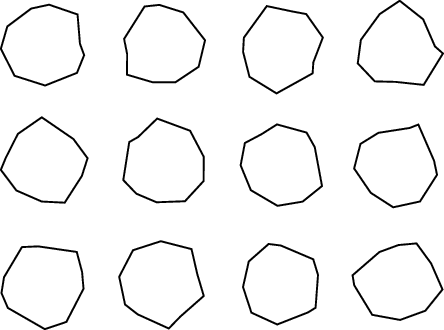
enter image description here

Qrrbrbirlbel
  • 119,821
  • Thank you very much for your fast answer! It is very helpful and all your solutions give a closed path. However, as a result, a segment is introduced which is (much) shorter than the other segments. Aesthetically, the objects would look more balanced if a workaround would not be necessary in the first place, i.e. the last segment would end up where the first started. Any hope that this could be achieved? (I am not proficient enough in pgf and tikz). – tosogoso Dec 10 '22 at 13:08
  • I can only offer another workaround: use a segment length that fits an integer amount into the circumference, say segment length=2*pi*.3cm/10. This won't be precise enough in most cases but with the fixes of my answer you won't notice? I don't usually deal with decorations much, maybe there's a way for a decoration to adjust its segment length according to the path length. – Qrrbrbirlbel Dec 10 '22 at 13:45
  • @Qrrbrbirlbel: Nice answer! (+1) Do you know why the offset occurs? It seems to be a rounding error of some sort. When the radius of the circle is larger (6mm for example) the endpoints almost match up. – Sandy G Dec 10 '22 at 22:37
  • @SandyG I don't deal with decorations often, my guess is, yes, the random steps won't ever fit perfectly into the circumference because of pi and imprecise math. Secondly, we replace a circle of a specific length with straight lines of a specific length. Even with amplitude=0pt, this doesn't hit the start point because the segments don't describe a regular polygon but are tangent to the circle. Just look at segment length=.3cm*2*pi/10, amplitude=0pt. Add randomnization to it and we'll never hit the start point cleanly. – Qrrbrbirlbel Dec 11 '22 at 00:31
  • The decoration does check if the remaining part is less then 1.5*segment length and if it is it uses a line to to the end, and possible a close operation. (The circle is constructed out of four arcs (those are Bezér curves, of course) and then a close on the spot.) Something fails here in some cases. – Qrrbrbirlbel Dec 11 '22 at 00:35
2

Here is an option to produce an array of random shapes with straight lines and sharp corners. The answer is adapted from: Random non erratic domain in tikz

\documentclass{standalone}
\usepackage{tikz}

% https://tex.stackexchange.com/questions/218475/random-non-erratic-domain-in-tikz % Answer by Kpym

% create some random points arround 0 % #1 is the number of points % #2 is the minimal radius % #3 is the maximal deviation (if =0 no randomness) \newcommand{\rndpts}[3]{ \def\pts{} \foreach[ evaluate=\x as \r using {#2+#3rnd}, evaluate=\x as \a using {\la+720rnd/#1}, remember=\a as \la (initially 0)] \x in {0,...,#1} { \pgfmathparse{int(\a)} \ifnum\pgfmathresult > 360\relax \breakforeach \else \xdef\pts{\pts (\a:\r)} \fi } } \begin{document}

\begin{tikzpicture}
    \foreach \x in {0,1,2,3}
    \foreach \y in {0,1,2}
        {\rndpts{9}{.3}{0}
            \draw[black, ultra thick] plot [smooth cycle, tension=0, xshift=\x cm, yshift=\y cm]  coordinates {\pts};}
\end{tikzpicture}

\end{document}

enter image description here

tosogoso
  • 107
  • You could also do something like \tikz \foreach \xxx in {0,1,2,3} \foreach \yyy in {0,1,2} \draw[black, ultra thick] plot [sharp cycle, samples at = {0,...,9}, shift={(\xxx,\yyy)}] (360*\x/10+rnd*30:.3cm+.1cm*rnd);. – Qrrbrbirlbel Dec 10 '22 at 16:22
  • This is an elegant solution. Would you mind to add it to your other options in your answer above? I would then accept it. – tosogoso Dec 10 '22 at 18:31