1

I want to reposition figure 2.2 right next to subsection 2.3.5.1, how to do it? enter image description here

My code:

\documentclass{book}
\usepackage{caption}

\begin{document}

\subsubsection{Simple Pendulum} Consider a pendulum as shown below \ \marginpar {\includegraphics[width=\marginparwidth]{Images/pendulum.png}[H] \captionof{figure}{Simple Pendulum}}

\end{document}

3 Answers3

1
  • Your document example is not complete. At least it should have loaded package graphicx.
  • What doing [H] ad end of code line \includegraphics ...? To my opinion, it should be deleted.
  • For start new paragraph just insert empty line. Don't use \\, it start new text line only and not a paragraph.
  • Adding missing packages, your MWE works as expected. Top of mage is aligned with \subsubsection, where you like that it be, but followed by ˙[H]`. So your MWE not reproduce your problem.
  • An MWE (Minimal Working Example) with which produce desired result, can be:
\documentclass{book}
\usepackage{caption}
\usepackage{graphicx}   % added
\usepackage{lipsum}     % dummy text filler

\begin{document}

\subsubsection{Simple Pendulum} Consider a pendulum as shown in figure \ref{fig:simplependulim} on margin. \marginpar{ \includegraphics[width=\linewidth]{example-image-duck}%{Images/pendulum.png} \captionof{figure}{Simple Pendulum} \label{fig:simplependulim} }

\lipsum[1] % inserted after empty line \end{document}

enter image description here

Zarko
  • 296,517
0

Don't use \\ in the text, do a blank line in the code to move to the next line. There are several possible ideas. The showframe package to visualize margins

    \documentclass{book}
    \usepackage{showframe}%<-- comment this line in the final doc
    \usepackage{paracol}
    \usepackage{graphicx}
    \usepackage{caption}
    \parindent=0pt
    \begin{document}
    \section{Simple Pendulum in margin}
    Consider a pendulum as shown
do a blank line in the code to move to the next line.
\marginpar
{\includegraphics[width=\marginparwidth]{example-image-b}
\captionof{figure}{Simple Pendulum}}
%
\section{Simple Pendulum with paracol}
\begin{paracol}{2}
    Consider a pendulum as shown
\switchcolumn
\begin{figure}
\includegraphics[width=\linewidth]{example-image-a}
\caption{Simple Pendulum}
\end{figure}
\end{paracol}
\end{document}
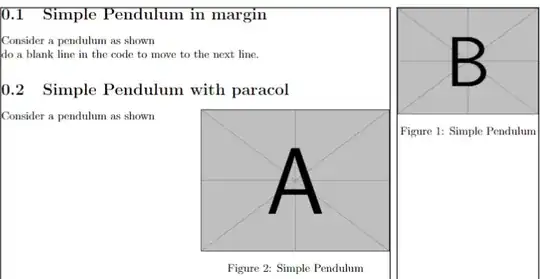
enter image description here

pascal974
  • 4,652
0

You can use the marginfigure option from [sidenotes][1] package to precisely control vertical the placement of the image in the margin. Note the offset [-3cm], this will push the image up from where it would have been placed. A positive offset will push the image down. This is very helpful when we have several images in the margin on the same page. You can also have tables in the margin with margintable option.

\begin{marginfigure}[-3cm]
\centering
\includegraphics[width=0.75\textwidth]{fig-1.pdf}
\caption{The caption. \label{fig-1}}
\end{marginfigure}
Damitr
  • 1,889