I show three versions; one is the textbook's, one is with a similarly reduced height middle bar but with a couple of fixes. The last one is a different possibility (I guess that the textbook's typesetter didn't know about \middle).
In any case, you should avoid too many \left and \right. Compare your version with them and the picture from the textbook.
\documentclass{article}
\usepackage{amsmath}
\DeclareMathOperator{\Ex}{\mathbf{E}}% expectation
\begin{document}
The textbook version
[
\Ex\left{
  \biggl(
    \frac{\sum_{i=1}^n(Y_i-m(X_i)) I_{{X_i \in A_n(x)}}}
         {n \mu_n(A_n(x))}
  \biggr)^{2}
  ,\Big|, X_1, \ldots, X_n
\right}
]
A better one
[
\Ex\biggl{
  \biggl(
    \frac{\sum_{i=1}^n(Y_i-m(X_i)) I_{{X_i \in A_n(x)}}}
         {n \mu_n(A_n(x))}
  \biggr)^{!2}
  \Bigm| X_1, \ldots, X_n
\biggr}
]
Another possibility
[
\Ex\left{
  \biggl(
    \frac{\sum_{i=1}^n(Y_i-m(X_i)) I_{{X_i \in A_n(x)}}}
         {n \mu_n(A_n(x))}
  \biggr)^{!2}
  ;\middle|; X_1, \ldots, X_n
\right}
]
\end{document}
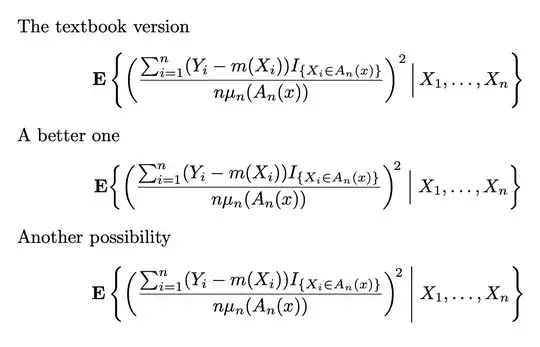
Some points to notice. The exponent in the textbook seems to hang from nowhere; adding \! places it nearer the parenthesis. Also \, space around the bar is too small and \; instead adds the standard spacing around relation symbols.


\midis something completely different. Here the author manually scaled the vertical bar. so something like\Bigm\vertmight be what you are after. (remember the are four levels of manual scaling:\big\Big\bigg\Biggeach has-l,-rand-mvariants. For example scaling()ought ro be done using the l/r variants\bigl(...\bigr). The-mvariant adds a bit of extra spacing. – daleif Dec 12 '22 at 10:31\left...\right, the rest does not contribute anything other than making your code harder to read. – daleif Dec 12 '22 at 10:32\Setmacro example in themathtoolsmanual. IMO the|in the image is a bit small. I would use a size that match the{}, chances are that the author did not know how to do that. – daleif Dec 12 '22 at 10:36\Bigm\vertdoes exactly what I want. – Analyst Dec 12 '22 at 10:44