UPDATE:
This is a more configurable solution, and easier in the maths department too.
For this one I made two \pics, one for the 'petals' and another for the 'flower' that repeats and rotate the petals.
Like this:
\documentclass[tikz,border=2mm]{standalone}
\tikzset
{
  pics/petal/.style 2 args={% #1 = radius, #2 = distance to the next petal
    code={
      \pgfmathsetmacro\half{0.5*#2}
      \ifdim\half pt<#1 pt % if the petals intersect
        \pgfmathsetmacro\aa{acos(\half/#1)}
        \path[pic actions] (\aa:#1) arc (\aa:360-\aa:#1) arc (180+\aa:180-\aa:#1);
      \else % if the petals don't intersect
        \draw[pic actions] (0,0) circle [radius=#1];
      \fi
    }},
  pics/flower/.style n args={3}{% #1 = flower radius, #2 = petal radius, #3 = number of petals
    code={
      \pgfmathsetmacro\dd{#1*sqrt(2*(1-cos(360/#3))} % distance between petals
      \foreach\i in {1,...,#3}
        \pic[draw,fill,rotate=180/#3+360*\i/#3+90] at (360*\i/#3:#1) {petal={#2}{\dd}};
    }},
}
\begin{document}
\begin{tikzpicture}[line cap=round,line join=round]
\foreach\i in {1,...,4}
  \pic[fill=green!20,rotate=90\i+180] at (90\i:4) {petal={1}{1}};
\pic[draw=red ,fill=red!20]  {flower={3}{1}{12}};
\pic[draw=blue,fill=blue!10] {flower={3}{0.2}{4}};
\pic[draw=blue,fill=blue!30] {flower={1}{0.2}{20}};
\foreach\i in {1,...,12}
  \pic[fill=yellow,rotate=30\i] at (30\i:3) {flower={0.4}{0.1}{7}};
\end{tikzpicture}
\end{document}

INITIAL ANSWER:
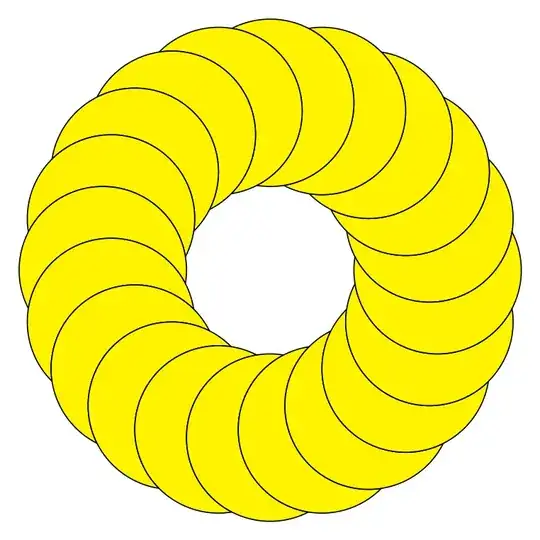
I'm creating a \pic that draws only the visible part of the circle (the same idea that mickep proposes, I think). Then I draw it and rotate each time.
It needs to compute a couple of angles using the cosine theorem (for example).
This is my solution:
\documentclass[tikz,border=2mm]{standalone}
\begin{document}
\begin{tikzpicture}
\def\n{20}
\pgfmathsetmacro\a{360/\n}
\pgfmathsetmacro\aa{acos(4cos(\a)-3)} % some other angles
\pgfmathsetmacro\bb{90-0.5\aa}        % obtained from the
\pgfmathsetmacro\cc{0.5\aa-0.5\a}    % cosine theorem
\tikzset
{% a pic (like a crescent moon)
  pics/moon/.style={
    code={
      \path[pic actions] (0:2) ++ (180-\cc:1) arc (180-\cc:540-\cc-2\bb:1) arc (\a-180+\cc+2\bb:\a-180+\cc:1);
    }},
}
\foreach \i in {1,...,\n}
  \pic[draw,fill=yellow,rotate=\a\i] (\a\i:2) {moon};
\end{tikzpicture}
\end{document}
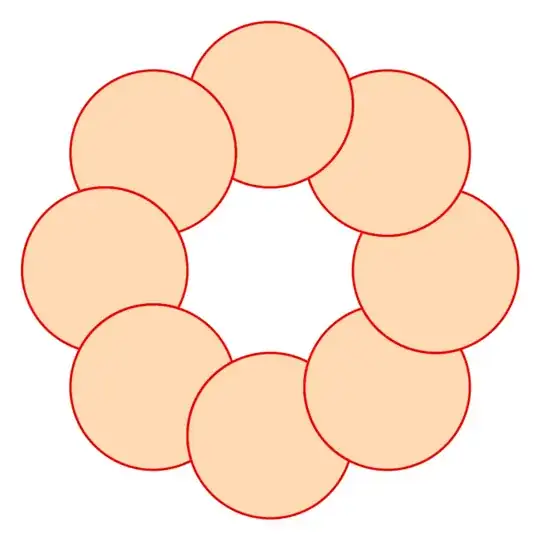
Or, changing
\def\n{8}
....
\pic[draw=red,thick,fill=orange!30,rotate=\a*\i] (\a*\i:2) {moon};
....


buildcycle, but as mentioned, I do not know how to do it in tikz. But I'm sure someone else will help with that. – mickep Jan 01 '23 at 10:44