Please ignore the binary numbers.

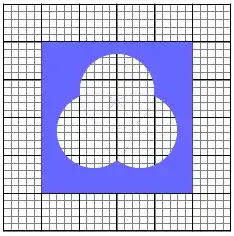
Without finding the intersection points in advance, is it possible to fill the complement of (A union B union C) with a solid color but the remaining regions remain transparent?
Please ignore the binary numbers.
Without finding the intersection points in advance, is it possible to fill the complement of (A union B union C) with a solid color but the remaining regions remain transparent?

Using the approach described in How can I invert a 'clip' selection within TikZ?:

\documentclass{article}
\usepackage{tikz}
\usetikzlibrary{calc}

\begin{document}
\tikzstyle{reverseclip}=[insert path={(current page.north east) --
  (current page.south east) --
  (current page.south west) --
  (current page.north west) --
  (current page.north east)}
]

\begin{tikzpicture}[remember picture]

\draw [gray!20, ultra thick] (-3,-3) grid (3,3);

\begin{pgfinterruptboundingbox}
\path  [clip] (90:0.7cm) circle [radius=1cm] [reverseclip];
\path  [clip] (-30:0.7cm) circle [radius=1cm] [reverseclip];
\path  [clip] (210:0.7cm) circle [radius=1cm] [reverseclip];
\end{pgfinterruptboundingbox}

\fill [orange] (-2,-2) rectangle (2,2);
\end{tikzpicture}
\end{document}
\fill [orange] (current page.north west) rectangle (current page.south east);. Note that you need to have the options remember picture, overlay in your tikzpicture options, and you need to compile the document twice.
– Jake
Oct 25 '13 at 11:04
needs the latest pstricks.tex from http://texnik.dante.de/tex/generic/pstricks/ available on CTAN in a few days
\documentclass{minimal}
\usepackage{pstricks}\SpecialCoor

\begin{document}

\begin{pspicture}(-3,-3)(3,3)\psgrid[gridlabels=0pt]
  \pscustom[linestyle=none]{%
  \pspolygon(-2,-2)(-2,2)(2,2)(2,-2)
  \moveto(0.7;90)\rmoveto(1,0)\pscircle(0.7;90){1}
  \moveto(0.7;-30)\rmoveto(1,0)\pscircle(0.7;-30){1}
  \moveto(0.7;210)\rmoveto(1,0)\pscircle(0.7;210){1}
  \closepath
  \code{eoclip}
  \pspolygon(-2,-2)(-2,2)(2,2)(2,-2)
  \fill[fillcolor=blue!60,fillstyle=solid,linestyle=none]}
\end{pspicture}

\end{document}
but there are still some small lines for the circles:


fill=blueoption to the path if it's 1 or 0 at the specific digit. – percusse Aug 16 '12 at 13:28