0

In a document I have to use \linebreak\indent like this:

\documentclass[a5paper,openany,14pt,oneside,]{extbook}
\usepackage[left=2.34cm, right=2.34cm, top=2.66cm]{geometry}
\setlength{\parskip}{6pt plus 2pt minus 1pt}
\begin{document}
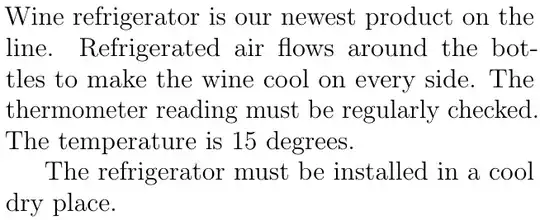
\noindent Wine refrigerator is our newest product on the line. Refrigerated air flows around the bottles to make the wine cool on every side. The thermometer reading must be regularly checked. The temperature is 15 degrees.
\linebreak\indent The refrigerator must be installed in a cool dry place.
\end{document}

When I use it, the words in the preceding line expand like this:

enter image description here

How to prevent that from happening?

System: TeXLive 2020, lualatex

Update In the document, I've used \setlength{\parskip}{6pt plus 2pt minus 1pt} to automatically apply padding space between the paragrahs. I don't know the internals of that line; I use it just because it gets the job done. I've added that line to the Minimal Working Example code.

Update (Workaround solution) Using the TikZ package, adding \tikz[baseline] \node[yshift=5.7pt,inner ysep=0mm,] at (5pt,-2pt) {is 16 degrees.}; works around the problem: enter image description here

Though it looks fine, this is a workaround solution entailing TikZ If someone comes up with a real solution (i.e. without using TikZ) I would prefer it.

  • 2
    Just curious: Why are you using \linebreak\indent instead of \par? – Mico Feb 05 '23 at 18:22
  • 1
    Normal… When break line, you artificially force justification or ragging. Maybe add some (stretching or fixed amount of) spaces in invisible box? But it's strange to do paragraphs manually. – gildux Feb 05 '23 at 18:41
  • 1
    @Mico, I've used \linebreak\indent because those were what I've found to get the job done. \parmight be doing it better but I didn't know it at the time. – Lars Malmsteen Feb 05 '23 at 19:15
  • I believe you'd benefit from some good general documentation. The question Which manuals are on your "TeX Reference" shelf? provides a number of suggestions; for "general knowledge", lshort is reliable. – barbara beeton Feb 05 '23 at 19:47
  • @barbarabeeton Thank you for the comment. Actually I have more than 20 books and documentation on TeX/LaTeX (no exaggeration) and I've briefly browsed several of them before posting. The problem is, if you're a beginning to intermediate TeX user, then you don't even know how to begin with a specific problem. I started searching with the \raggedleft thinking that it would compress that line to left, but it didn't worked out :) then I tried \hfill It didn't worked out either. After some time, it becomes a tedious trial-n-error game. – Lars Malmsteen Feb 05 '23 at 20:03
  • 1
    Is it that sometimes you want vertical space between paragraphs and sometimes you don't? If so, which is the more common outcome you seek: no extra vertical space between paragraphs or extra vertical space between paragraphs? I´d likely be inclined to leave \parskip alone and look at the commands \bigskip and \smallskip for when vertical space is required. Or define my own \fancybreak (as it were) for such cases. – jon Feb 05 '23 at 20:43
  • You might also be interested in the package parskip. – jon Feb 05 '23 at 20:45
  • 2
    don't use \linebreakor \noindent except in exceptional cases. smply use a bank line between paragraphs (and add ``\usepackage{parskip}` so paragraphs have vertical spacinng – David Carlisle Feb 05 '23 at 20:51
  • @jon Yes, generally I prefer space between paragraphs. But this particular problem is not related so much to paragraph spacing, I think. All in all, the problem is linebreak interferes with the precedent line which it souldn't. I've tried parskip no change in situation, it didn't help. Thanks. – Lars Malmsteen Feb 05 '23 at 21:28
  • @DavidCarlisle Thank you for the comment. I have to use \linebreak and \noindent there. I've tried the parskip package but it didn't help, it actually worsened the case. – Lars Malmsteen Feb 05 '23 at 21:39
  • 1
    \linebreak is designed to produce exactly what you show: it forces a line break while maintaining justifcation so stretches the space on that line. If you "have to use \linebreak there isn't really any answer, you are forcing the output you show. Any answer which does not stretch that line will not be using \linebreak – David Carlisle Feb 05 '23 at 21:46
  • @DavidCarlisle Couldn't the \linebreak redefined (through renewcommand, newcommand, etc) so that it doesn't cause the preceding line's words to expand or as you put it better, "stretch" ? – Lars Malmsteen Feb 06 '23 at 08:48
  • 1
    @LarsMalmsteen sure latex is a macro language you can redefine anything, but if someone asks how to make \textbf{hello} not bold, surely the answer is to not use \textbf not to risk redefining a core command not to do the only thing it is designed to do. – David Carlisle Feb 06 '23 at 08:52
  • @DavidCarlisle I count myself as a beginning to inteemediate TeX user, so I cannot know the most suitable solution, whether it be redefining the linebreak or create a new command from ground up. Meanwhile, I've fixed the issue using TikZ (see the update on the quesiton) But, I count that fix as a workaround solution. Real solution is welcomed. – Lars Malmsteen Feb 06 '23 at 11:09
  • 3
    tikz???? !!! the solution as told multiple times is to simply use a blank line and remove \setlength{\parskip}{6pt plus 2pt minus 1pt} . For the cases where you want a vertical space before a paragraph use \smallskp or \vspace{\setlength{6pt plus 2pt minus 1pt} if you need exactly that. – David Carlisle Feb 06 '23 at 11:13
  • TikZ is one of the greatest packages I've ever seen in more than ten years of using LaTeX. However, using TikZ this way is absolutely nonsense. And I have already shown better and simpler solutions long before you presented this attempt "from behind through the chest into the knee". Why do you refuse to use one of these simple solutions? – cabohah Feb 06 '23 at 12:50

3 Answers3

6

You should not use \linebreak for paragraphs. It sets only an absolute break point, so the line is justified like each other line of a justified paragraph.

You should also not use \newline or \\ for paragraphs. Correct paragraphs are either \par or empty lines in the source code:

\documentclass[a5paper,openany,14pt,oneside,]{extbook}
\usepackage[left=2.34cm, right=2.34cm, top=2.66cm]{geometry}
\begin{document}
\chapter{Wine refrigerator}
Wine refrigerator is our newest product on the line. Refrigerated air flows around the bottles to make the wine cool on every side. The thermometer reading must be regularly checked. The temperature is 15 degrees.

The refrigerator must be installed in a cool dry place. \end{document}

example

BTW: a5paper and 14pt is a little bit problematic with justified text. (See the overfull \hbox with the “The” in the example.) But you can improve it, using package microtype:

\documentclass[a5paper,openany,14pt,oneside,]{extbook}
\usepackage[left=2.34cm, right=2.34cm, top=2.66cm]{geometry}
\usepackage{microtype}
\begin{document}
\chapter{Wine refrigerator}
Wine refrigerator is our newest product on the line. Refrigerated air flows around the bottles to make the wine cool on every side. The thermometer reading must be regularly checked. The temperature is 15 degrees.
\par
The refrigerator must be installed in a cool dry place.
\end{document}
with microtype


Edit, because of the changed MWE in the question (after already answering the original question!).

If you don't use \chapter, using extbook and option openany do not make much sense. In this case extarticle would be barely sufficient. So I'm using this class in the following answers.

With the standard classes or gently derived classes like the ext-classes, the best option to use paragraph distance (skip) instead of indenting the first line of a paragraph is the parskip package. In my opinion it also does not make much sense nor is it good style to mix general setting of paragraph skip with some only indented paragraphs. However, you can do it simply using an environment for the indented paragraphs:

\documentclass[a5paper,14pt]{extarticle}
\usepackage[left=2.34cm, right=2.34cm, top=2.66cm]{geometry}
\usepackage[skip=6pt plus 2pt minus 1pt]{parskip}% To use paragraph skip
                                                 % instead of indent.
\usepackage{microtype}
\newenvironment{indentedpar}{%
  \par
  \setlength{\parfillskip}{0pt plus 1fil}%
  \setlength{\parindent}{1em}%
  \setlength{\parskip}{0pt}%
}{%
  \par
}

\begin{document}

Wine refrigerator is our newest product on the line. Refrigerated air flows around the bottles to make the wine cool on every side. The thermometer reading must be regularly checked. The temperature is 15 degrees. \begin{indentedpar} The refrigerator must be installed in a cool dry place. \end{indentedpar} \end{document}

using an environment

But sometimes it makes indeed sense, to use paragraph indent as default and to have a kind of section without title but distance. In this case, defining a special paragraph command would be a good idea:

\documentclass[a5paper,14pt]{extarticle}
\usepackage[left=2.34cm, right=2.34cm, top=2.66cm]{geometry}

\usepackage{microtype} \newcommand*{\microsection}{\par\medskip\noindent}% Alternatively you can use \smallskip or \bigskip or a \vspace{…}

\usepackage{lipsum}% useful for MWEs

\begin{document}

\lipsum[1] \microsection Wine refrigerator is our newest product on the line. Refrigerated air flows around the bottles to make the wine cool on every side. The thermometer reading must be regularly checked. The temperature is 15 degrees.

The refrigerator must be installed in a cool dry place. \end{document}

with command

cabohah
  • 11,455
  • 1
    Good suggestion to use microtype. In a straightforward case like this it is superior to sloppypar; it would probably not work if the problem is a too-long url. – barbara beeton Feb 05 '23 at 19:22
  • Thank you for the answer. In the document, I'm using the \setlength{\parskip}{6pt plus 2pt minus 1pt} line (see the update note) and because of it, if I use \par the last line is pushed farther down. That line must not be pushed like that; it must be treated as an ordinary new line. Meanwhile, the document doesn't make use of \chapter ; it consists solely of paragraph texts. – Lars Malmsteen Feb 05 '23 at 19:43
  • @LarsMalmsteen Nevertheless faking a paragraph with \linebreak, \newline or \\ is not a good idea! For example, TeX has special treatment for the first and last line of a paragraph, that do not work with \linebreak etc. So I've added additional answers for your special case. But next time, please ask a new question, if you want to change the specification after already getting answer(s). – cabohah Feb 06 '23 at 08:50
  • @barbarabeeton I know, that it does not help in any case, i.e., not in cases that are also problematic with long lines like too-long urls. I just wanted to offer a way to mitigate problems due to the large font and narrow line length in particular. For general solutions, a new question or reading the already existing would make more sense. – cabohah Feb 06 '23 at 09:02
  • The code before the last one, ie the one with the \newenvironment{indentedpar}{% works fine. I've selected the answer as accepted based on that alone. I haven't tried the last code (ie the one with the \newcommand*{\microsection}) but it looks good in terms of learning and exploring. Thanks! – Lars Malmsteen Feb 06 '23 at 14:52
3

The first knowledge about TeX must be: the document is divided by paragraphs, the paragraphs are divided by empty lines in the source file. The text of a single paragraph can de divided to more lines (but without empty lines between them).

You don't need to know any more at this first state, you don't need \hfil\break inside the paragraph (in LaTeX: you don't need \\ nor \linebreak etc. inside the paragraph).

wipet
  • 74,238
  • Thank you for the comment. If I don't need \ nor \linebreak inside the paragraph, then what is the correct way of starting a new line inside a paragraph? – Lars Malmsteen Feb 05 '23 at 20:26
  • 1
    @LarsMalmsteen Why do you need to start a new line within a paragraph? This is a serious question, since forcing a new line (with indent) within a paragraph seems like the wrong solution to a problem (regardless of what the problem actually is). What problem are you trying to solve with regards to text layout? – enkorvaks Feb 05 '23 at 22:43
  • @enkorvaks Because I'm TeXifying an old, scanned document and in that document we have such occurances, i.e. new lines with indents and I'd like to make the exact same looking TeX document. – Lars Malmsteen Feb 06 '23 at 08:50
  • 2
    @LarsMalmsteen a "new line with indent" is a new paragraph that has how such a layout has been understood for hundeds of years. – David Carlisle Feb 06 '23 at 08:54
  • @LarsMalmsteen. Can I assume that there are both paragraphs with indent, and more (different) paragraphs with a space between them? If so, the solution might be ordinary (indented) paragraphs for indented stuff, with a specific command to put in the skip where needed. – enkorvaks Feb 06 '23 at 10:32
  • Yes, the first task of each TeX user is to realize that each document is divided to paragraphs. – wipet Feb 07 '23 at 07:38
1

Looking at your desired output it is clear that "The refrigerator.." is a new paragraph as a new line and indent has been understood that way for centuries. So in LaTeX just use a blank line.

Not shown but in comments you also have annonymous sections set off with vertical space and no indent. Again marking those as sections would be the natural markup, I used \subsection level here. You could adjust the space elsewhere

enter image description here

\documentclass[a5paper,openany,14pt,oneside,]{extbook}
\usepackage[left=2.34cm, right=2.34cm, top=2.66cm]{geometry}
\usepackage{microtype}

\begin{document} \subsection*{} Wine refrigerator is our newest product on the line. Refrigerated air flows around the bottles to make the wine cool on every side. The thermometer reading must be regularly checked. The temperature is 15 degrees.

The refrigerator must be installed in a cool dry place.

\subsection*{} Wine refrigerator is our newest product on the line. Refrigerated air flows around the bottles to make the wine cool on every side. The thermometer reading must be regularly checked. The temperature is 15 degrees.

The refrigerator must be installed in a cool dry place. \end{document}

David Carlisle
  • 757,742