Let's look at extarticle.cls:
\DeclareOption{8pt}{\renewcommand\@ptsize{8}}
\DeclareOption{9pt}{\renewcommand\@ptsize{9}}
\DeclareOption{10pt}{\renewcommand\@ptsize{10}}
\DeclareOption{11pt}{\renewcommand\@ptsize{11}}
\DeclareOption{12pt}{\renewcommand\@ptsize{12}}
\DeclareOption{14pt}{\renewcommand\@ptsize{14}}
\DeclareOption{17pt}{\renewcommand\@ptsize{17}}
\DeclareOption{20pt}{\renewcommand\@ptsize{20}}
So if you choose 17pt or 20pt you'll get them provided you load also fix-cm (in case your document uses the standard Computer Modern fonts) or a package that supports scalable fonts. In the former case, you should add
\RequirePackage{fix-cm}
before \documentclass.
Specifying other options is useless, because they're not recognized. If you want an arbitrary font size, there's the fontsize package:
\RequirePackage{fix-cm}
\documentclass{article}
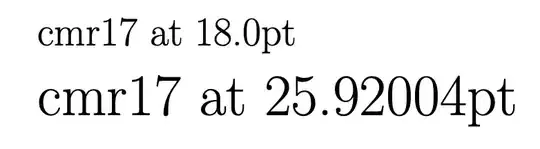
\usepackage[fontsize=18pt]{fontsize}
\begin{document}
\fontname\font
\Large\fontname\font
\end{document}


\fontsize{3cm}{4cm}\selectfont ABCif you want big letters. – David Carlisle Mar 06 '23 at 16:25\documentclass{article} \begin{document} \fontsize{3cm}{4cm}\selectfont ABC \end{document}– David Carlisle Mar 06 '23 at 16:30scrextendorfontsize. And some classes likescrartclalso allow such sizes. – cabohah Mar 06 '23 at 17:08memoirclass (a superset ofbook) provides for font sizes from 4pt to 132pt. Read the documentation section 3.2 "Font sizes". – Peter Wilson Mar 06 '23 at 18:18