The following document
\documentclass[11pt,a4paper]{report}

\usepackage{tikz}
\usetikzlibrary{shapes}
\usetikzlibrary{arrows}
\usetikzlibrary{positioning}

\begin{document}
\begin{tikzpicture}[remember picture]
  \node [draw] (a) {%
    \begin{tabular}{l}
      line 1 \\
      line 2
      \begin{tikzpicture}[remember picture]
        \coordinate (line2);
      \end{tikzpicture}
      \\
      line 3 \\
      line 4 \\
    \end{tabular}
  };

  \node [draw, right=5cm of line2] (a) {a};

  \draw (line2) -- (a);
\end{tikzpicture}
\end{document}
yields a different result when I compile it to PDF using pdflatex compared to using dvips and then ps2pdf.
For instance, here is the (expected) figure produced by pdflatex:

And here is the (incorrect) figure produced by dvips and ps2pdf:
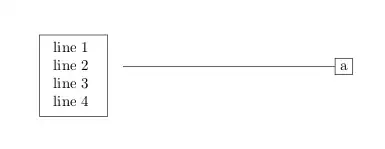
Why is this, and how do I fix it so that the result is always like the one produced by pdflatex?


\usepackage[a4paper]{geometry}, or load the graphicx package. – Ulrike Fischer Aug 21 '12 at 08:13geometrypackage as well witha4paperas option. But is there anything I can do to make this work with dvips-ps2pdf? – gablin Aug 21 '12 at 10:44pdflatex, but in this document the original author useddvips-ps2pdfso I continued with that, seeing no reason to change it. However, my concern is that if I submit a paper with TikZ figures to a conference, and they happen to use thedvips-ps2pdfapproach, I want to make sure that the end result at their end looks exactly like I see on my machine. So I want to find out what's the problem here. =) – gablin Aug 21 '12 at 12:57\includegraphics... – krlmlr Aug 21 '12 at 13:25dvips-ps2pdfapproach and I use thepdflatexapproach when generating my paper, I want there to be no discrepancies between the produced PDFs. – gablin Aug 22 '12 at 07:01