If you're tied to calculator, then define a \GADD command for “global addition”, because alignment cells form groups and calculator does local assignments.
\documentclass{scrlttr2}
\usepackage{calculator}
\newcommand{\GADD}[3]{%
  \ADD{#1}{#2}{\tmpcalc}\global\let#3\tmpcalc
}
\newcommand{\resetinvoicesum}{\GADD{0}{0}{\invoicesum}}
\newcommand{\addtoinvoicesum}[1]{\GADD{\invoicesum}{#1}{\invoicesum}}
\begin{document}
\resetinvoicesum
\begin{tabular}{l}
  15.78\addtoinvoicesum{15.78}\
  15.89\addtoinvoicesum{15.89}\
  sum: \invoicesum
\end{tabular}
\end{document}
With “more modern” tools:
\documentclass{scrlttr2}
\ExplSyntaxOn
\NewDocumentCommand{\resetfpvar}{m}
 {
  \fp_zero_new:c { g_carnivore_fpvar_#1_fp }
 }
\NewDocumentCommand{\addtofpvar}{mm}
 {% #1 = var name, #2 = amount
  \fp_gadd:cn { g_carnivore_fpvar_#1_fp } { #2 }
 }
\NewExpandableDocumentCommand{\printfpvar}{m}
 {
  \fp_use:c { g_carnivore_fpvar_#1_fp }
 }
\ExplSyntaxOff
\newcommand{\resetinvoicesum}{\resetfpvar{invoicesum}}
\newcommand{\addtoinvoicesum}[1]{\addtofpvar{invoicesum}{#1}}
\begin{document}
\resetinvoicesum
\begin{tabular}{l}
  15.78\addtoinvoicesum{15.78}\
  15.89\addtoinvoicesum{15.89}\
  sum: \printfpvar{invoicesum}
\end{tabular}
\end{document}
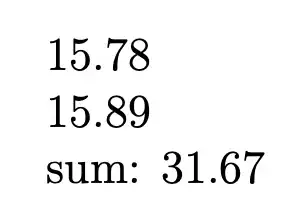


\ADDdoes a global assignment you will never get the result you are after – daleif Mar 22 '23 at 12:39\newcommand{\addtoinvoicesum}[1]{\ADD{\invoicesum}{#1}{\invoicesum}\GLOBALCOPY{\invoicesum}{\invoicesum}}– Marijn Mar 22 '23 at 12:41tabularx. Somehow the result is 2 or 3 times higher than expected... – mrCarnivore Mar 22 '23 at 13:35\ADDstatements) in order to get the layout right. There was a recent question about that, using a different calculation package but the same overall issue, let me see if I can find that. – Marijn Mar 22 '23 at 13:42