3

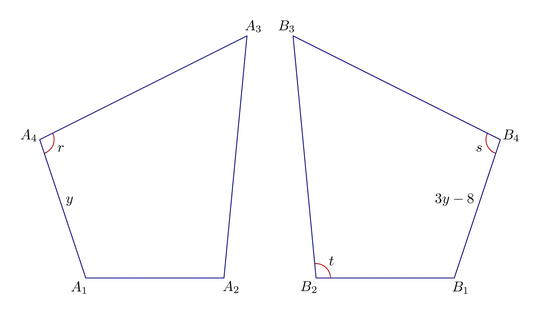
I want to draw this image: enter image description here I write this code, but I can't define mirror nodes based on nodes A1 ... A4.

How define nodes B1 ... B4 based on A1 ... A4?

\documentclass[border=5pt]{standalone}

\usepackage{tikz}

\usepackage{amsmath,amsfonts,amssymb}

\begin{document}

\begin{tikzpicture}[line cap=round]

% First, define nodes \node[inner sep=0pt] (A1) at (0, 0) {};
\node[inner sep=0pt] (A2) at (1, 0) {};
\node[inner sep=0pt] (A3) at (1.5, 1.5) {};
\node[inner sep=0pt] (A4) at (-0.2, 1) {};

\draw [line width=2pt, -] (A1) -- (A2) -- (A3) -- (A4) -- (A1);

\end{tikzpicture}

\end{document}

niksirat
  • 617
  • 1
    In this case it‘s simple to calculate the required transformation for 4 x-coordinates by hand or head, place 4 more nodes and draw one more path. // You can also end the draw statement with cycle, instead of (A1), if you like: it will close the path. – MS-SPO Apr 25 '23 at 03:48
  • 2
    You can use tikz-euclide. – Tolaso Apr 25 '23 at 04:06
  • For a general approach to mirroring: Q119914 – Qrrbrbirlbel Apr 25 '23 at 08:03
  • Can you provide a more description title for your question? "How to draw this?" doesn't help people searching this site. – Werner Apr 25 '23 at 17:36

4 Answers4

8

With a reflection and the macro \tkzDefPointsBy you can define easily $B1, B2, B3, B4$. You ajust the position with the coordinates of $I$ and $J$.

This is possible with only TikZ but if you want some other figures like this you can invest some time in the study of tkz-euclide.

\documentclass[border=5pt]{standalone}
\usepackage{tkz-euclide}
\usepackage{amsmath,amsfonts,amssymb}

\begin{document} \begin{tikzpicture}[line cap=round,scale=2] \tkzDefPoints{0/0/A1,1/0/A2,1.5/1.5/A3,-0.2/1/A4,2/0/I,2/2/J} \tkzDefPointsByreflection = over I--J{B1,B2,B3,B4} \tkzDrawPolygons(A1,A2,A3,A4 B1,B2,B3,B4) % drawing \tkzSetUpStyle[font=\footnotesize]{label style} \tkzLabelPointsleft \tkzLabelPointsright,font=\footnotesize \tkzMarkAngles[size=.3](A1,A4,A3 B1,B2,B3 B3,B4,B1) \tkzLabelAnglepos = 0.4{$r$} \tkzLabelAnglepos = 0.4{$t$} \tkzLabelAnglepos = 0.4{$s$} \tkzLabelSegmentright{$y$} \tkzLabelSegmentleft{$3y-8$} \end{tikzpicture} \end{document}

enter image description here

Alain Matthes
  • 95,075
3

Since coordinates have a somewhat fixed position once they are defined, you would need to transform (flip and shift) them manually (such as ([shift={(4, 0)}, xscale=-1]A1)). But you could create a macro to define them inside an already transformed scope like this nice answer suggests.

Apart from this, I would suggest that you really use \coordinates instead of \nodes to define the paths and use the line join option.

MWE:

\documentclass[border=5pt]{standalone}
\usepackage{tikz}

\begin{document} \begin{tikzpicture}[line join=round]

\newcommand{\definecoordinates}[1][A]{% % First, define coordinates \coordinate (#11) at (0, 0);
\coordinate (#12) at (1, 0);
\coordinate (#13) at (1.5, 1.5);
\coordinate (#14) at (-0.2, 1); }

\begin{scope} \definecoordinates \draw[line width=2pt] (A1) -- (A2) -- (A3) -- (A4) -- cycle; \end{scope}

\begin{scope}[shift={(4, 0)}, xscale=-1] \definecoordinates[B] \draw[line width=2pt] (B1) -- (B2) -- (B3) -- (B4) -- cycle; \end{scope}

\end{tikzpicture} \end{document}

enter image description here

3

For comparison, here is a version in Metapost showing how to do reflection.
enter image description here

This is wrapped up with luamplib so you need to compile it with lualatex.

\documentclass[border=5mm]{standalone}
\usepackage{luamplib}
\begin{document}
\mplibtextextlabel{enable}
\begin{mplibcode}
beginfig(1);
path A, B;  
A = origin -- (32, -96) -- (128, -96) -- (144, 72) -- cycle;
A := A shifted 160 left;
B = A reflectedabout(up, down);

vardef add_angle_label(expr a, o, b, r, t) = save arc; path arc; arc = fullcircle scaled 2r rotated angle (a-o) shifted o cutafter (o..b); draw arc withcolor 3/4 red; label(t, beyond(o, point arctime 1/2 arclength arc of arc of arc, 6)); enddef;

vardef median(expr p) = save n; numeric n; n = length p; origin for i=1 upto n: + point i of p scaled (1/n) endfor enddef;

vardef beyond(expr a, b, o) = save d; d = abs(b-a); (1+o/d)[a, b] enddef;

add_angle_label(point 1 of A, point 4 of A, point 3 of A, 10, "$r$"); add_angle_label(point 3 of B, point 4 of B, point 1 of B, 10, "$s$"); add_angle_label(point 1 of B, point 2 of B, point 3 of B, 10, "$t$");

forsuffixes $=A, B: pair m; m = median($); draw $ withcolor 1/2 blue; for i=1 upto 4: label("$" & str $ & "_" & decimal i & "$", beyond(m, point i of $, 8)); endfor endfor

label.urt ("$y$", point 1/2 of A); label.ulft("$3y-8$", point 1/2 of B);

endfig; \end{mplibcode} \end{document}

Notes

The first <path> variable A is created like this:

A = origin -- (32, -96) -- (128, -96) -- (144, 72) -- cycle;

then shifted so it is the left of the origin (note that you have to use := to update it).

A := A shifted 160 left;

Then the second <path> variable B is created in one go:

B = A reflectedabout(up, down);

Then I've added a couple of useful macros:

  • add_angle_label creates an appropriate circular arc, draws it in red, and then adds the label t half way along it.

  • median gives you a weighted central point for any cyclic polygon path -- a bit more useful than center if the shape is irregular.

  • beyond(a, b, o) returns a <pair> that is o pt beyond b in the direction of a--b.

Finally the shapes and labels are drawn in a nested loop.

Thruston
  • 42,268
1

Using the generalization of mirroring along an axis following my answer to Can we mirror a part in tikz ("axial symmetry", "reflection")?.

The Ai coordinates are defines as usual, the Bi are defined via the A nodes with an active transformations: xmirror = 2, i.e. mirroring at an axis that follows x = 2.

The rest of the diagram is then just drawing the polygons and marking lines, angles and vertices.

Code

\documentclass[tikz]{standalone}
\usetikzlibrary{angles, ext.transformations.mirror, quotes}
\tikzset{
  _pos xmirror/.style args={#1 = #2}{
    xmir #1/.style={#2={##1}}, xmir #2/.style={#1={##1}}},
  _pos xmirror/.list={
    right = left, above right = above left, below left = below right,
                  above       = above,      below      = below}} % not used
\begin{document}
\begin{tikzpicture}[angle eccentricity = 1, scale = 2]
\coordinate (A1) at (0, 0)
 coordinate (A2) at (1, 0)
 coordinate (A3) at (1.5, 1.5)
 coordinate (A4) at (-.2, 1);

% mirror coordinates at x = 2 and draw closed polygons \foreach \i in {1,...,4} \coordinate(B\i) at ([xmirror = 2]A\i); \draw[sharp cycle, samples at = {1, ..., 4}] foreach \p in {A, B} {plot (\p\x)};

% mark lines \path (A1) to["$y$" right] (A4) (B1) to["$3y-8$" left] (B4);

% mark angles \scoped[inner sep = .15em, pics/angle/.append style = /tikz/draw] \pic["$r$" below right] {angle = A1--A4--A3} pic["$s$", below left] {angle = B3--B4--B1} pic["$t$", above right] {angle = B1--B2--B3};

% mark vertices \foreach \n/\p in {1/left, 2/right, 3/right, 4/above left} \node[ \p] at (A\n) {$A_{\n}$} node[xmir \p] at (B\n) {$B_{\n}$}; \end{tikzpicture} \end{document}

Output

enter image description here

Qrrbrbirlbel
  • 119,821