I have seen a nice looking table of contents in a Beamer presentation. There were some formulas, pictures, graphs situated across the frame in a shadow background. Any idea how to do this?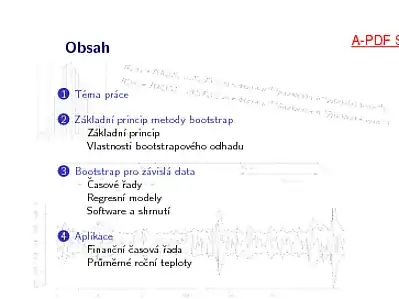
Asked
Active
Viewed 6,583 times
4

Laura
- 1,861
-
What did you see? A background picture? – Marco Daniel Aug 25 '12 at 10:30
-
Could you upload as picture the frame you saw? – Claudio Fiandrino Aug 25 '12 at 10:33
-
You can refer to how can i upload an image to be included in a question or answer?. – Claudio Fiandrino Aug 25 '12 at 11:29
2 Answers
4
You can use the background template; the background is an image that can be included with the usual \includegraphics command; the opacity is controlled by putting the image inside a \node with the help of TikZ; after the ToC, the template is again redefined to suppress the image:
\documentclass{beamer}
\usetheme{Boadilla}
\usepackage{tikz}

\begin{document}

\setbeamertemplate{background}{%
   \tikz\node[opacity=0.3] at (current page.center) {\includegraphics[height=\paperheight]{ctanlion}};}
\begin{frame}
\frametitle{Outline}
\tableofcontents
\end{frame}

\setbeamertemplate{background}{}
\section{Test Section One}
\begin{frame}
Contents of section one
\end{frame}

\section{Test Section Two}
\begin{frame}
Contents of section two
\end{frame}

\section{Test Section Three}
\begin{frame}
Contents of section three
\end{frame}

\end{document}

CTAN lion drawing by Duane Bibby.

Gonzalo Medina
- 505,128
-
ImageMagick's
convertcan help us to convert a PDF file into a PNG image tightly (rather than pressing PRINTSCREEN that sometimes leaves unnecessary borders). Invokeconvert -density <integer value> -alpha <choose: on, off, remove> <input filename>.pdf <output filename>.png. Remarks:-alpha removewill remove the transparency better than-alpha off. Inserting%02din the output filename makes 2-digit counter00, 01, ..., 99attached to the output filename when the PDF contains more than one page. – kiss my armpit Aug 25 '12 at 14:14 -
1@GarbageCollector ah, thank you very much for that. I simply open the document with okular, seclect the desired region and save it as an image. – Gonzalo Medina Aug 25 '12 at 14:18
2

\documentclass{beamer}
\usepackage{filecontents}
\begin{filecontents*}{background.tex}
\documentclass[pstricks,border=0pt]{standalone}
\usepackage{pst-plot}

\begin{document}
\begin{pspicture}(-\psPi,-2)(\psPi,2)
    \psplot[algebraic,plotpoints=1500]{-\psPi}{\psPi}{sin(15*x)*cos(13*x)+cos(5*x)}
\end{pspicture}
\end{document}
\end{filecontents*}

\usepackage{graphicx}
\AtBeginDocument
{
    \immediate\write18{latex background}
    \immediate\write18{dvips background}
    \immediate\write18{ps2pdf background.ps}
}
\begin{document}
\bgroup
\usebackgroundtemplate{\includegraphics[width=\paperwidth]{background}}
\begin{frame}[t]{Table of Contents}
\tableofcontents
\end{frame}
\egroup

\section{Introduction}
\begin{frame}[t]{Who am I?}
I am a Garbage Collector.
\end{frame}

\section{At a glance}
\begin{frame}[t]{What is your hobby?}
Coding!
\end{frame}

\end{document}
Edit: Compile the code with pdflatex --shell-escape filename.

kiss my armpit
- 36,086