Is there a way to set it so that math mode automatically stops italicizing upper-case letters? That is, so that $U$ produces the effect of what is now $\mathrm{U}$? I am using computer modern. I am aware other fonts have this option, but I would like to do it in computer modern. However, it would be great if some solution is font-independent, so that I can switch between them and keep this setting.
Asked
Active
Viewed 877 times
7


-
possible duplicate of Use \mathrm by default – Marco Daniel Aug 26 '12 at 07:45
-
@MarcoDaniel: This asks only for capital letters. – morbusg Aug 26 '12 at 07:57
-
@morbusg: +1 ;-) I misunderstood. – Marco Daniel Aug 26 '12 at 08:25
2 Answers
6
For LaTeX, see Philippe Goutet's answer!
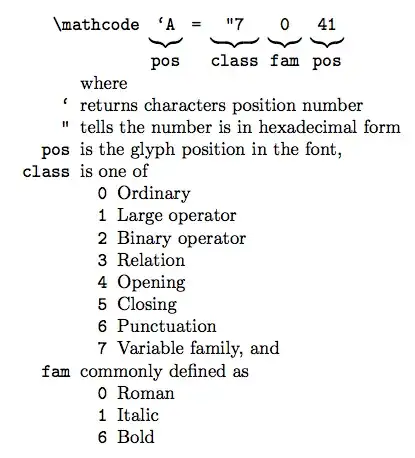
For Plain TeX the definition could be:
\mathcode`A="7041
\mathcode`B="7042
\mathcode`C="7043
% ...
\mathcode`Z="705A
$ ABC\dots Z $
\bye

morbusg
- 25,490
- 4
- 81
- 162
6
If you're using LaTeX and not plain TeX, you should prefer \DeclareMathSymbol to \mathcode. You can even avoid giving explicitly the position of the uppercase letters in the font by using `A instead of the corresponding number 41:
\DeclareMathSymbol{A}{\mathalpha}{operators}{`A}
\DeclareMathSymbol{B}{\mathalpha}{operators}{`B}
\DeclareMathSymbol{C}{\mathalpha}{operators}{`C}
\DeclareMathSymbol{D}{\mathalpha}{operators}{`D}
\DeclareMathSymbol{E}{\mathalpha}{operators}{`E}
\DeclareMathSymbol{F}{\mathalpha}{operators}{`F}
\DeclareMathSymbol{G}{\mathalpha}{operators}{`G}
\DeclareMathSymbol{H}{\mathalpha}{operators}{`H}
\DeclareMathSymbol{I}{\mathalpha}{operators}{`I}
\DeclareMathSymbol{J}{\mathalpha}{operators}{`J}
\DeclareMathSymbol{K}{\mathalpha}{operators}{`K}
\DeclareMathSymbol{L}{\mathalpha}{operators}{`L}
\DeclareMathSymbol{M}{\mathalpha}{operators}{`M}
\DeclareMathSymbol{N}{\mathalpha}{operators}{`N}
\DeclareMathSymbol{O}{\mathalpha}{operators}{`O}
\DeclareMathSymbol{P}{\mathalpha}{operators}{`P}
\DeclareMathSymbol{Q}{\mathalpha}{operators}{`Q}
\DeclareMathSymbol{R}{\mathalpha}{operators}{`R}
\DeclareMathSymbol{S}{\mathalpha}{operators}{`S}
\DeclareMathSymbol{T}{\mathalpha}{operators}{`T}
\DeclareMathSymbol{U}{\mathalpha}{operators}{`U}
\DeclareMathSymbol{V}{\mathalpha}{operators}{`V}
\DeclareMathSymbol{W}{\mathalpha}{operators}{`W}
\DeclareMathSymbol{X}{\mathalpha}{operators}{`X}
\DeclareMathSymbol{Y}{\mathalpha}{operators}{`Y}
\DeclareMathSymbol{Z}{\mathalpha}{operators}{`Z}

Philippe Goutet
- 28,978
-
Seeing how it must eventually expand out to the same thing, I cannot see how it would be preferrable to say the same thing with more letters? – morbusg Aug 26 '12 at 10:04
-
1@morbusg: when you use LaTeX, you should always prefer the LaTeX syntax, even if it's longer to type. There's a reason why the LaTeX team made the
\DeclareMathSymbolcommand instead of directly using\mathcode. – Philippe Goutet Aug 26 '12 at 10:22 -
-
@morbusg: LaTeX does dynamic math font assignation. The fam number might not even exist before the first formula using a given alphabet (e.g.
\mathtt; that's the reason for the convolutions in http://tex.stackexchange.com/a/64257) and can change from one document to another (depending on the loading order of packages). Here, as the roman family number is always0, it's not that important, but if you wanted to use the ttfamily for the math, using plain tex syntax would not be reliable (the number you choose could either already be taken or overwritten later). – Philippe Goutet Aug 26 '12 at 11:06 -
@morbusg: and if you use xelatex,
\fam0can have surprises:\documentclass{article}\usepackage{fontspec}\begin{document}Character 0A is $\mathchar"700A$ in fam0 but $\mathchar"740A$ in fam4.\end{document}– Philippe Goutet Aug 26 '12 at 11:13 -
Hmm, I see, thanks. How do we promote your answer instead of mine? Should I delete my answer? – morbusg Aug 26 '12 at 11:45
-
@morbusg: you've clearly labeled your answer for use with plain tex, so there's no ambiguity. Deleting your answer would be a mistake as it's always informative to know how things work with plain tex. – Philippe Goutet Aug 26 '12 at 12:41