You say that the first works, but it really doesn't.
\documentclass{article}
\usepackage{lipsum} % to provide content
\usepackage{showframe} % to show the page margins
\begin{document}
\begin{minipage}[t]{0.25\textwidth}
\lipsum[1][1-2]
\end{minipage}
\hfill
\begin{minipage}[t]{0.73\textwidth}
\lipsum[2][1-5]
\end{minipage}
\end{document}

You get Overfull \hbox (10.32074pt too wide), because the left minipage is preceded by the standard indent. What you get is a normal interword space between the two minipages and an overfull line. The interword space is due to the endline after the first \end{minipage}. Compare with
\documentclass{article}
\usepackage{lipsum} % to provide content
\usepackage{showframe} % to show the page margins
\begin{document}
\noindent
\begin{minipage}[t]{0.25\textwidth}
\lipsum[1][1-2]
\end{minipage}\hfill
\begin{minipage}[t]{0.73\textwidth}
\lipsum[2][1-5]
\end{minipage}
\end{document}
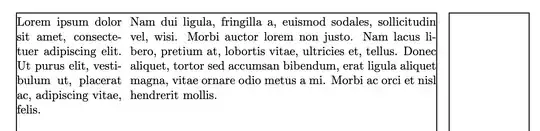
Note that the endline is no more, because \hfill will ignore the following endline.
What happens if you leave a blank line before \hfill? This ends a paragraph consisting of the indentation and the first minipage. Then a new paragraph is started, with the standard indent, the \hfill and the second minipage.
\documentclass{article}
\usepackage{lipsum} % to provide content
\usepackage{showframe} % to show the page margins
\begin{document}
\begin{minipage}[t]{0.25\textwidth}
\lipsum[1][1-2]
\end{minipage}
\hfill
\begin{minipage}[t]{0.73\textwidth}
\lipsum[2][1-5]
\end{minipage}
\end{document}

Never leave a blank line if you don't want to end a paragraph. And keep a careful watch on spaces and endlines.


\mbox{}\hfill ...– Ulrike Fischer Jun 18 '23 at 08:40