Some fine tuning may be required, and you should absolutely read the documentation for nicematrix. But here is an example of the second matrix that you posted.
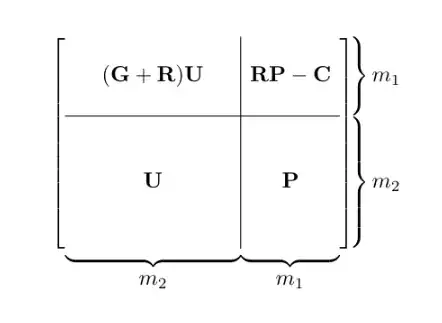
\documentclass{article}
\usepackage{amsmath,nicematrix}
\begin{document}
\[
        \begin{bNiceArray}[last-col,margin]{w{c}{7em}|w{c}{3.5em}}
                \\
                (\mathbf{G}+\mathbf{R})\mathbf{U} & \mathbf{R}\mathbf{P}-\mathbf{C}  & \hspace*{8pt} m_1 \\
                \\
                \hline
                \Block{5-1}{\mathbf{U}} \\
                \\
                                                  & \mathbf{P} & \hspace*{8pt} m_2\\
                                                  \\
                &
                \CodeAfter
                \UnderBrace[yshift=5pt]{1-1}{8-1}{m_2}
                \UnderBrace[yshift=5pt]{1-2}{8-2}{m_1}
                \SubMatrix.{1-1}{3-2}\}[right-xshift=8pt]
                \SubMatrix.{4-1}{8-2}\}[right-xshift=8pt]
        \end{bNiceArray}
\]
\end{document}
Quick explanations:
bNiceArray specifies that you want to put it in brackets. using the ...Array version as opposed to the ...Matrix version gives you more control on the column specifications (which we use).last-col allows you to add one final column outside the brackets. (Where we put the m_1 and m_2.)margin puts a bit of margin, otherwise the \hline runs up against the brackets.- The column specifier
w{c}{7em} puts in a fixed width column with width 7em and contents centered.
- You can alternatively use some empty columns to get the horizontal spacing; I choose this to require less typing/counting.
- Note that the last column is not included in the column specification.
- Blank rows are included for vertical spacing.
- Extra spaces are inserted ahead of
m_1 and m_2 to accommodate the braces (to be put in later in the \SubMatrix block).
\CodeAfter allows you to mark up the matrix additionally.
- Use
\SubMatrix to put extra delimters, such as vertical braces (read the documentation for syntax); the extra xshift is to push the braces beyond the brackets; this is why we have to add space in front of the m_1 and m_2.
- Use
\UnderBrace to put horizontal braces across columns. Read the documentation for syntax. I put in an extra yshift to make it more closely resemble the spacing you have in your question.


nicematrix. https://ctan.org/pkg/nicematrix?lang=en – Willie Wong Jul 07 '23 at 14:35