I want to write MATLAB code in a sentence.
I installed package mcode, no problem if I want to display the code by inserting the code in environment \begin{verbatim} and \end{verbatim}.
How could I possibly insert the MATLAB code in a sentence?
I want to write MATLAB code in a sentence.
I installed package mcode, no problem if I want to display the code by inserting the code in environment \begin{verbatim} and \end{verbatim}.
How could I possibly insert the MATLAB code in a sentence?


The mcode package provides \mcode{<code>} for inline MATLAB code. The following example is taken almost verbatim from the demo documentation:

\documentclass{article}
% http://www.mathworks.com/matlabcentral/fileexchange/8015-m-code-latex-package
\usepackage{mcode}
\begin{document}
This inline demo \mcode{for i=1:3, disp('cool'); end;} uses \verb|\mcode{}|.
\end{document}
Fundamentally, mcode uses listings but sets all the appropriate keys so you don't have to worry about setting it yourself.
For full-width listings, use the regular lstlisting environment rather than verbatim, since the formatting will otherwise be different (again, taken verbatim from the documentation demo):
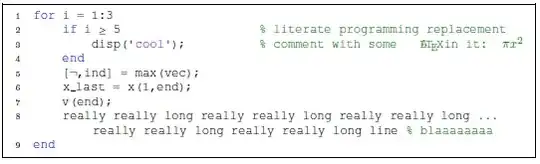
\documentclass{article}
% http://www.mathworks.com/matlabcentral/fileexchange/8015-m-code-latex-package
\usepackage[framed,numbered,autolinebreaks,useliterate]{mcode}
\begin{document}
\begin{lstlisting}
for i = 1:3
    if i >= 5                   % literate programming replacement
        disp('cool');          % comment with some §\mcommentfont\LaTeX in it: $\mcommentfont\pi x^2$§
    end
    [~,ind] = max(vec);
    x_last = x(1,end);
    v(end);
    really really long really really long really really long really really long really really long line % blaaaaaaaa
end
\end{lstlisting}
\end{document}
listings also provide a language=Matlab setting, but the formatting differs from that provided by mcode.
matlab-prettifierpackage; see this answer. – jub0bs Apr 28 '14 at 15:35