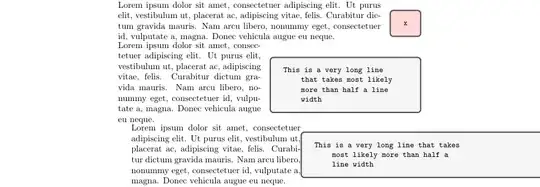
Your definition wrapping varwidth around tcblisting doesn't really work to keep the maximum width at .5 linewidth (it works for the text, but not for the drawn box -- I fixed that by using the width-key and dropping hbox, but only if the natural width exceeds the specified horizontal maximum space, so the tcblisting might be used twice, once with hbox once with width).
Other than that the following does what you want, using enverb (some unpublished code I wrote, mostly for the documentation of my expkv-bundle). It assumes that the left hand side never needs verbatim content, and hence grabs it as a normal mandatory argument.
The code features automatic indentation detection based on the indentation of the line with the \end-statement and allows to remove additional symbols (spaces are counted here, but the code is "stupid" and would remove any character, and currently throws a low level error if there is a line shorter than what should be removed). The default settings remove two additional spaces (because that's the amount I use to indent the contents of an environment). It can also add contents at the start and end of each line with the bol and eol keys.
Also \enverb features a mechanism to read an optional argument setting its settings locally. I ripped out a few other features that aren't necessary for your application (or were related to my specific output needs). Instead I added two keys to control your output, varwidth sets the maximum width of the nested varwidth environment, and tcbopts sets the options forwarded to tcblisting (and if you use += it'll add to the existing options).
\documentclass{article}
\usepackage{lipsum}
\usepackage[listings]{tcolorbox}
\makeatletter
\usepackage{expkv-def}
\ExplSyntaxOn
\cs_new_eq:NN \enverb@count \tl_count:n
\ExplSyntaxOff
%% key setup
\ekvdefinekeys{enverb}
{
% if true ignore the number of spaces preceding the \end-statement
boolTF auto-ignore = \enverb@ifautoignore
,initial auto-ignore
% number of additional characters to ignore for nested indentation
,eint more-ignore = \enverb@moreignore
,initial more-ignore = 2
% if used ignore exactly this many characters (overwrites auto-ignore)
,protected code ignore = \let\enverb@ifautoignore@secondoftwo
,also eint ignore = \enverb@ignore
% contents to place at the start of every line
,long store bol = \enverb@bol@content
% contents to place at the end of every line
,long store eol = \enverb@eol@content
,e: initial eol = \csname char_generate:nn\endcsname{13}{12}
%% Additional keys for your environment
% maximum varwidth width
,long store varwidth = \mbAeVarwidthwidth
,initial varwidth = .5\linewidth
% tcb-options
,long store tcbopts = \mbAeTcbopts
,initial tcbopts = {listing only, box align=center}
% define tcbopts+={<keys>} to add to the tcbopts instead of resetting them
,meta tcbopts += {o: tcbopts = {\mbAeTcbopts, #1}}
,meta tcbopts+ = {o: tcbopts = {\mbAeTcbopts, #1}}
}
\protected\long\ekvsetdef\enverbsetup{enverb}
%% auxiliary error function
\newcommand\enverb@error[1]
{%
\GenericError
{(enverb)@spaces@spaces@spaces@spaces}%
{Environment enverb error: #1}%
{Just use it correctly!}%
{Read the sources.}%
}
%% setup for weird category code regime
\begingroup
\lccode\~=^^M
\catcode\:=13 \lccode:=\ % <- space \catcode;=13
\lccode\;=^^I % <- tab
\lowercase{\endgroup
%% code for spaces and CR
\def\enverb@body@space{}%
\def\enverb@body@tab{}%
\def\enverb@body@newline#1~%
{\enverb@ifnotend{#1}{\enverb@bol\unexpanded{#1}\enverb@eol~}}%
%% activate the category code regime of the body
\protected\def\enverb@body@setup
{%
\let\enverbCollectedBody@empty
\let\do@makeother\dospecials
\catcode\^^M=13 \let~\enverb@body@newline \catcode\ =13 \let:\enverb@body@space
\catcode\^^I=13 \let;\enverb@body@tab \let\enverb@bol\relax \let\enverb@eol\relax } %% check for optional argument \newcommand\enverb@search@oarg@a {% \ifx:\next \ifenverb@firsteol \else \enverb@body@add{:}% \fi \let\next\enverb@search@oarg@b \else \ifx~\next \ifenverb@firsteol \enverb@firsteolfalse \else \enverb@body@add{~}% \fi \let\next\enverb@search@oarg@b \else \ifx[\next\@gobble]% \let\next\enverb@oarg \else \ifenverb@firsteol \let\next\enverb@body@after@begin \else \let\next\enverb@body \fi \fi \fi \fi \next } %% start body collection \newcommand\enverb@body {\edef\enverbCollectedBody{\iffalse}\fi\expandafter~\enverbCollectedBody} %% check the line after an oarg \def\enverb@body@after@oarg#1~% {\enverb@ensure@blank{#1}{closing bracket}\enverb@body} %% check the line after the \begin statement \def\enverb@body@after@begin#1~% {\enverb@ensure@blank{#1}{\string\begin}\enverb@body} } %% quick check for empty line \newcommand\enverb@ensure@blank[2] {% \expandafter\enverb@ifempty\expanded{{#1}}{}% {% \expanded{% \noexpand\enverb@error {% Line after #2 not empty.\noexpand\MessageBreak Contains: \detokenize\expandafter{\romannumeral^^@#1}%
}%
}%
}%
}
%% quick check for empty argument
\newcommand\enverb@ifempty[1]
{%
\enverb@ifempty@\enverb@ifempty@A#1\enverb@ifempty@B.\enverb@ifempty@true
\enverb@ifempty@A\enverb@ifempty@B
}
\def\enverb@ifempty@#1\enverb@ifempty@A\enverb@ifempty@B#2#3{#3}
\def\enverb@ifempty@true\enverb@ifempty@A\enverb@ifempty@B#1#2{#1}
\newcommand\enverb@gadd[2]{\xdef#1{\unexpanded\expandafter{#1#2}}}
\newcommand\enverb@body@add[1]
{%
\edef\enverbCollectedBody
{\unexpanded\expandafter{\enverbCollectedBody#1}}%
}
% start of environment enverb' \newcommand\enverb {% \begingroup \def\tmp{enverb}% \expandafter \endgroup \expandafter\enverb@ifnotend@setup@perhaps\expanded {{\string{\@currenvir\string}}}% \begingroup \enverb@body@setup \enverb@firsteoltrue \let\enverb@collected@oarg\@empty \enverb@search@oarg } \newif\ifenverb@firsteol \newcommand\enverb@search@oarg{\futurelet\next\enverb@search@oarg@a} \newcommand\enverb@search@oarg@b{\expandafter\enverb@search@oarg\@gobble} \newcommand\enverb@oarg{\endgroup\enverb@oarg@} \NewDocumentCommand\enverb@oarg@{O{}} {% \edef\enverb@collected@oarg{\unexpanded{#1}}% \begingroup \enverb@body@setup \enverb@body@after@oarg } \def\enverb@ifnotend#1% {% \def\enverb@ifnotend##1% {% \enverb@ifnotend@ ##1\enverb@mark\enverb@ifnotend@maybe #1\enverb@mark\@thirdofthree \enverb@stop }% \def\enverb@ifnotend@##1#1##2\enverb@mark##3##4\enverb@stop{##3{##1}{##2}}% } \expandafter\enverb@ifnotend\expanded{{\expandafter\@gobble\string\\end}} \newcommand\enverb@ifnotend@maybe[2] {\expandafter\enverb@ifnotend@perhaps\expandafter{\romannumeral^^@#2}{#1}}
\newcommand\enverb@ifnotend@setup@perhaps[1]
{%
\def\enverb@ifnotend@perhaps##1%
{%
\enverb@ifnotend@perhaps@\enverb@mark##1\enverb@mark\enverb@ifnotend@end
\enverb@mark#1\enverb@mark@thirdofthree
\enverb@stop
}%
\def\enverb@ifnotend@perhaps@
##1\enverb@mark#1##2\enverb@mark##3##4\enverb@stop
{##3{##2}}%
}
\providecommand@thirdofthree[3]{#3}
\newcommand\enverb@ifnotend@end[3]
{%
\iffalse{\fi}%
\enverb@ensure@blank{#1}{\string\end}%
\expanded
{%
\endgroup
\enverbsetup
{\unexpanded\expandafter{\enverb@collected@oarg}}%
\noexpand\enverb@final
{\unexpanded\expandafter{\enverbCollectedBody}}%
}%
{#2}%
\expandafter\end\expandafter{@currenvir}%
}
\long\def\enverb@final#1#2%
{%
\enverb@ifautoignore
{\enverb@setup@ignore{\enverb@count{#2}+\enverb@moreignore}}%
{\enverb@setup@ignore\enverb@ignore}%
\edef\enverb@line##1\enverb@eol
{%
\noexpand\detokenize{##1}%
\noexpand\unexpanded{\unexpanded\expandafter{\enverb@eol@content}}%
}%
\edef\enverbCollectedBody{#1}%
}
\providecommand@firstofnine[9]{#1}
\newcommand\enverb@setup@ignore[1]
{\expandafter\enverb@setup@ignore@\the\numexpr#1\relax;\enverb@line}
\def\enverb@setup@ignore@#1;#2%
{%
\ifnum#1>9
\expandafter@firstoftwo
\else
\expandafter@secondoftwo
\fi
{\expandafter\enverb@setup@ignore@\the\numexpr#1-8;{@firstofnine{#2}}}%
{%
\let\enverb@bol@gobble@empty % just so that renewcommand doesn't go nuts
\expanded
{%
\unexpanded{\renewcommand\enverb@bol@gobble}\ifnum#1>\z@[#1]\fi
{%
\noexpand\unexpanded
{\unexpanded\expandafter{\enverb@bol@content}}%
\unexpanded{#2}%
}%
\unexpanded{\def\enverb@bol##1\enverb@eol}%
{%
\unexpanded{\expandafter\enverb@ifempty\expanded}{{##1}}%
{\noexpand\enverb@line}%
{\noexpand\enverb@bol@gobble}%
##1\unexpanded{\enverb@eol}%
}%
}%
}%
}
\let\endenverb@empty
\makeatother
\newcommand\mbAeLeftHandSide{}
\newsavebox\mbAeRightHandSide
\newcommand\mbAeRightHandSideListing[1]
{%
\sbox\mbAeRightHandSide
{%
% \csname tl_analysis_show:N\endcsname\mbAeRightHandSideContents
\scantokens\expanded
{{%
\noexpand\begin{tcblisting}%
{#1,\unexpanded\expandafter{\mbAeTcbopts}}%
\mbAeRightHandSideContents
\noexpand\end{tcblisting}\csname char_generate:nn\endcsname{13}{12}%
\noexpand\noexpand\noexpand\noexpand
}}%
}%
}
\expanded{\unexpanded{\def\mbAeSplitSides#1}\string\BREAK}#2\stop
{%
\def\mbAeLeftHandSideContents {#1}%
\def\mbAeRightHandSideContents{#2}%
}
\newenvironment{mbAe}
{\enverb}
{%
\expandafter\mbAeSplitSides\enverbCollectedBody\stop
\mbAeRightHandSideListing{hbox}% first pass, try hbox
\ifdim\wd\mbAeRightHandSide>\mbAeVarwidthwidth\relax % if too wide use width
\mbAeRightHandSideListing{width=\mbAeVarwidthwidth}%
\fi
\par\noindent
\begin{minipage}[c]{\dimexpr\linewidth-\wd\mbAeRightHandSide-1em\relax}
\scantokens\expanded{{\mbAeLeftHandSideContents\noexpand\noexpand\noexpand\noexpand}}%
\end{minipage}%
\hfill
\usebox\mbAeRightHandSide
\par
}
\usepackage{varwidth} % only needed to show your approach
\begin{document}
\begin{mbAe}[tcbopts+={colback=red!15}]
\lipsum[1][1-5]
\BREAK
x
\end{mbAe}
\begin{mbAe}
\lipsum[1][1-5]
\BREAK
This is a very long line that takes most likely more than half a line width
\end{mbAe}
\begin{minipage}{\dimexpr\linewidth-5cm-1em\relax}
\lipsum[1][1-5]
\end{minipage}\hfill%
\begin{varwidth}{.5\linewidth}
\begin{tcblisting}{hbox,listing only}
This is a very long line that takes most likely more than half a line width
\end{tcblisting}
\end{varwidth}
\end{document}


tcblisting?) or like in your MWE not related at all? You'd need to evaluate thevarwidthbefore yourminipagein order to access its width (and if you still need the outcome in the order you show, you'll need to change your process either to a two-pass solution or to verbatimly grab the contents, process them, store the results in a box, insert yourminipageand then the contents of your box storing thevarwidth). – Skillmon Sep 11 '23 at 09:04\dimexprto your calculated minipage ;width. – John Kormylo Sep 11 '23 at 15:08