7

Why does true type fonts consolidate spaces and is there any way to stop this? I need easily add white space between words equal to the width of a space(which for monospace should be the same for all letters).

\documentclass{article}
\usepackage[T1]{fontenc}
\usepackage{inconsolata}
\begin{document}
\catcode`_=11
\par\texttt{this is monospaced text    Where  are  the  spaces  ?    !!!}%
\par\texttt{this_is_monospaced_text____Where__are__the__spaces__?____!!!}
\end{document}​

update:

Using \obeyspaces or \verb works BUT something seems to be ruining the spacing:

\documentclass{article}
\usepackage[T1]{fontenc}
\usepackage{tikz}
\usepackage{fancyvrb}
\usetikzlibrary{matrix}

\begin{document}
\begin{tikzpicture}%
\matrix (m) [matrix of nodes, every node/.style={font=\ttfamily},%
    row 1/.style={text width=7em, align=left,font=\ttfamily},
    row 2/.style={text width=7em, align=left,font=\ttfamily},]
    {
        \verb+A  B  C  D +\\
        \verb+Ac Ad Be Cf+\\
    };
\end{tikzpicture}
\end{document}​

The output looks like the monspace font is not used.


update2:

Weird behavior: extra spaces between ? and !!!! Breaks the tikz matrix for some reason(remove tikzpicture to get it to work):

\documentclass{article}
\usepackage[T1]{fontenc}
\usepackage{tikz}
\usepackage{fancyvrb}
\usetikzlibrary{matrix}

\begin{document}


\catcode`_=11
\par\obeyspaces{\texttt{this is monospaced text    Where  are  the  spaces  ?    !!!}}%
\par\texttt{this_is_monospaced_text____Where__are__the__spaces__?____!!!}
\catcode`_=8

\begin{tikzpicture}%
\matrix (m) [matrix of nodes, every node/.style={font=\ttfamily},%
    row 1/.style={text width=7em, align=left,font=\ttfamily},
    row 2/.style={text width=7em, align=left,font=\ttfamily},]
    {
        \verb+A  B  C  D +\\
        \verb+Ac Ad Be Cf+\\
    };
\end{tikzpicture}
\end{document}​
Moriambar
  • 11,466
  • \obeyspaces might be what you are looking for. or more simply \verb|.. ...| – David Carlisle Sep 03 '12 at 23:12
  • @DavidCarlisle Yep, but for some reason they don't seem to work well and causes some problems. See my second update. – AbstractDissonance Sep 04 '12 at 00:04
  • 3
    any command requiring catcode changes (\obeyspaces, \verb, ...) does not work in the argument to another command. But normal catcode spaces are compressed by TeX before the macro layer sees the input so you have a choice: use catcode changes or use different markup such as \ for the spaces. – David Carlisle Sep 04 '12 at 09:29

4 Answers4

3

\texttt just sets the typeface. It doesn't change how TeX sees spaces. If you want that, then you need to use some kind of verbatim macro or environment. Or fiddle with the catcode of space (NOT RECOMMENDED!)

kahen
  • 2,165
  • verbatim doesn't work because it seems to create a new indented paragraph. (I'm using this in a tikz matrix). Changing the catcode for space causes the space to take on a weird looking character. Verbatim does keep the extra spaces though but basically adds some vertical space to the matrix cell. – AbstractDissonance Sep 03 '12 at 23:03
  • @AbstractDissonance Please, add to your question the setting where you need that spaces are obeyed. – egreg Sep 03 '12 at 23:29
3

You can use the package listings or the environment verbatim. An example you will see in the following MWE. Could it be that a table would better fit your issue?

%http://tex.stackexchange.com/questions/70007/monospaced-fonts-not-respecting-spaces
\documentclass{article}
\usepackage[T1]{fontenc}
\usepackage{listings}
\begin{document}
\par\texttt{this is monospaced text    Where  is  the  spaces  ?    !!!}

\begin{verbatim}
this is monospaced text    Where  is  the  spaces  ?    !!!
\end{verbatim}

\begin{lstlisting}[basicstyle=\ttfamily]
this is monospaced text    Where  is  the  spaces  ?    !!!
\end{lstlisting}

\begin{lstlisting}[basicstyle=\ttfamily,showspaces=true]
this is monospaced text    Where  is  the  spaces  ?    !!!
\end{lstlisting}

\end{document}​
Mensch
  • 65,388
  • lstlisting seems to not work in my code(it's being used in a tikz matrix node). Verbatim seems to create a new \par that causes extra space in my matrix node. I sort of need an 'inline' verbatim. – AbstractDissonance Sep 03 '12 at 23:10
3

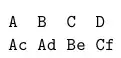
Another approach for short verbatim text is to use the \Verb command from the fancyvrb package; I added the obeytabs option and used tabsize to recover the alignment inside the \matrix (the characters are spaced using tabs):

Apparently, when I copy the code from my editor to this site the tabs get lost. You need to use A(tab)B(tab)C(tab)D and Ac(tab)Ad(tab)Be(tab)Cf in the code below, where (tab) stands for a tab in your editor:

\documentclass{article}
\usepackage{fancyvrb}
\usepackage{tikz}
\usetikzlibrary{matrix}

\fvset{obeytabs}

\begin{document}

\begin{tikzpicture}%
\matrix (m) [matrix of nodes, every node/.style={font=\ttfamily},%
    row 1/.style={text width=7em, align=left},
    row 2/.style={text width=7em, align=left}]
    {
\Verb[tabsize=2]+A  B   C   D+\\
\Verb[tabsize=1]+Ac Ad  Be  Cf+\\
    };
\end{tikzpicture}

\end{document}​

enter image description here

Using the \lstinline command from the listings package, there's no need to use tabs; simple spaces will behave as expected:

\documentclass{article}
\usepackage{listings}
\usepackage{tikz}
\usetikzlibrary{matrix}

\begin{document}

\begin{tikzpicture}%
\matrix (m) [matrix of nodes, every node/.style={font=\ttfamily},%
    row 1/.style={text width=7em, align=left},
    row 2/.style={text width=7em, align=left}]
    {
\lstinline+A  B  C  D+\\
\lstinline+Ac Ad Be Cf+\\
    };
\end{tikzpicture}

\end{document}

enter image description here

Moriambar
  • 11,466
Gonzalo Medina
  • 505,128
1

Why make things complicated when there's a much simpler solution/hack to this problem? E.g. just replace all the extra intended spaces (two in this example, so "XX" are the two placeholder characters) by

\textcolor{white}{XX}

where "white" should be the color of the background. And you can apply a search and replace operation to do that quickly multiple times.

Petoetje59
  • 1,051
  • Because if you then copy-paste the text you'll get a bunch of XX. It'd be rather easy to devise a macro \GiveMeSpaces{<number>} to print <number> spaces without having to know the background color. Besides, if you need, for instance, to disable color features for a black-and-white print you'll have a nasty surprise. – Phelype Oleinik Feb 13 '19 at 16:27
  • The simplest of all solutions is to replace the number of wanted spaces by ~ : https://tex.stackexchange.com/questions/88845/two-consecutive-spaces – Petoetje59 Feb 15 '19 at 12:23