Unfortunately the @lziminza's suggestion can fail:
\documentclass[twoside]{article}
\usepackage{ifoddpage}
\newcommand{\testmacro}{%
\checkoddpage
\ifoddpage
    \begin{tabular}{lr}Inner text & Outer text\end{tabular}
\else
    \begin{tabular}{lr}Outer text & Inner text\end{tabular}
\fi
}
\usepackage{blindtext}
\begin{document}
\blindtext[2]
\vskip 4\baselineskip
\blindtext[2]
\testmacro
\blindtext
\testmacro
\end{document}
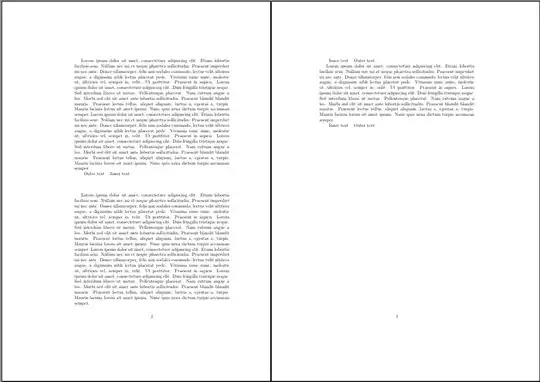
results in:

on second page after two or more LaTeX runs.
To avoid this issue, you should at least prohibit page breaks between the \checkoddpage and \ifoddpage. I recommend to also explicitly allow page breaks before the \checkoddpage:
\documentclass[twoside]{article}
\usepackage{ifoddpage}
\newcommand{\testmacro}{%
% \par % could also be a good idea
  \pagebreak[1]
  \checkoddpage\nobreak
  \ifoddpage
    \begin{tabular}{lr}Inner text & Outer text\end{tabular}
  \else
    \begin{tabular}{lr}Outer text & Inner text\end{tabular}
  \fi
}
\usepackage{blindtext}
\begin{document}
\blindtext[2]
\vskip 4\baselineskip
\blindtext[2]
\testmacro
\blindtext
\testmacro
\end{document}
results in:

on second page.
Another suggestion would be to set a test label inside the tabular and do the test outside:
\documentclass[twoside]{article}
\usepackage{refcount}
\newcounter{testpage}
\newcommand{\testmacro}{%
  \ifodd \getpagerefnumber{testpage:\thetestpage}
    \begin{tabular}{lr}\label{testpage:\thetestpage}\stepcounter{testpage}Inner text & Outer text\end{tabular}
  \else
    \begin{tabular}{lr}\label{testpage:\thetestpage}\stepcounter{testpage}Outer text & Inner text\end{tabular}
  \fi
}
\usepackage{blindtext}
\begin{document}
\blindtext[2]
\testmacro
\vskip 3\baselineskip
\blindtext[2]
\testmacro
\blindtext
\testmacro
\end{document}
also works:


\pagerefandifoddpageget around this by placing a reference, writing the page of the reference to the aux file, and then reading the aux file to figure out the page that was used. But using the aux means that you have to compile again after the table has been placed on its eventual page. – Teepeemm Nov 14 '23 at 16:34