3

I am trying to pass a \def coordinate to a macro and got an error. Below is the code. The macro with direct passing works, but the two commented out lines don't.

\documentclass[border=1cm]{standalone}
\usepackage{tikz}
\usetikzlibrary{calc}   % required for \centerarc
\begin{document}
    \begin{tikzpicture}
        \def\centerarc[#1](#2)(#3:#4:#5){ \draw[#1] ($(#2)+({#5*cos(#3)},{#5*sin(#3)})$) arc (#3:#4:#5); }
        \def \cpt {(1,2)};
        \draw (0,0) node [right] {cpt position coordinate = \cpt } ;
        \centerarc[ultra thick, cyan](1,2)(-30:30:2);       
        %\centerarc[ultra thick, purple] \cpt (-30:30:1);
        \def \cpt2 {(0,3)++(180-30:3)};
        %\centerarc[ultra thick, purple] \cpt2 (-30:30:3);
    \end{tikzpicture}
\end{document}

I noticed that in the pgfmanual, 2.15 Specifying Coordinates, it used \def this way:

   \def\rectanglepath{-- ++(1cm,0cm) -- ++(0cm,1cm) -- ++(-1cm,0cm) -- cycle}
    \draw (0,0) \rectanglepath; 

Don't know why mine doesn't work?

cfr
  • 198,882

4 Answers4

4

There are multiple issues here. The most complex involve expansion, as indicated in the comments. Let's start with the simplest.

First, you have a sprinkling of excess semicolons. These don't cause errors, but you do get warnings about the character not existing in null font. This is pgf/TikZ's way of pointing out you have garbage stuff which you might have thought was real content.

  • \def<spec>{<definition>} does not need to be followed by a semicolon.
  • If you define a semicolon into a macro, you need to take this into account when using it. So either delete the final semicolon from the definition of \centerarc or don't follow it by a semicolon when you use it.

For example,

  \def \cpt{(1,2)}
  \draw (0,0) node [right] {cpt position coordinate = \cpt } ;
  \centerarc[ultra thick, cyan](1,2)(-30:30:2)      

will avoid the warnings.

Second, ((0,3)++(180-30:3)) is not a valid coordinate. This will give an error regardless of whether \def is involved. I'm not certain what you meant here, but I'm guessing ($(0,3)+(180-30:3)$) and have amended the definition on that basis.

Third, you can't use a numeral in a macro name. Only letters are allowed.

      \def \cpt2 {($(0,3)+(180-30:3)$)}

[Thanks to Heiko Oberdiek for correcting me here.] This redefines the macro \cpt so it expects to be followed by 2 and then expands to {($(0,3)+(180-30:3)$)}. So trying to use \cpt2 without a following space will cause an error.

There are special ways around this restriction, but there's no need of them here. We can just use a different name. For example,

      \def \cpttwo {($(0,3)+(180-30:3)$)}

Fourth, you have serious expansion issues here. When you put \cpt into a node, all is well. When you try to substitute it for a literal coordinate, things go haywire.

\centerarc[ultra thick, purple]\cpt(-30:30:1)

TeX reads tokens one-by-one from a stream, which is like a long line of tokens. \centerarc is the first token here. That's a macro, so TeX looks up its definition and finds that it absorbs [#1](#2)(#3:#4:#5) so it reads on to scoop up #1, #2, #3, #4 and #5 in order to slot them into the appropriate places in the definition. That means TeX expects to see a [ first. No problem there. It knows #1 is everything until the next ]. So #1 is ultra thick, purple and that can be slotted into \centerarc's definition. Next it expects ( but instead it finds \cpt which doesn't match the template it has for \centerarc. So you get an error. To correct this, you need \cpt to be expanded before [ultra thick, purple]. You could do that with a whole bunch of \expand afters, but you'd need to jump every token separately i.e. the [, the u, the l and so on. That's a lot of typing and a recipe for inscrutable code.

  \def\myopts{[ultra thick, purple]}

This turns that group of tokens into a single token \myopts, making it easier to skip. So, we want

  \expandafter\myopts\cpt

But if we just do that, it still won't work because \centerarc will now see \expandafter rather than [ as the first token. So we need to expand \centerarc after expanding \expandafter.

\expandafter\centerarc\expandafter\myopts\cpt(-30:30:1)

This gets \cpt to expand first, so TeX will see

\centerarc\myopts(1,2){-30:30:1}

Now the problem is \centerarc expects [ to begin with and not \myopts. So we need another \expandafter.

\expandafter\expandafter\centerarc\expandafter\myopts\cpt(-30:30:1)

But that's not quite good enough, because \expandafter\expandafter\centerarc expands \centerarc first, which was where all the problems started. Hence, we need a third \expandafter at the beginning for a total of five.

\expandafter\expandafter\expandafter\centerarc\expandafter\myopts\cpt(-30:30:1)

Similarly, for the case with \cpttwo,

\expandafter\expandafter\expandafter\centerarc\expandafter\myopts\cpttwo(-30:30:3)

I've referenced an answer below which explains the same idea in a simpler case, so you might want to read that if the multiplicative effects of \expandafter above seem unduly alarming. (I did try doing it token-by-token to show what \myopts avoids, but I got entangled and gave up.)

Complete code:

\documentclass[border=1cm]{standalone}
\usepackage{tikz}
\usetikzlibrary{calc}   % required for \centerarc
\begin{document}
\begin{tikzpicture}
  \def\centerarc[#1](#2)(#3:#4:#5){\draw[#1] ($(#2)+({#5*cos(#3)},{#5*sin(#3)})$) arc (#3:#4:#5); }
  \def \cpt{(1,2)}
  \draw (0,0) node [right] {cpt position coordinate = \cpt } ;
  \centerarc[ultra thick, cyan](1,2)(-30:30:2)   
  % ateb: https://tex.stackexchange.com/a/701593/   
  % i gwestiwn Leon Chang: https://tex.stackexchange.com/q/701586/
  % refs: Caramdir https://tex.stackexchange.com/a/18316/
  \def\myopts{[ultra thick, purple]}
  \expandafter\expandafter\expandafter\centerarc\expandafter\myopts\cpt(-30:30:1)
  \def \cpttwo {($(0,3)+(180-30:3)$)}
  \expandafter\expandafter\expandafter\centerarc\expandafter\myopts\cpttwo(-30:30:3)
\end{tikzpicture}
\end{document}
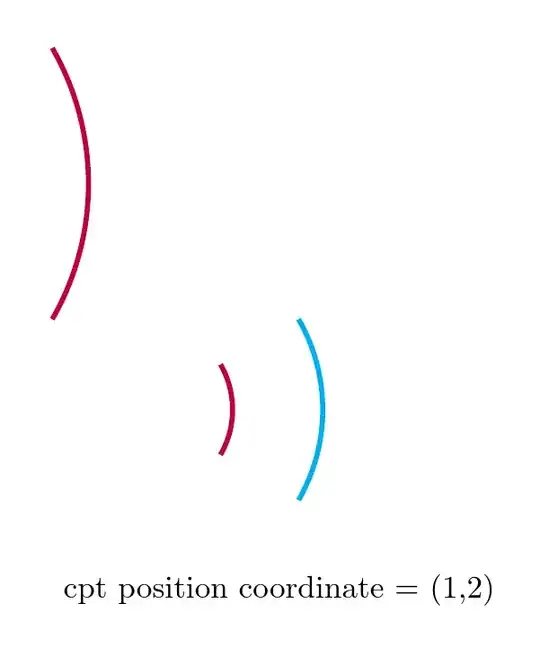
three arcs and a node

Needless to say, I don't recommend implementing this!

cfr
  • 198,882
  • 1
    \def \cpt2 {($(0,3)+(180-30:3)$)} defines macro \cp with 2␣ (digit 2, followed by space) as parameter text. Then, TeX requires that the parameter text follows \cp and \cp expands to the definition text ($(0,3)+(180-30:3)$). If the parameter text is not given, TeX complains with an error message. – Heiko Oberdiek Nov 18 '23 at 09:27
  • @HeikoOberdiek I knew I shouldn't answer this. – cfr Nov 18 '23 at 17:48
  • @cfr Thank you for the insights. To a user, macros are more restrictive and error-prone than functions. – Leon Chang Nov 19 '23 at 07:10
  • @LeonChan Are you talking about expl3? – cfr Nov 19 '23 at 07:24
  • @cfr Any document on expl3 or \expandafter is appreciated. I couldn't even find doc. on macros \def{}. – Leon Chang Nov 19 '23 at 18:32
  • @LeonChang So what did you mean by 'function'? I would not necessarily tangle with expl3 at this point, but texdoc expl3 and texdoc interface3 are probably the key references (but not really aimed at beginners). Overleaf has some quite good stuff on TeX's handling of tokens and such. – cfr Nov 19 '23 at 19:09
  • @HeikoOberdiek It does not define macro \cp. It defines macro \cpt. ;-) – Ulrich Diez Nov 19 '23 at 23:48
  • @cfr By function, I mean a C or Python function. But looks like I can only find tikzmath function which can only take numbers. So I would say macro is better than a function in this respect. – Leon Chang Dec 17 '23 at 06:34
  • @LeonChang expl3 functions can absorb arguments of all sorts. In expl3 functions are syntactically distinguished from variables, whereas at the TeX level, both would be macros. This has nothing to do with TikZ. expl3 is now part of core LaTeX. So that's why I asked if you meant expl3 when you mentioned functions. – cfr Dec 17 '23 at 07:00
2

With a command \path #2 coordinate (ZZ); We could do better with the ZZ point name to make sure it is not used elsewhere in your code.

EDIT: I forgot to change ctp2 to cpttwo, (the cfr's answer) and the ++

The code

\documentclass[border=1cm]{standalone}
\usepackage{tikz}
\usetikzlibrary{calc}   % required for \centerarc

\NewDocumentCommand{\mycenterarc}{O{ultra thick, purple} m m m m} { \path #2 coordinate (ZZ); \draw[#1] ($(ZZ)+({#5cos(#3)},{#5sin(#3)})$) arc (#3:#4:#5); }

\begin{document} \begin{tikzpicture} \def \cpt {(1,2)} \draw (0,0) node [right] {cpt position coordinate = \cpt } ; \mycenterarc[ultra thick, cyan]{\cpt}{-30}{30}{2} \mycenterarc{\cpt}{-30}{30}{1} \def \cpttwo {(0,3)+(180-30:3)} \mycenterarc{\cpttwo}{-30}{30}{1} \end{tikzpicture} \end{document}

enter image description here

pascal974
  • 4,652
  • Can you explain the code \NewDocumentCommand{\mycenterarc}{O{ultra thick, purple} m m m m}? Is there a manual for \NewDocumentCommand? – Leon Chang Nov 19 '23 at 07:22
  • 1
    You can read https://www.latex-project.org/publications/2021-JAW-TUB-tb130wright-newdoccmd.pdf A tutorial expl3 https://www.alanshawn.com/latex3-tutorial/ A documention 'interface3` – pascal974 Nov 19 '23 at 10:41
  • and xparse documentation – pascal974 Nov 28 '23 at 14:37
  • xparse is deprecated. These commands are now documented in the core LaTeX docs and interface3 isn't helpful for \NewDocumentCommand. @LeonChang is probably looking for usrguide.pdf and, possibly, clsguide.pdf. – cfr Dec 17 '23 at 07:02
1

Within tikzpicture-environments, too, spaces and ends of lines of .tex-input usually get tokenized as space tokens when TeX's reading apparatus is in state M. This may affect macro-argument-grabbing with macros like \centerarc that process delimited macro arguments.
Within tikzpicture-environments stuff not yielding visible output is due to some null-font being in effect and due to other adjustments not related to tokenization and not related to macro-argument-grabbing during the stage of expansion but related to typesetting.

Expansion is suppressed when TeX is gathering tokens for macro arguments and hereby probably is scanning for argument delimiters.
E.g., if you define
\def\foo#1/Delimiter{Argument: #1} and
\def\bar{Tokens/Delimiter}, then
\foo\bar won't work out as in the course of gathering the tokens belonging to \foo's delimited macro argument #1, \bar won't get expanded.
But \foo Tokens/Delimiter does work out.
\expanded{\unexpanded{\foo}\bar} also works out as the \expanded-expression yields
\foo Tokens/Delimiter.

Thus you can do with some expansion trickery.

You need to define \cpt2 to deliver replacement text with curly braces {...} surrounding the inner of the (...)-expression so that delimiter-matching of \centerarc will grab the correct set of tokens as its delimited macro argument #2.

\documentclass[border=1cm]{standalone}

\makeatletter %%=============================================================================== %% Obtain control sequence token from name of control sequence token: %%=============================================================================== %% \CsNameToCsToken<stuff not in braces>{NameOfCs} %% -> <stuff not in braces>\NameOfCs %% (<stuff not in braces> may be empty.) @ifdefinable\CsNameToCsToken{% \long\def\CsNameToCsToken#1#{\romannumeral\InnerCsNameToCsToken{#1}}% }% \newcommand\InnerCsNameToCsToken[2]{% \expandafter\Exchange\expandafter{\csname#2\endcsname}{@stopromannumeral#1}% }% @ifdefinable@stopromannumeral{\chardef@stopromannumeral=`^^00}% \newcommand\Exchange[2]{#2#1}% \makeatother

\usepackage{tikz} \usetikzlibrary{calc} % required for \centerarc \begin{document} \begin{tikzpicture} \def\centerarc#1(#3:#4:#5){\draw[#1] ($(#2)+({#5cos(#3)},{#5sin(#3)})$) arc (#3:#4:#5);} \def\cpt{(1,2)} \draw (0,0) node [right] {cpt position coordinate = \cpt}; \centerarcultra thick, cyan(-30:30:2) \expanded{\unexpanded{\centerarc}[ultra thick, purple]\cpt(-30:30:1)} % ++ doesn't work - I don't know if just + is the right thing, % but with the expression (0,3)+(180-30:3) the stuff between % the outermost parentheses ( and ) needs to be wrapped in % curly braces to ensure it all is grabbed as \centerarc's % delimited argument #2 and not just (0,3) is grabbed as % \centerarc's delimited argument #2: ({0,3)+(180-30:3}) . % Curly braces surrounding an entire delimited argument are % stripped off when in the replacement text #2 gets replaced % by the argument gathered from the token stream: \CsNameToCsToken\def{cpt2}{({0,3)+(180-30:3})} %%%% \expanded{\unexpanded{\centerarc}[ultra thick, purple]\CsNameToCsToken{cpt2}(-30:30:3)} \end{tikzpicture} \end{document}

enter image description here

Ulrich Diez
  • 28,770
0

Having learnt from psascal974's answer, I was able to use \newcommand to implement it which circumvents using the \def\centerarc macro.

\documentclass[border=1cm]{standalone}
\usepackage{tikz}
\usetikzlibrary{calc}   % required for \centerarc
\begin{document}
    \begin{tikzpicture} 
        \draw[loosely dashed] (0,0) grid [step=2] (5,5)
        %Below either one is working; 
        \newcommand{\centerarc}[5]{\path #2 coordinate (xy); \draw[#1] ($(xy)+({#5*cos(#3)},{#5*sin(#3)})$) arc (#3:#4:#5) }
        %\newcommand{\centerarc}[5]{\coordinate [label=left:$C$] (yz) at #2; \draw[#1] ($(yz)+({#5*cos(#3)},{#5*sin(#3)})$) arc (#3:#4:#5) }        
        \def \cpt {(1,2)}
        \draw (0.3,0.5) node [right] {cpt position coordinate = \cpt } ;
        \centerarc{ultra thick, orange} {\cpt} {-30}{30}{1};
        \def \cptTwo {(4,2)+(180-30:3)}
        \centerarc{ultra thick, purple} {\cptTwo} {-30}{30}{3};
        \def\rectanglepath{-- ++(1cm,0cm) -- ++(0cm,1cm) -- ++(-1cm,0cm) -- cycle}
    \draw (0,0) \rectanglepath; 
    \end{tikzpicture}
\end{document}

enter image description here

  • I assumed you wanted the original syntax ;). You could use \NewDocumentCommand here, perhaps. – cfr Nov 19 '23 at 19:11