1

In my project, in the section 1.1, I want to create a definition. When I use

\begin{definition} abc \end{definition}

the output goes as "Definition 1.11. abc"

I want to change the format of my definition to "1.1.1. Definition. abc"

How can I do that ? Thank you.

PermQi
  • 187
  • Do you use a package such as amsthm or ntheorem to help manage the appearance of theorem-like environments, including an environment named definition? If so, how do you define the definition environment, and is its definition (pun intended) tied to the definition of another theorem-like environment? Finally, is section "1.1" contained in chapter numbered "1"? – Mico Nov 23 '23 at 04:53
  • yeah I use package amsthm, my section 1.1 is contained in chapter 1. So what I look for is just kind of 1.1.1. Definition. 1.1.2. Theorem. 1.1.3. Lemma. 1.1.4. Example ... – PermQi Nov 23 '23 at 06:26

1 Answers1

1

If you're using one of the standard document classes, your current preamble code likely contains an instruction similar to

\newtheorem{theorem}{Theorem}[chapter]

I suggest you change it to

\newtheorem{theorem}{Theorem}[section]

If that doesn't work for you (possibly because you use an uncommon document class), I suggest you execute

\counterwithin{theorem}{section}

after setting up the theorem-like environments.
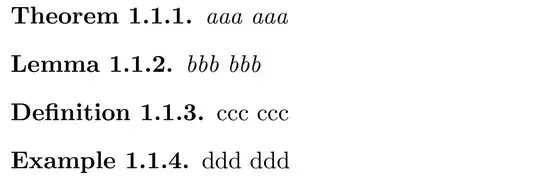

enter image description here

\documentclass{report} % or some other suitable document class

\usepackage{amsthm} \newtheorem{theorem}{Theorem}[section] \newtheorem{lemma}[theorem]{Lemma} \theoremstyle{definition} % optional \newtheorem{definition}[theorem]{Definition} \newtheorem{example}[theorem]{Example}

%\counterwithin{theorem}{section} % alternate solution

\begin{document}

\stepcounter{chapter} % just for this example \stepcounter{section}

\begin{theorem} aaa aaa \end{theorem} \begin{lemma} bbb bbb \end{lemma} \begin{definition} ccc ccc \end{definition} \begin{example} ddd ddd \end{example}

\end{document}

Mico
  • 506,678
  • how can I swtitch the number of the theorem to the front and then the word "Definition" goes to the back ? Like "1.1.1. Theorem." ? – PermQi Nov 23 '23 at 09:01
  • @PermQi - Your follow-up question is answered in Section 4.2, "Number swapping", of the user guide of the amsthm package. To bring up the user guide in a pdf viewer, type texdoc amsthm at a command prompt. (Remark: Give executing \swapnumbers immediately after \usepackage{amsthm} a try. Observe that a period (aka full stop) will be placed after the name of the theorem-like environment rather than after the number.) – Mico Nov 23 '23 at 09:06
  • I did just like your guidance and my output goes as "1.11 Definition. " The output is missing a dot in the number "1.11" while it should have been "1.1.1", and I don't know why. Maybe I did some code related to the counting inside the section. So how can I fix this without doing anything to the rest of my project ? – PermQi Nov 23 '23 at 10:09
  • @PermQi - Did you change \newtheorem{theorem}{Theorem}[chapter] to \newtheorem{theorem}{Theorem}[section]? If that's not applicable, did you try running \counterwithin{<theorem>}{section}, where <theorem> is the primary theorem-like environment? – Mico Nov 23 '23 at 10:52
  • I think my problem is since my chapter is 1 and my section is 1.1, so the definition some how is numbered from 1.11 with missing a dot between 1 and 1. I think it has nothing to do with the \counterwithin{}{section}, I think it is an issue with the format of title of the environment. Do you think the code \renewcommand{\thetheorem}{\arabic{chapter}.\arabic{section}.} would fix this ? – PermQi Nov 23 '23 at 11:36
  • @PermQi - The example I provided, which employs the report document class, does not experience any of the issues you say you're encountering. Unfortunately, , you've have not (yet) seen fit to let me know which document class you use, and you haven't communicated either how exactly you define the theorem-like environments. Without these crucial pieces of information, I can't meaningfully help you any further. – Mico Nov 23 '23 at 11:45
  • here is my source code \documentclass[13pt,a4paper]{report} \usepackage{amsthm} \renewcommand{\thesection}{\arabic{chapter}.\arabic{section}.\hspace{-0.3cm}} \renewcommand{\cftsecnumwidth}{2em} \sectionfont{\fontsize{17}{20}\selectfont} \swapnumbers \newtheorem{theorem}{Theorem}[section] \newtheorem{definition}[theorem]{Definition} – PermQi Nov 23 '23 at 12:09
  • @PermQi - So the culprit is likely \hspace{-0.3cm} in \renewcommand{\thesection}{\arabic{chapter}.\arabic{section}.\hspace{-0.3cm}}. What's the purpose of the backward spacing? Does the problem with the numbering of the theorem-like environments persist if you remove \hspace{-0.3cm}? Even better, could you just get rid of \renewcommand{\thesection}{\arabic{chapter}.\arabic{section}.\hspace{-0.3cm}} entirely? – Mico Nov 23 '23 at 12:11
  • oh, I created that code long time ago that I don't remember now why I did that, but I promise any code I create in the past is for some reason, and when I create a new project, I usually copy that code from my previous projects, so – PermQi Nov 23 '23 at 12:14
  • @PermQi - What happens to the numbering of the theorem-like environments if you get rid of \renewcommand{\thesection}{\arabic{chapter}.\arabic{section}.\hspace{-0.3cm}}? Please advise. – Mico Nov 23 '23 at 12:16
  • 1
    you are right, my problem is gone ! this is insane – PermQi Nov 23 '23 at 12:16
  • @PermQi - Off-topic: The document class option 13pt has exactly zero effect if the report document class is used. The only font size options that the report class recognizes are 10pt, 11pt, and 12pt. If you switch from report to extreport, the class option 14pt would become available. – Mico Nov 23 '23 at 12:23
  • @PermQi - I'm glad the issue has been resolved. – Mico Nov 23 '23 at 12:24
  • thank you for really helpful advice. By the way, when I use the code \subsection*{something}, my "something" are not numbered while I want it to be. So how can I number my "something" within the section ? – PermQi Nov 23 '23 at 12:29
  • @PermQi All "starred" sectioning commands -- \section*, \subsection*, etc. -- produce unnumbered headers by design. Hence, if you do not want to suppress the numbering scheme, don't use the starred variants of the commands. – Mico Nov 23 '23 at 13:09
  • but I have to use it because I want to use the subsection environment instead of theorem environment (since I think the subsection is easier to use than the theorem), otherwise I don't want to add the subsection into my table of contents, so I used \subsection*. So let me describe my project's layout for you.

    Chapter 1. Introductory knowledge Section 1.1. Linear Algebra Subsection 1.1.1. Coordinates and the change of basis Subsection 1.1.1.1. Definition Subsection 1.1.1.2. Proposition Subsection 1.1.2. Orthogonal group Subsection 1.1.1.2. Definition

    – PermQi Nov 23 '23 at 15:16
  • @PermQi - Sorry, but your argument is invalid: LaTeX does not impose a rigid connection between what's numbered in the body of the document and what's included in the Table of Contents (ToC). Two facts: (a) If you want to have numbered subsection-level headers in the body of the text, you must use \subsection, not \subsection*. (b) If you don't want subsection-level headers to be included in the ToC, just issue the instruction \setcounter{tocdepth}{1} in the preamble. That way, only chapter-level and section-level entries ("level" 0 and 1, resp.) will be included in the ToC. – Mico Nov 23 '23 at 17:34
  • 1
    wow thank you, I really appreciate. By the way your English is so good, I want to be that good too – PermQi Nov 23 '23 at 20:46
  • I have used the code \setcounter{tocdepth}{1} right before the \subsection{2.1.1. Definition.}, but it didn't worked, the subsection is still not hiden in the table of content. What should I do to fix that ? – PermQi Dec 12 '23 at 11:58
  • @PermQi - Sorry, but I've lost track of which of the many possible permutations of parameter settings we're at. May I ask you to post a new query, in which you (a) full and replicable information about your document setup and (b) which outcomes you're trying to a achieve but are somehow stymied at? Thanks. – Mico Dec 12 '23 at 13:49