I have a relatively complex table that looks like this:
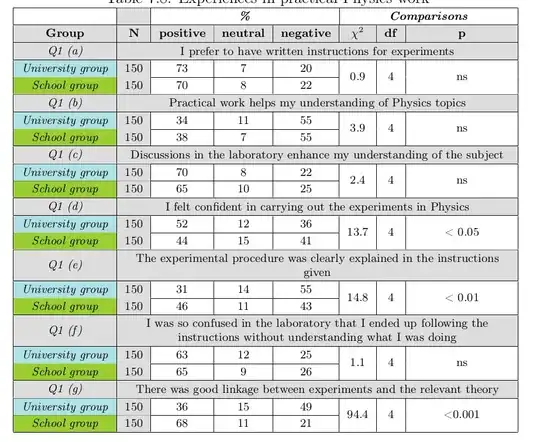
The same table structure is going to be repeated so many times. I already have the tables in MS Word. My question is if there is an easy method to fill the data in the table code?
Here's the code:
\documentclass[12pt]{report}

\usepackage{color}
\usepackage[usenames,dvipsnames,svgnames,table]{xcolor}
\usepackage{multirow}

%This will change the font for all the tables in the document.
\makeatletter
\g@addto@macro{\table[ht]}{\fontsize{9pt}{10.8pt}\selectfont}
\makeatother

\begin{document}
\begin{table}[ht]
\newcolumntype{Z}{>{\centering\arraybackslash}m{4.11in}}
\newcolumntype{Y}{>{\centering\arraybackslash\columncolor{Gainsboro}}c}
\renewcommand*{\arraystretch}{1.2}
\centering
\caption{Experiences in practical Physics work}
  \begin{tabular}{|c|Y|c|c|c|c|c|c|}
    \hline
               &            & \multicolumn{3}{c}{\emph{\textbf{\%}}} & \multicolumn{3}{|c|}{\emph{\textbf{Comparisons}}}  \\
    \hline  \rowcolor{Gainsboro}  {\textbf{Group}}& {\textbf{N}} & \textbf{positive} & \textbf{neutral} & \textbf{negative} & \textbf{$\chi^2$} & \textbf{df} & \textbf{p} \\
    \hline
    \rowcolor{Gainsboro}{\emph{Q1 (a)}} & \multicolumn{7}{Z|}{I prefer to have written instructions for experiments}  \\
    \hline
    \cellcolor{PowderBlue}\emph{University group} & {150} & 73         & 7          & 20         & \multirow{2}{*}{0.9} & \multirow{2}{*}{4} & \multirow{2}{*}{ns} \\
    \cline{1-5}
    \cellcolor{YellowGreen}\emph{School group} & {150} & 70         & 8          & 22         &            &            &  \\
    \hline
    \rowcolor{Gainsboro}{\emph{Q1 (b)}} & \multicolumn{7}{Z|}{Practical work helps my understanding of Physics topics}                   \\
    \hline
    \cellcolor{PowderBlue}\emph{University group} & {150} & 34         & 11         & 55         & \multirow{2}{*}{3.9} & \multirow{2}{*}{4} & \multirow{2}{*}{ns} \\
    \cline{1-5}
    \cellcolor{YellowGreen}\emph{School group} & {150} & 38         & 7          & 55         &            &            &  \\
    \hline
    \rowcolor{Gainsboro}{\emph{Q1 (c)}} & \multicolumn{7}{Z|}{Discussions in the laboratory enhance my understanding of the subject}                   \\
    \hline
    \cellcolor{PowderBlue}\emph{University group} & {150} & 70         & 8          & 22         & \multirow{2}{*}{2.4} & \multirow{2}{*}{4} & \multirow{2}{*}{ns} \\
    \cline{1-5}
    \cellcolor{YellowGreen}\emph{School group} & {150} & 65         & 10         & 25         &            &            &  \\
    \hline
    \rowcolor{Gainsboro}{\emph{Q1 (d)}} & \multicolumn{7}{Z|}{I felt confident in carrying out the experiments in Physics}                   \\
    \hline
    \cellcolor{PowderBlue}\emph{University group} & {150} & 52         & 12         & 36         & \multirow{2}{*}{13.7} & \multirow{2}{*}{4} & \multirow{2}{*}{< 0.05} \\
    \cline{1-5}
    \cellcolor{YellowGreen}\emph{School group} & {150} & 44         & 15         & 41         &            &            &  \\
    \hline
    \rowcolor{Gainsboro}{\emph{Q1 (e)}} & \multicolumn{7}{Z|}{The experimental procedure was clearly explained in the instructions given}                   \\
    \hline
    \cellcolor{PowderBlue}\emph{University group} & {150} & 31         & 14         & 55         & \multirow{2}{*}{14.8} & \multirow{2}{*}{4} & \multirow{2}{*}{< 0.01} \\
    \cline{1-5}
    \cellcolor{YellowGreen}\emph{School group} & {150} & 46         & 11         & 43         &            &            &  \\
    \hline
    \rowcolor{Gainsboro}{\emph{Q1 (f)}} & \multicolumn{7}{Z|}{I was so confused in the laboratory that I ended up following the instructions without understanding what I was doing}                   \\
    \hline
    \cellcolor{PowderBlue}\emph{University group} & {150} & 63         & 12         & 25         & \multirow{2}{*}{1.1} & \multirow{2}{*}{4} & \multirow{2}{*}{ns} \\
    \cline{1-5}
    \cellcolor{YellowGreen}\emph{School group} & {150} & 65         & 9          & 26         &            &            &  \\
    \hline
    \rowcolor{Gainsboro}{\emph{Q1 (g)}} & \multicolumn{7}{Z|}{There was good linkage between experiments and the relevant theory}                   \\
    \hline
    \cellcolor{PowderBlue}\emph{University group} & {150} & 36         & 15         & 49         & \multirow{2}{*}{94.4} & \multirow{2}{*}{4} & \multirow{2}{*}{<0.001} \\
   \cline{1-5}
    \cellcolor{YellowGreen}\emph{School group} & {150} & 68         & 11         & 21         &            &            &  \\
    \hline
    \end{tabular}
\label{ch7:tab:experiencesinpracticalphysics}
\end{table}

\end{document}
I know that I shouldn't be asking two questions but this one is small: How do I make an individual cell transparent?
Edit: I made it MWE and here's another table with the same structure but different data:


\g@addto@macrobit is wrong; remove[ht]from it as soon as possible. – egreg Sep 05 '12 at 22:19[ht]in it but adding it makes everything work. When I remove it: 1- The word[ht]comes at the top of every table (because my tables are alwaysbegin{table}[ht]. 2- The font does NOT change 3- The positioning of the float doesn't work anymore – abdulhaq-e Sep 06 '12 at 03:05\haligns and\valigns, which could accomplish this kind of format. – morbusg Sep 29 '12 at 17:56