Not altogether sure what you want. (I vaguely remember from earlier questions, but there's not much to refresh my memory in this one.)
The following generates note and page numbers in the indices without altering the contents of the document environment. Whether that's the target behaviour, I'm not sure.
The initial problem with your code is that you have defined \pagenoteindex to require 3 arguments, but are passing it only 2. I'm guessing you want an optional argument here, because you're passing one to \is, so we need 4 cases rather than 2:
- we're inside a page note and have an optional argument;
- we're inside a page note without one;
- we're outside with one;
- we're outside without one.
expl3 makes expansion (relatively) straightforward. It is, at least, a lot less unwieldy than juggling chains of \expandafters which threaten to regress to infinity. We define 2 functions for cases (1) and (2):
\cs_new_protected:Nn \thomkrates_pagenoteindex:nnnn
{
  \index [#1] { #3 | pn {#2}{#4} }
}
\cs_new_protected:Nn \thomkrates_pagenoteindex:nnn
{
  \index  { #2 | pn {#1}{#3} }
}
If using this code, do note this is not the correct way to do this. As explained below, we're bypassing the standard mechanisms here.
Then we tell LaTeX we'd like variants which should receive a pre-expanded argument in second or first place:
\cs_generate_variant:Nn \thomkrates_pagenoteindex:nnnn { nene }
\cs_generate_variant:Nn \thomkrates_pagenoteindex:nnn { ene }
This means LaTeX will expand those arguments before passing them to our base functions, so we don't have to. So now we can define a version of \is to handle our 4 cases:
\NewDocumentCommand {\is} { om }{%
  \if@nopnote
    \IfValueTF { #1 } {
      \index[#1]{#2}
    }{
      \index{#2}
    }
  \else
    \hypertarget{pn:\tempnumber}{}%
    \IfValueTF { #1 } {
      \thomkrates_pagenoteindex:nene { #1 } { \tempnumber } { #2 } { \temppgnumber }
    }{
      \thomkrates_pagenoteindex:ene { \tempnumber } { #2 } { \temppgnumber }
    }
  \fi
}
Because I don't understand the format xindy wants (as opposed to makeindex) and couldn't find the relevant documentation (which I assume exists somewhere), I gave up trying to figure out how to get the page number to show up when \hyperindexformat is used in the .idx rather than \hyperpage.
So at this point we use a brute-force-and-ignorance approach, simply adding the page number directly and bypassing the usual mechanisms:
\renewcommand{\notenuminnotes}[1]{%
  \edef\tempnumber{#1}%
  \edef\temppgnumber{\thepage}%
  {\normalfont #1.} }
We also modify our definition \pn to utilise the target we added in \is:
\newcommand\pn[2]{\hyperpage{#2}\hyperlink{pn:#1}{n#1}}
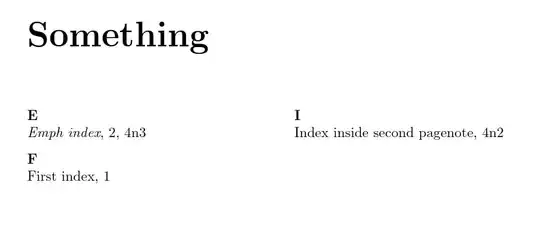
Complete code:
\documentclass{report}
% ateb: https://tex.stackexchange.com/a/705581/ addaswyd o gwestiwn Thomkrates: https://tex.stackexchange.com/q/705565/
\usepackage{index}
\usepackage[texindy,splitindex]{imakeidx}
\usepackage[hidelinks]{hyperref}
\usepackage[page]{pagenote}
\newcommand\pn[2]{\hyperpage{#2}\hyperlink{pn:#1}{n#1}}
\makeatletter
\let\if@nopnote\iffalse % just for the example
\renewcommand{\notenuminnotes}[1]{%
  \edef\tempnumber{#1}%
  \edef\temppgnumber{\thepage}%
  {\normalfont #1.} }
\ExplSyntaxOn
\NewDocumentCommand {\is} { om }{%
  \if@nopnote
    \IfValueTF { #1 } {
      \index[#1]{#2}
    }{
      \index{#2}
    }
  \else
    \hypertarget{pn:\tempnumber}{}%
    \IfValueTF { #1 } {
      \thomkrates_pagenoteindex:nene { #1 } { \tempnumber } { #2 } { \temppgnumber }
    }{
      \thomkrates_pagenoteindex:ene { \tempnumber } { #2 } { \temppgnumber }
    }
  \fi
}
\cs_new_protected:Nn \thomkrates_pagenoteindex:nnnn
{
  \index [#1] { #3 | pn {#2}{#4} }
}
\cs_generate_variant:Nn \thomkrates_pagenoteindex:nnnn { nene }
\cs_new_protected:Nn \thomkrates_pagenoteindex:nnn
{
  \index  { #2 | pn {#1}{#3} }
}
\cs_generate_variant:Nn \thomkrates_pagenoteindex:nnn { ene }
\ExplSyntaxOff
\makeatother
\makeindex[program=texindy,name=Names,title=Names]
\makeindex[program=texindy,name=Something,title=Something]
\makepagenote
\begin{document}
First index.\index[Something]{First index}
Sentence.\pagenote{First pagenote without index.}
\clearpage
Emph index.\index[Something]{Emph index@\emph{Emph index}}
pagenote and index.\pagenote{Second pagenote with index.\is[Something]{Index inside second pagenote}}
\clearpage
Third pagenote.\pagenote{\emph{Emph index word}.\is[Something]{Emph index@\emph{Emph index}}}
Namenindex\index[Names]{Namenindex}
\printnotes
\printindex[Something]
\printindex[Names]
\end{document}


\includeand\inputand used the exact code of yours in the preamble. Always the same output result. as said with these 2 differences with your output. Do you have the newest version oftexindyinstalled? Since difference number 1. appearce to me that your version is not equal to mine, but the output on my system seems correct and as intended. Difference 2. I have no idea where the problem lies. – Thomkrates Dec 24 '23 at 13:11\ifdefined\HCode. So what I need seems 1. texindy/xindy and 2. tex4ebook and hyperlink support. Due to this emph problem with double output entries whennotusing texindy/xindy. – Thomkrates Dec 25 '23 at 07:54\hyperindexformat? I have no idea where to look at the present definition. – Thomkrates Dec 25 '23 at 18:03\hyperindexformatis neither to find inindex packagenor inhyperref package. I do not know how to see its definition or possibility of changing. – Thomkrates Dec 25 '23 at 18:44hyperref.sty: \def\hyperindexformat#1#2{% \let\HyOrg@hyperpage\hyperpage \let\hyperpage@firstofone #1{\HyOrg@hyperpage{#2}}% \let\hyperpage\HyOrg@hyperpage }% -- I still do not understand that Code. Are you able to understand it? – Thomkrates Dec 25 '23 at 18:56\hyperindexformatthe wording\hyperindexformatis to be found 5 more time inhyperref package. Just to changehyperindexformatseems not sufficient for me, since these other five usages would be needed to change or completed with it. - We have in this problem 2 numbers (instead of one for a single index-entry) that need to go into index (the pagnote-number and the page-number of the pagenote). hyperindex-entry would have a link for 1. the pagenote-number, and 2. the page-number of the pagenote (which do not link to the same area in the hypertext document). – Thomkrates Dec 25 '23 at 19:33\isis called. That is, it isn't, strictly speaking, linking to the note but to an invisible target created by\is. – cfr Dec 26 '23 at 04:44LaTeX Warning: Command \markboth has changed. Check if current package is valid. LaTeX Warning: Command \markright has changed. Check if current package is valid.Without yet trying tex4ebook it seems not to be an error complaining, only a warning. So I will see. - Have a nice boxing day and winter time. – Thomkrates Dec 26 '23 at 08:47WARNING: Found no :close-range matching an already opened one! Location-reference is 72 in keyword (lange aufbleiben). Maybe I lost some of the regular location-references. WARNING: Found a :close-range in the index that wasn't opened before! Location-reference is 73 in keyword (lange aufbleiben) I'll continue and ignore this.- And in the index no pagenumbers/ranges are given. – Thomkrates Dec 26 '23 at 10:18docpackage breaks that functionality. (Though I think that's because it repurposes the encap character.) – cfr Dec 26 '23 at 16:52\markbothetc. That sounds rather odd. Those are used to set the 'marks' used in headers. The code I used does violence to the indexing mechanism, but it shouldn't alter the way headers get set etc. At least, I don't think so unless you're using dictionary-style headers or similar in the indices? – cfr Dec 26 '23 at 17:02docbut couldn't. Or I can delete this answer if you'd prefer. Dictionary-style headers are headers which indicate the first and last entries on each page, so the header content depends on which glossary, dictionary or index entries end up on the page. It wouldn't surprise me if my code broke those, since those obviously depend on the indexing code. Otherwise, the marks mechanism shouldn't be affected, I wouldn't think. – cfr Dec 26 '23 at 21:06