An adaptation of my answer at How to add referrable numbered circle symbols to code listings?:
\documentclass{article}
\usepackage{tikz}
\usepackage{listings}
\usepackage{circledsteps}
\pgfkeys{/csteps/outer color=orange}
\lstset{%
  basicstyle =\ttfamily,
  language = Python,
  keywordstyle = \bfseries,
  commentstyle = \itshape,
  numbers = left,
  numberstyle = \tiny\sffamily,
  escapechar = |,
  gobble = 2,
}
\makeatletter
\newcommand*\CircleNext{%
  \lst@AddToHook{OnNewLine}{%
   \def\thelstnumber{\Circled{\arabic{lstnumber}}\hskip-2.1pt}}%
}
\def\circlabel#1{
  \lst@AddToHook{OnNewLine}{%
   \def\thelstnumber{\arabic{lstnumber}}}%
  \label{#1}%
}
\makeatother
\begin{document}
\begin{lstlisting}
  import numpy as np
  from matplotlib import pyplot as plt
  |\CircleNext|
  t = np.linspace(0, 1, 100) |\circlabel{that-line}|
  plt.plot(t, t**2)|\CircleNext|
  plt.show() |\circlabel{that-other-line}|
\end{lstlisting}
Please see line~\ref{that-line} and line~\ref{that-other-line}.
\end{document}
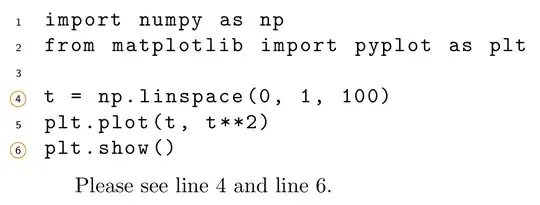
Below a variant that doesn't need the \CircleNext commands. It works by writing an extra label consisting of the format listing number-line number. Instead of an OnNewLine hook for listings, now the command \thelstnumber (which prints the line number for every line) is modified to check if the label for the current listing and current line exists or not. If the label exists then the number is circled (at the next run).
Unfortunately \thelstnumber is also written to the .aux file as the label text which is read by \ref. To prevent circled numbers in the main text a solution is to temporarily redefine \thelstnumber to be just the number when writing the regular \label.
The rest of the code is bookkeeping to create and increment the listings counter that is used in the new label.
Code:
\documentclass{article}
\usepackage{tikz}
\newcounter{lstprefix}
\setcounter{lstprefix}{0}
\usepackage{listings}
\AddToHook{env/lstlisting/before}{\stepcounter{lstprefix}}
\usepackage{circledsteps}
\pgfkeys{/csteps/outer color=orange}
\lstset{%
  basicstyle =\ttfamily,
  language = Python,
  keywordstyle = \bfseries,
  commentstyle = \itshape,
  numbers = left,
  numberstyle = \tiny\sffamily,
  escapechar = |,
  gobble = 2,
}
\makeatletter
\def\thelstnumber{%
\ifcsname r@lst\thelstprefix-\arabic{lstnumber}\endcsname%
\Circled{\arabic{lstnumber}}\hskip-2.1pt%
\else%
\arabic{lstnumber}%
\fi%
}
\def\circlabel#1{
  {\def\thelstnumber{\arabic{lstnumber}}\label{#1}}%
  \label{lst\thelstprefix-\arabic{lstnumber}}%
}
\makeatother
\begin{document}
\begin{lstlisting}
  import numpy as np
  from matplotlib import pyplot as plt
t = np.linspace(0, 1, 100) |\circlabel{that-line}|
  plt.plot(t, t**2)
  plt.show() |\circlabel{that-other-line}|
\end{lstlisting}
Please see line~\ref{that-line} and line~\ref{that-other-line}.
\begin{lstlisting}
  import numpy as np
  from matplotlib import pyplot as plt |\circlabel{import-line}|
t = np.linspace(0, 1, 100)
  plt.plot(t, t**2)
  plt.show()
\end{lstlisting}
See also line \ref{import-line}.
\end{document}
This creates the following .aux file:
\relax
\newlabel{that-line}{{4}{1}}
\newlabel{lst1-4}{{\Circled {4}\hskip -2.1pt}{1}}
\newlabel{that-other-line}{{6}{1}}
\newlabel{lst1-6}{{\Circled {6}\hskip -2.1pt}{1}}
\newlabel{import-line}{{2}{1}}
\newlabel{lst2-2}{{\Circled {2}\hskip -2.1pt}{1}}
\gdef \@abspage@last{1}


\def\REF#1{AAA-\ref{#1}}. Change the AAA to what you need. – yannisl Jan 18 '24 at 10:47