I would make the size configurable. For example,
\documentclass[border=5]{standalone}
\usepackage{tikz}
\newcount\segmentsleft
\tikzset{%
  pics/circle fraction/.style args={#1/#2}{%
    code={%
      \segmentsleft=#1\relax
      \pgfmathloop
        \ifnum\segmentsleft<1
        \else
          \ifnum\segmentsleft<#2
            \edef\n{\the\segmentsleft}
          \else
            \def\n{#2}
          \fi
        \begin{scope}[shift={(\pgfmathcounter2\circlefractionsize,0)}]
          \foreach \i [evaluate={\a=360/#2(\i-1)+90;}] in {1,...,\n}
          \fill[fill=green] (0,0) -- (\a:\circlefractionsize) arc (\a:\a+360/#2:\circlefractionsize) -- cycle;
          \draw circle [radius=\circlefractionsize];
          \ifnum#2>1
            \foreach \i [evaluate={\a=360/#2(\i-1);}] in {1,...,#2}
            \draw (0,0) -- (90+\a:\circlefractionsize);
          \fi
        \end{scope}
        \advance\segmentsleft by-#2
      \repeatpgfmathloop
    }
  },
  circle fraction size/.store in=\circlefractionsize,
  circle fraction size=1,
}
\begin{document}
\begin{tikzpicture}
  \foreach \numerator/\denominator [count=\y,evaluate=\y as \s using (-2\circlefractionsize\y)]
  in {1/1, 1/3, 2/4, 3/5, 8/8, 4/1, 10/3, 20/6, 30/7, 40/15}{
    \node at (-1/2,\s) {};
    \pic  at (0,\s) {circle fraction={\numerator/\denominator}};
  }
\end{tikzpicture}
\begin{tikzpicture}[circle fraction size=1.5]
  \foreach \numerator/\denominator [count=\y,evaluate=\y as \s using (-2\circlefractionsize\y)]
  in {1/1, 1/3, 2/4, 3/5, 8/8, 4/1, 10/3, 20/6, 30/7, 40/15}{
    \node at (-1/2,\s) {};
    \pic  at (0,\s) {circle fraction={\numerator/\denominator}};
  }
\end{tikzpicture}
\end{document}

I would also probably not set the pic code up like this, but that may be a matter of taste. I tend to set my pics up in a standard way so they can take key-value options are are semi-isolated to avoid conflicts. For example,
\documentclass[border=5]{standalone}
\usepackage{tikz}
% ateb: https://tex.stackexchange.com/a/710293/ addaswyd o gwestiwn user292225: https://tex.stackexchange.com/q/710289/
\newcount\segmentsleft
\usetikzlibrary{fit}
\newcount\circlefracnum
\newcount\circlefracdenom
\tikzset{%
  circle frac/.search also={/tikz,/pgf},
  circle frac/.code={\tikzset{circle frac/.cd,#1,/tikz/.cd}},
  circle frac/.cd,
  back/.code={\colorlet{circle frac back}{#1}},
  back=white,
  draw/.code={\colorlet{circle frac draw}{#1}},
  draw=black,
  fill/.code={\colorlet{circle frac fill}{#1}},
  fill=green,
  frac/.code args={#1/#2}{%
    \circlefracnum=#1
    \circlefracdenom=#2
  },
  frac=1/2,
  label/.store in=\circlefraclabel,
  label=,
  name/.store in=\circlefracname,
  name=,
  size/.store in=\circlefracsize,
  size=1,
  /tikz/.cd,
  pics/circle frac/.style={%
    code={%
      \tikzset{circle frac/.cd, #1, /tikz/.cd}%
      \begin{scope}[local bounding box/.expanded=\circlefracname]
        \segmentsleft=\circlefracnum\relax
        \pgfmathloop
          \ifnum\segmentsleft<1
          \else
            \ifnum\segmentsleft<\circlefracdenom
              \edef\n{\the\segmentsleft}
            \else
              \def\n{\circlefracdenom}
            \fi
          \begin{scope}[draw=circle frac draw,shift={(\pgfmathcounter*2*\circlefracsize,0)}]
            \fill [circle frac back] circle [radius=\circlefracsize];
            \foreach \i [evaluate={\a=360/\circlefracdenom*(\i-1)+90;}] in {1,...,\n}
            \fill [fill=circle frac fill] (0,0) -- (\a:\circlefracsize) arc (\a:\a+360/\circlefracdenom:\circlefracsize) -- cycle;
            \draw circle [radius=\circlefracsize];
            \ifnum\circlefracdenom>1
              \foreach \i [evaluate={\a=360/\circlefracdenom*(\i-1);}] in {1,...,\circlefracdenom}
              \draw (0,0) -- (90+\a:\circlefracsize);
            \fi
          \end{scope}
          \advance\segmentsleft by-\circlefracdenom
        \repeatpgfmathloop
      \end{scope}
      \node (\circlefracname) [fit=(\circlefracname.north east) (\circlefracname.south west), label/.expanded=\circlefraclabel] {};
    }%
  },
}
\begin{document}
\begin{tikzpicture}
  \foreach \numerator/\denominator [count=\y,evaluate=\y as \s using (-2\circlefracsize\y)]
  in {1/1, 1/3, 2/4, 3/5, 8/8, 4/1, 10/3, 20/6, 30/7, 40/15}{
    \node at (-1/2,\s) {};
    \pic  at (0,\s) {circle frac={frac=\numerator/\denominator}};
  }
\end{tikzpicture}
\begin{tikzpicture}[circle frac={size=1.5}]
  \foreach \numerator/\denominator [count=\y,evaluate=\y as \s using (-2\circlefracsize\y)]
  in {1/1, 1/3, 2/4, 3/5, 8/8, 4/1, 10/3, 20/6, 30/7, 40/15}{
    \node at (-1/2,\s) {};
    \pic  at (0,\s) {circle frac={frac=\numerator/\denominator}};
  }
\end{tikzpicture}
\begin{tikzpicture}[circle frac={size=1.5}]
  \foreach \numerator/\denominator/\col [count=\y,evaluate=\y as \s using (-2\circlefracsize\y)]
  in {1/1/pink, 1/3/magenta, 2/4/red, 3/5/orange, 8/8/yellow, 4/1/green, 10/3/cyan, 20/6/blue, 30/7/purple, 40/15/gray}{
    \node at (-1/2,\s) {};
    \pic  at (0,\s) {circle frac={frac=\numerator/\denominator,fill=\col,back=\col!5,name=row\y}};
    \node [anchor=east,font=\sffamily,xshift=-20pt] at (row\y.west) {Row \y};
  }
\end{tikzpicture}
\end{document}
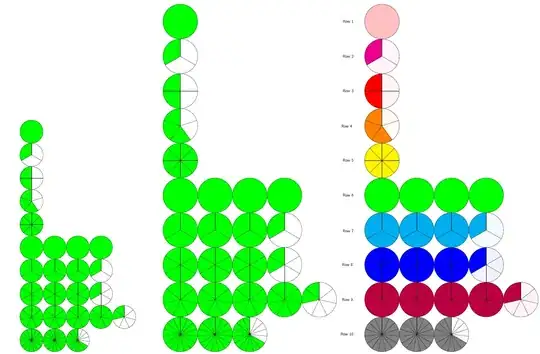
Of course, you might want fewer, more or different toggles from the ones I setup here. Once you have the basic structure, it is fairly straightforward to extend the pattern.


