2

I have this piece of LaTeX:

\documentclass{article}
\usepackage[pdftex,active,tightpage]{preview}
\setlength\PreviewBorder{2mm}
% Source: http://tex.stackexchange.com/a/15278/5645

\usepackage{chessboard}
\storechessboardstyle{4x4}{maxfield=d4}

\begin{document}
\begin{preview}

% showmover shows which player is to move
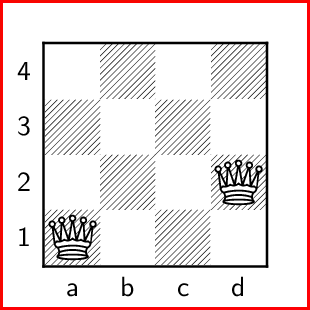
\chessboard[style=4x4,setwhite={Qa1,Qd2},showmover=false]

\end{preview}
\end{document}

And I compile using pdflatex.

But the PDF document is too wide (just mark the image to see its width)

chess board - too wide

How can I make the width of the PDF equal to the of the chessboard?

Martin Scharrer
  • 262,582
Martin Thoma
  • 18,799

2 Answers2

10

The problem is the blank lines in the preview environment. You'll get a tight box by removing them:

\begin{preview}
% showmover shows which player is to move
\chessboard[style=4x4,setwhite={Qa1,Qd2},showmover=false]
\end{preview}

See also Standalone package creates a page with a fixed width

Lev Bishop
  • 45,462
  • 1
    The blank lines create a paragraph, so the output is \linewidth wide. Removing the lines will give you only an horizontal box with no added space. – Martin Scharrer Sep 11 '12 at 06:32
4

Case 1

standalone has an option border that you can use to specify the left, bottom, right, top borders. Negative values can also be used to trim. 

enter image description here

\documentclass[preview,border={-8pt -8pt -18pt -18pt}]{standalone}
% Source: http://tex.stackexchange.com/a/15278/5645

\usepackage{chessboard}
\storechessboardstyle{4x4}{maxfield=d4}

\begin{document}
% showmover shows which player is to move
\chessboard[style=4x4,setwhite={Qa1,Qd2},showmover=false]
\end{document}

Case 2

If you want to have equal borders or trimmed offset, just use one value border=-5pt for example.

enter image description here

\documentclass[preview,border=-5pt]{standalone}
% Source: http://tex.stackexchange.com/a/15278/5645

\usepackage{chessboard}
\storechessboardstyle{4x4}{maxfield=d4}

\begin{document}
% showmover shows which player is to move
\chessboard[style=4x4,setwhite={Qa1,Qd2},showmover=false]
\end{document}

Remarks: The red rectangles were added when I converted the PDF output to PNG. They are useful to show the edges of the outputs.