something like the following -- my detailed answer with the syntax and citation to the original is here -- How highlight date or week in TikZ Calendar with background color?
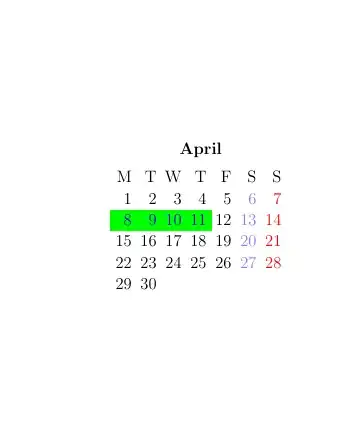
MWE
\documentclass[12pt]{article}
\usepackage{hyperref}
\hypersetup{colorlinks=true, citecolor=blue}
\usepackage{tikz}
\usetikzlibrary{calc,calendar}
%%% Shorthand w- for Weekday
\expandafter\def\csname pgfcalendar@shorthand@w-\endcsname{\ifcase\pgfcalendarcurrentweekday M\or T\or W \or T\or F\else S\fi}
%%% equal key that strips /<text>
\pgfqkeys{/pgf/calendar}{equals-strip/.style args={#1/#2}{equals={#1}}}
%%% A simple parser for <year>-<month>-<day> so we can use shorthands outside of a calendar
\def\pgfcalendarsimpleparse#1-#2-#3\relax{%
    \def\pgfcalendarcurrentyear{#1}%
    \def\pgfcalendarcurrentmonth{#2}%
    \def\pgfcalendarcurrentday{#3}}
%%% hyperling node
\tikzset{
    hyperlink node/.style={
        alias=@hyper,
        append after command={
            let \p1 = (@hyper.north west),
            \p2 = (@hyper.south east),
            \n1 = {\x2-\x1}, \n2 = {\y1-\y2} in
            node [inner sep=+0pt, outer sep=+0pt, anchor=center, at=(@hyper)] {\hyperlink{ref-#1}{\XeTeXLinkBox{\phantom{\rule{\n1}{\n2}}}}}}}}
\newcommand{\calrow}[1]{\node[draw,black, minimum width=7\csname tikz@lib@cal@xshift\endcsname]{\textbf{#1}};}
\newcommand{\calperiod}[1]{%
    \calendar [
    dates=2024-#1-01 to 2024-#1-last,
    day text={%d=},
    %
    % we name every weekday node (even though we only need the Thursday)
    weekday node/.style={
        black, name=weekday-\pgfcalendarcurrentmonth-\pgfcalendarcurrentweekday},
    %
    % teaching day, include hyperlink node based on the date
    teaching day/.style={
        days={text=blue, fill=green, hyperlink node=\pgfcalendarcurrentyear-\pgfcalendarcurrentmonth-\pgfcalendarcurrentday}}]
    %
    % standard stuff
    %
    if (Saturday) [blue!50]
    if (Sunday)   [red]
    %
    % the first day of the month is in the upmost row,
    % let's place the weekday above it and align it properly
    % the name @firstweekday can be referenced later
    %
    if (day of month=1) [days={append after command={
            node [anchor=base east, at={(\tikzlastnode.base east)}, alias=@firstweekday,
            yshift=\csname tikz@lib@cal@yshift\endcsname, weekday node/.try] {%w-}}}]
    %
    % for all other days 2 to 7 we place the weekday text similar but we use the
    % the first placed weekday text to make sure we align it at the same height
    %
    if (day of month=2, day of month=3, day of month=4, day of month=5, day of month=6, day of month=7) [days={append after command={
            node [anchor=base east, at={(@firstweekday.base east-|\tikzlastnode.base east)}, weekday node/.try] {%w-}}}]
    %
    % and go
    %
    if (equals-strip/.list/.expand once=\myDates) [teaching day]
    ;
}
\newcommand*\myDates{%
    2024-04-8/Intro,
    2024-04-9/Basics I,
    2024-04-10/Basics II,
    2024-04-11/And}
\linespread{1.3}
\begin{document}\noindent
    \begin{tikzpicture}[every calendar/.style={week list}],
        \matrix[column sep=1.5ex]{%
            \calperiod{04} &  &  \
        };
        \foreach \mon/\t in {04/April}
        \node[anchor=south, yshift=2ex, at=(weekday-\mon-3)] {\textbf{\t}};
    \end{tikzpicture}
%   \pagebreak
%   \setlength{\labelwidth}{4em}
%   \begin{itemize}
    %       \foreach \target/\name[/utils/exec=\let\%\pgfcalendarshorthand] in \myDates{
        %           \expandafter\pgfcalendarsimpleparse\target\relax
        %           \item[\%m. \%d= \%y-] \hypertarget{ref-\target}{\name}}
    %   \end{itemize}

\end{document}


