You can get the first hypergeometric aligned with the integral symbol:
\documentclass{article}
\usepackage{amsmath}
\usepackage{showframe}
\ExplSyntaxOn
% https://tex.stackexchange.com/a/125531/4427
\NewDocumentCommand{\pFq}{O{}mmmmm}
 {
  % #2 = left subscript, #3 = right subscript
  % #4 = top, #5 = bottom, #6 = right
  \group_begin:
  \keys_set:nn { hypergeometric } { #1 }
  \hypergeometric_print:nnnnn { #2 } { #3 } { #4 } { #5 } { #6 }
  \group_end:
 }
\NewDocumentCommand{\hypergeometricsetup}{m}
 {
  \keys_set:nn { hypergeometric } { #1 }
 }
\tl_new:N \l_hypergeometric_divider_tl
\tl_new:N \l_hypergeometric_left_tl
\tl_new:N \l_hypergeometric_right_tl
\keys_define:nn { hypergeometric }
 {
  symbol .tl_set:N = \l_hypergeometric_symbol_tl,
  symbol .initial:n = F,
  separator .tl_set:N = \l_hypergeometric_separator_tl,
  separator .initial:n = {},
  skip .tl_set:N = \l_hypergeometric_skip_tl,
  skip .initial:n = 8,
  divider .choice:,
  divider/semicolon .code:n = \tl_set:Nn \l_hypergeometric_divider_tl { ;; },
  divider/bar .code:n = \tl_set:Nn \l_hypergeometric_divider_tl { ;\middle|; },
  divider .initial:n = semicolon,
  fences .choice:,
  fences/brack .code:n =
   \tl_set:Nn \l_hypergeometric_left_tl {[}
   \tl_set:Nn \l_hypergeometric_right_tl {]},
  fences/parens .code:n =
   \tl_set:Nn \l_hypergeometric_left_tl {(}
   \tl_set:Nn \l_hypergeometric_right_tl {)},
  fences .initial:n = brack,
 }
\cs_new_protected:Nn \hypergeometric_print:nnnnn
 {
  % the main symbol
  {} \sb {#1} \l_hypergeometric_symbol_tl \sb { #2 }
  % the parameters
  \left\l_hypergeometric_left_tl
  \genfrac .. % no delimiters
           {0pt} % no line
           {} % default style
           { __hypergeometric_process:n { #3 } } % numerator
           { __hypergeometric_process:n { #4 } } % denominator
  \l_hypergeometric_divider_tl
  #5
  \right\l_hypergeometric_right_tl
 }
\cs_new_protected:Nn __hypergeometric_process:n
 {
  \clist_use:nn { #1 }
   {
    {\l_hypergeometric_separator_tl}
    \mspace { \l_hypergeometric_skip_tl mu }
   }
 }
\ExplSyntaxOff
\hypergeometricsetup{
  fences=brack,
  divider=semicolon,
  separator={,},
}
\newcommand{\diff}{\mathop{}!d}
\newcommand{\dd}{\Delta}
\newcommand{\p}{\phi}
\begin{document}
\begin{equation}
\begin{split}
&!
 \int_0^1 y^{\frac{\dd-\ell}{2}-\dd_\p+s-1} (1-y)^{2\dd_\p-h+\ell-1}\
& \pFq{2}{1}{s,s+j}{2s+j}{1-y}
 \pFq{2}{1}{-h+\frac{\dd+\ell}{2}+\dd_\p,-h+\frac{\dd+\ell}{2}+\dd_\p}{\dd-h+1}{y}
 \diff y,.
\end{split}
\end{equation}
\end{document}

If you want the number aligned with the bottom row, use the tbtags option to amsmath: with \usepackage[tbtags]{amsmath} you'd get
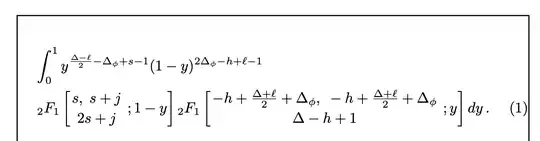
Alternatively, if you want such placement only for this display and not generally for split, you can use aligned:
\begin{equation}
\begin{aligned}[b]
&\!
 \int_0^1 y^{\frac{\dd-\ell}{2}-\dd_\p+s-1} (1-y)^{2\dd_\p-h+\ell-1}\\
& \pFq{2}{1}{s,s+j}{2s+j}{1-y}
 \pFq{2}{1}{-h+\frac{\dd+\ell}{2}+\dd_\p,-h+\frac{\dd+\ell}{2}+\dd_\p}{\dd-h+1}{y}
 \diff y\,.
\end{aligned}
\end{equation}
Another possibility worth mentioning is to give a name to the complicated formula:
If we set
\[
 H(y)=
 \pFq{2}{1}{s,s+j}{2s+j}{1-y}
 \pFq{2}{1}{-h+\frac{\dd+\ell}{2}+\dd_\p,-h+\frac{\dd+\ell}{2}+\dd_\p}{\dd-h+1}{y},
\]
then we can consider
\begin{equation}
 \int_0^1 y^{\frac{\dd-\ell}{2}-\dd_\p+s-1} (1-y)^{2\dd_\p-h+\ell-1} H(y)\diff y,
\end{equation}
Fill in with the appropriate wording.


dmathyou are presumably defining withbreqnthat you don't mention.breqnchanges almost everything about the math layout so any answer would be breqn-specific, and really you should say if you are using that. preferably by providing a small complete document that makes (just) the image shown. – David Carlisle Mar 16 '24 at 14:46\\in your expression? – David Carlisle Mar 16 '24 at 14:48multlinedoes that for example) so your display looks Ok to me (and would not look better if you move the second line left) but as you have not provided usable code, hard to suggest any alternatives. – David Carlisle Mar 16 '24 at 14:54\dd,\p,\pFq, and\diff. – Mico Mar 16 '24 at 17:10