9

I have the following code that should print the two figures next to each other with an a to the left of the first figure and a b to the left of the second one. The code below does this, but everything is aligned to the bottom line. Is there an option to force the pictures down? Or maybe a totally different way of avhiving my goal? Thanks!

\documentclass{scrbook}

\usepackage{tikz-qtree}

\begin{document}

\begin{figure}[htbp]
\centering
\begin{tabular}[t]{@{}ll@{\hspace{2cm}}ll@{}}
a. & \begin{tikzpicture}
\Tree[.N 
          [.PV pazirāi ]
          [.N 
            [.V kon- ] ande ] ]
\end{tikzpicture} &
b. &
\begin{tikzpicture}
\Tree[.N 
          [.V 
            [.PV pazirāi ]
            [.V kon- ] ] ande ] 
\end{tikzpicture}
\end{tabular}
\end{figure}


\end{document}
Stefan Müller
  • 6,901
  • 3
  • 29
  • 61

5 Answers5

8

Here's an option using the floatrow and subfig packages; as an advantage of this approach, you don't have to manually label the figures and can easily control the vertical position of the labels; furthermore, you can cross-reference the subfigures:

\documentclass{scrbook}
\usepackage{tikz-qtree}
\usepackage{floatrow}
\usepackage{subfig}

\floatsetup[figure]{style=plain,subcapbesideposition=center}

\begin{document}

\begin{figure}
\sidesubfloat[]{%
\begin{tikzpicture}
\Tree[.N 
          [.PV pazirāi ]
          [.N 
            [.V kon- ] ande ] ]
\end{tikzpicture} 
}\qquad%
\sidesubfloat[]{%
\begin{tikzpicture}
\Tree[.N 
          [.V 
            [.PV pazirāi ]
            [.V kon- ] ] ande ] 
\end{tikzpicture}
}
\end{figure}

\end{document}
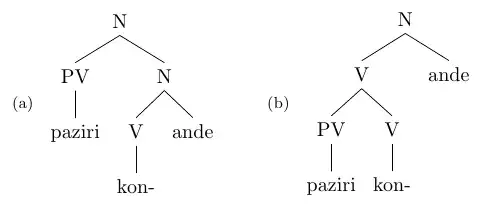
enter image description here

Simply loading the bidi package in the above solution (and processing with XeLaTeX), as in the following document:

\documentclass{scrbook}
\usepackage{tikz-qtree}
\usepackage{floatrow}
\usepackage{subfig}
\usepackage{bidi}

\floatsetup[figure]{style=plain,subcapbesideposition=center}

\begin{document}

\begin{figure}
\sidesubfloat[]{%
\begin{tikzpicture}
\Tree[.N 
          [.PV pazirāi ]
          [.N 
            [.V kon- ] ande ] ]
\end{tikzpicture} 
}\qquad%
\sidesubfloat[]{%
\begin{tikzpicture}
\Tree[.N 
          [.V 
            [.PV pazirāi ]
            [.V kon- ] ] ande ] 
\end{tikzpicture}
}
\end{figure}

\end{document}

produces the error

! LaTeX Error: \floatc@plain undefined.

See the LaTeX manual or LaTeX Companion for explanation.
Type  H <return>  for immediate help.
 ...                                              

l.16 \renewcommand\floatc@plain
                               [2]{\setbox\@tempboxa\hbox{{\@fs@cfont #1:} #2}%

? 

A workaround then is to define \floatc@plain before loading the bidi package; the definition can be found in the float.sty file; the following code can be processed without errors and produces the desired result:

\documentclass{scrbook}
\usepackage{tikz-qtree}
\usepackage{floatrow}
\usepackage{subfig}
\makeatletter
\newcommand\floatc@plain[2]{\setbox\@tempboxa\hbox{{\@fs@cfont #1:} #2}%
  \ifdim\wd\@tempboxa>\hsize {\@fs@cfont #1:} #2\par
    \else\hbox to\hsize{\hfil\box\@tempboxa\hfil}\fi}
\makeatother
\usepackage{bidi}

\floatsetup[figure]{style=plain,subcapbesideposition=center}

\begin{document}

\begin{figure}
\sidesubfloat[]{%
\begin{tikzpicture}
\Tree[.N 
          [.PV pazirāi ]
          [.N 
            [.V kon- ] ande ] ]
\end{tikzpicture} 
}\qquad%
\sidesubfloat[]{%
\begin{tikzpicture}
\Tree[.N 
          [.V 
            [.PV pazirāi ]
            [.V kon- ] ] ande ] 
\end{tikzpicture}
}
\end{figure}

\end{document}

enter image description here

Gonzalo Medina
  • 505,128
  • I would prefer this solution, but it seems incompatible with the bidi package: (/usr/local/texlive/2012/texmf-dist/tex/latex/bidi/xcolor-xetex-bidi.def) (/usr/local/texlive/2012/texmf-dist/tex/latex/bidi/float-xetex-bidi.def

    ! LaTeX Error: \floatc@plain undefined.

    See the LaTeX manual or LaTeX Companion for explanation. Type H for immediate help. ...

    l.16 \renewcommand\floatc@plain [2]{\setbox@tempboxa\hbox{{@fs@cfont #1:} #2}%

    ?

    – Stefan Müller Sep 13 '12 at 14:28
  • @StefanMüller true. The author of bidi claims compatibility with subfig but says nothing about floatrow; perhaps you could contact him about this issue (he is one of the regulars here). – Gonzalo Medina Sep 13 '12 at 14:34
  • When I started to deal with Persian, I tried to email him, but his mail account is not functional. Maybe he reads this. I try adding the bidi tag to my question ... – Stefan Müller Sep 13 '12 at 15:03
  • @StefanMüller I left a note for the author about this particular issue; let's hope the note reaches him. – Gonzalo Medina Sep 13 '12 at 15:37
  • @StefanMüller In the meantime I've found a solution to the floatrow-bidi problem; Please see my updated answer and let me know if it produces the desired result. – Gonzalo Medina Sep 14 '12 at 21:02
  • Yes, works! Thanks! How are such cases handled? Will this be taken care of in bidi later? Will it be anounced here later or do I have to check the updates and test whether I can remove your additional code? – Stefan Müller Sep 15 '12 at 05:13
  • @StefanMüller Glad to hear it worked. Regarding your question, I guess we have to wait and see if the package author receives my note (I provided a link to your question and my answer) and see what he decides to do. – Gonzalo Medina Sep 15 '12 at 22:48
  • Make a bug report in https://github.com/vafa/bidi/issues but I do not promise updating bidi package unless there is some donations to the project –  Nov 04 '12 at 11:24
7

The following example shows two methods to shift the tikz pictures. The first is using \raisebox{-.5\height}{...} that would also work with images. Then second uses a option baseline:

\documentclass{scrbook}

\usepackage{tikz-qtree}

\begin{document}

\begin{figure}[htbp]
\centering
\begin{tabular}[t]{@{}ll@{\hspace{2cm}}ll@{}}
a. & \raisebox{-.5\height}{\begin{tikzpicture}
\Tree[.N
          [.PV pazirai ]
          [.N
            [.V kon- ] ande ] ]
\end{tikzpicture}} &
b. &
\begin{tikzpicture}[baseline=(current bounding box.center)]
\Tree[.N
          [.V
            [.PV pazirai ]
            [.V kon- ] ] ande ]
\end{tikzpicture}
\end{tabular}
\end{figure}

\end{document}

Result

Heiko Oberdiek
  • 271,626
6

You can also use one TikZ picture and the local bounding box options but I would recommend using the subcaption package to handle your subfigures properly. Here is an example:

\documentclass{scrbook}

\usepackage{tikz-qtree}
\usetikzlibrary{positioning}

\begin{document}

\begin{figure}[htbp]
\centering
\begin{tikzpicture}

\begin{scope}[local bounding box=aa]
\Tree[.N 
          [.PV pazirāi ]
          [.N 
            [.V kon- ] ande ] ]

\end{scope}

\begin{scope}[shift={(6,0)},local bounding box=bb]
\Tree[.N 
          [.V 
            [.PV pazirāi ]
            [.V kon- ] ] ande ] 

\end{scope}

\node[right = -1cm of aa.west] {a.)};
\node[right = -1cm of bb.west] {b.)};

\end{tikzpicture}
\end{figure}


\end{document}

It might need additional shifts if the scope heights are different.

enter image description here

percusse
  • 157,807
4

This solution doesn't give the format you requested, but it uses the subcaption to give (a) and (b) below each subfigure. Note that a lot of people reading your document will expect to see the captions below the figures, and won't necessarily be looking for them to the side.

enter image description here

Using this approach is somewhat advantageous because you can reference them easily using the standard label and ref techniques.

\documentclass{article}

\usepackage{tikz-qtree}
\usepackage{subcaption}

\begin{document}

\begin{figure}[htbp]
    \begin{subfigure}{.5\textwidth}
        \centering
        \begin{tikzpicture}
            \Tree[.N 
            [.PV pazirāi ]
            [.N 
            [.V kon- ] ande ] ]
        \end{tikzpicture} 
        \caption{First subpicture}
        \label{fig:myfirstsubfig}
    \end{subfigure}%
    \begin{subfigure}{.5\textwidth}
        \centering
        \begin{tikzpicture}
            \Tree[.N 
            [.V 
            [.PV pazirāi ]
            [.V kon- ] ] ande ] 
        \end{tikzpicture}
        \caption{Second subpicture}
        \label{fig:mysecondsubfig}
    \end{subfigure}
\end{figure}

\end{document}
cmhughes
  • 100,947
2

Another option for manual labeling is too put the figures into minipages. I use this technique to align all kind of figures, especially when the baseline of the figure can not be controlled (which is possible for TikZ figures though).

\documentclass{article}
\usepackage{tikz-qtree}
\makeatletter
\newsavebox{\my@figbox}
\newcommand{\myfigbox}[2][\empty]{
  \if#1\empty\else\textbf{#1}\fi%
  \savebox{\my@figbox}{#2}%
  \begin{minipage}[c]{\wd\my@figbox}
    \centering\vspace{0pt}
    \usebox{\my@figbox}%
  \end{minipage}%
}
\makeatother
\begin{document}

\myfigbox[a.]{%
\begin{tikzpicture}
  \Tree[.N 
          [.PV pazirai ]
          [.N 
            [.V kon- ] ande ] ]
\end{tikzpicture}
}%
\myfigbox[b.]{%
\begin{tikzpicture}
\Tree[.N 
          [.V 
            [.PV pazirai ]
            [.V kon- ] ] ande ] 
\end{tikzpicture}
}

\end{document}

enter image description here

Often space can be saved by laying the labels over the figure. For this one can modify the \myfigbox macro as follows:

\newcommand{\myfigbox}[2][\empty]{
  \if#1\empty\else\makebox[0pt][l]{\textbf{#1}}\fi%
  \savebox{\my@figbox}{#2}%
  \begin{minipage}[t]{\wd\my@figbox}
    \centering\vspace{0pt}
    \usebox{\my@figbox}%
  \end{minipage}%
}

which yields

enter image description here

alexurba
  • 1,648