I can use latex -v to check the version of LaTeX. Is there a way to check what version of MacTeX (MacTeX 2008, 2009 or 2010) is installed?
Asked
Active
Viewed 3.1k times


7 Answers
17
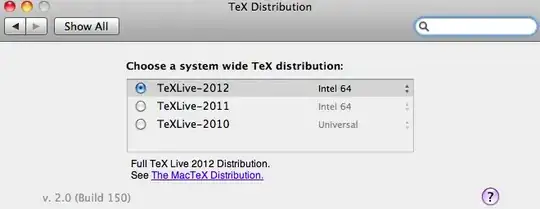
MacTeX installs a System Preferences pane which shows TeX installations for selection. There you can see the version.
Here's a screenshot:

Peter Grill
- 223,288

Stefan Kottwitz
- 231,401
-
Oh. I thought he wanted something that he could check programmatically. – Harald Hanche-Olsen Dec 17 '10 at 17:34
-
This is the right (i.e., Mac-like) answer. I totally forgot about the preference pane. – Matthew Leingang Dec 17 '10 at 17:55
-
6If I am correct, this is no longer the case with TexLive 2016 on Mac OS X 10.9.5. – Karlo Aug 03 '17 at 22:38
-
1This is no longer the case, indeed. Look for the TeX Live Utility app instead. – postylem May 02 '22 at 18:56
9
The latest info as of May 2019.
Tex Live Utility allows you to check the MacTex version you are currently using (and to switch to other version if needed). There is no longer a System Preferences pane for this purpose.
The MacTex website says:
Long ago we installed a Preference Pane which could do this switching, but this functionality is now in TeX Live Utility, which is in /Applications/TeX. To switch, use the Configure menu item "Select Default TeX Live Version."

T_T
- 557
5
Found this answer on superuser which essentially says:
- Run
pdflatex --version - The first row contains the version
pdfTeX 3.14159265-2.6-1.40.21 (TeX Live 2020)(2020 in my case)

belteshazzar
- 171
5
; readlink /usr/texbin
../usr/local/texlive/2010/bin/x86_64-darwin

Harald Hanche-Olsen
- 15,968
-
2Weird. On my mac that gives
../Library/TeX/Distributions/.DefaultTeX/Contents/Programs/i386Butreadlink /usr/textbin/(note the trailing slash) gives../../../../../../../usr/local/texlive/2010/bin/x86_64-darwin– Matthew Leingang Dec 17 '10 at 16:43 -
Yeah,
/Library/TeX/Distributions/contains a whole mess of links. I have no idea why my/usr/texbinis a direct link rather than indirecting though said mess. – Harald Hanche-Olsen Dec 17 '10 at 17:41 -
Your programmatical approach is fine. I like the command line. – Stefan Kottwitz Dec 17 '10 at 17:45
4
In 2010, this worked:
cd /usr/texbin && pwd -P
and gave something like /usr/local/texlive/2009/bin/universal-darwin.
For more recent versions, use
cd /Library/TeX/Root && pwd -P
which gives something like /usr/local/texlive/2018.

lhf
- 2,212
2
Create a "hello world" latex file and compile it. Look at the console or .log file and see what files are being loaded. On my machine I see
(/usr/local/texlive/2010/texmf-dist/tex/latex/base/article.cls...
So you can guess it's TL 2010.

Matthew Leingang
- 44,937
- 14
- 131
- 195
0
You could also use:
which tex # shows which and where your MacTex is installed
Or:
tex --version # or `tex -v`

psygo
- 438