Your interest in prettifying the expression is most likely around the alignment. Regardless, don't use eqnarray. Rather use the capabilities of amsmath's align environment(s):
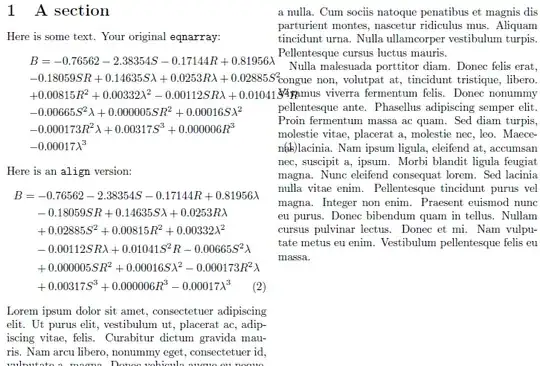
\documentclass[twocolumn]{article}
\usepackage{lipsum}% http://ctan.org/pkg/lipsum
\usepackage{amsmath}% http://ctan.org/pkg/amsmath
\newcommand{\noeq}{\phantom{=}{}}
\begin{document}
\section{A section}
Here is some text. Your original \verb|eqnarray|:
\begin{eqnarray}
&& B =-0.76562-2.38354S-0.17144R+0.81956\lambda      \nonumber \\
&&-0.18059SR+0.14635S\lambda+0.0253R\lambda+0.02885S^2 \nonumber \\
&&+0.00815R^2+0.00332\lambda^2-0.00112SR\lambda+0.01041S^2R\nonumber \\
&&-0.00665S^2\lambda+0.000005SR^2+0.00016S\lambda^2 \nonumber \\
&&-0.000173R^2\lambda+0.00317S^3+0.000006R^3\nonumber \\
&&-0.00017\lambda^3
\end{eqnarray}
Here is an \verb|align| version:
\begin{align}
B &= -0.76562-2.38354S-0.17144R+0.81956\lambda \nonumber \\
  &\noeq -0.18059SR+0.14635S\lambda+0.0253R\lambda \nonumber \\
  &\noeq +0.02885S^2+0.00815R^2+0.00332\lambda^2 \nonumber \\
  &\noeq -0.00112SR\lambda+0.01041S^2R-0.00665S^2\lambda \nonumber \\
  &\noeq +0.000005SR^2+0.00016S\lambda^2-0.000173R^2\lambda \nonumber \\
  &\noeq +0.00317S^3+0.000006R^3-0.00017\lambda^3
\end{align}
\lipsum[1-3]
\end{document}
As a motivation, see \eqnarray vs \align, where you will find additional reference to not using eqnarray.


alingninsteadeqnarray– c.p. Sep 30 '12 at 01:04alignenvironment instead of aneqnarrayenvironment. Theeqnarrayenvironment suffers from several rather severe shortcomings. However, if you absolutely must use the latter environment anyway, at least start off the first line withB&=&-0.76562instead of&& B =-0.76562. – Mico Sep 30 '12 at 02:47