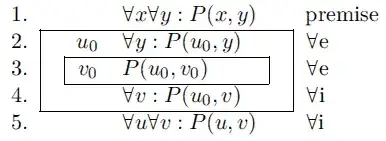
Here is a way to do that with {NiceTabular} of nicematrix. This environment is similar to the classical {tabular} (of array) but adds PGF/Tikz nodes under the cells, rows and columns. It's possible to use those nodes to draw whatever you want after the construction of the array with Tikz in the \CodeAfter.
\documentclass{article}
\usepackage{nicematrix,tikz}
\begin{document}
[\begin{NiceArray}{lcclcl}
- & \quad & & \forall x\forall y : P(x,y) & \quad & \mbox{premise} \
- & & u_0 & \forall y : P(u_0,y) && \forall e \
- & & v_0 & P(u_0,v_0) & & \forall e \
- & & & \forall v : P(u_0,v) && \forall i \
- & & & \forall u\forall v : P(u,v) & & \forall i
\CodeAfter
\tikz \draw (2-|2) rectangle (5-|6) (3-|3) rectangle (4-|5) ;
\end{NiceArray}]
\end{document}
You need several compilations (because nicematrix uses PGF/Tikz nodes under the hood).

In fact, in your case, it's also possible to use the built-in command \Block with the key draw in the cells which correspond to the upper-left corners. You don't have to use Tikz explicitely.
\documentclass{article}
\usepackage{nicematrix}
\begin{document}
[\begin{NiceArray}{lcclcl}
- & \quad & & \forall x\forall y : P(x,y) & \quad & \mbox{premise} \
- & \Block[draw]{3-4}{} & u_0 & \forall y : P(u_0,y) && \forall e \
- & & \Block[draw]{1-2}{} v_0 & P(u_0,v_0) & & \forall e \
- & & & \forall v : P(u_0,v) && \forall i \
- & & & \forall u\forall v : P(u,v) & & \forall i
\end{NiceArray}]
\end{document}
The output is the same.




tabularcreation aids. – Werner Oct 06 '12 at 04:01\text{}more appropriate than\mbox{}? – azetina Oct 07 '12 at 02:34\displaystyle,\textstyle,\scriptstyle, ...), yes. However, in this instance, not so much. – Werner Oct 07 '12 at 02:42