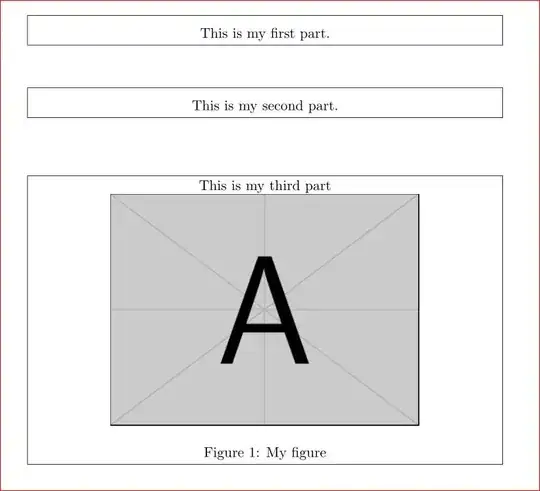
As told in the linked answer by lockstep, you can't put figure inside a minipage as the former is a float and latter is not. The solution is to define a separate figurebox in addition to textbox as shown in the MWE. Also you have to add % at appropriate places to avoid spurious spaces.
\documentclass{article}
\usepackage{graphicx}
\newcommand{\textbox}[1]{%
\par
\noindent
\fbox{%
\begin{minipage}{0.95\textwidth}%
\vspace{0.2cm}
\centering
#1
\end{minipage}%
}
\vspace{1cm}
}%
%
\newcommand{\figurebox}[4]{%
\begin{figure}[htb]%
\fbox{%
\centering
\begin{minipage}[c]{0.95\textwidth}
\centering #1\par
    \includegraphics[width=3.0in]{#2}
    \caption{#3}
    \label{#4}
\end{minipage}%
}%
\end{figure}%
}%

\begin{document}
\noindent
\textbox{This is my first part.}%
\textbox{This is my second part.}
%% syntax is \figurebox{text}{figure file name}{caption}{label}
\figurebox{This is my third part}{example-image-a}{My figure}{fig:first}
\end{document}
Option -2
If you want to use the same textbox command for figures also, then you have to avoid the float figure To get the captions you can use caption or capt-of packages.
\documentclass{article}
\usepackage{graphicx,capt-of}
\newcommand{\textbox}[1]{%
\par
\noindent
\fbox{%
\begin{minipage}{0.95\textwidth}%
\vspace{0.2cm}
\centering
#1
\end{minipage}%
}
\vspace{1cm}
}%

\begin{document}
\noindent
\textbox{This is my first part.}%
\textbox{This is my second part.}
\textbox {%
    This is my third part.
    \includegraphics[width=9cm]{example-image-a}
    \vspace{-12pt}
    \captionof{figure}{My caption.}
    \label{fig:myfigure}
}%


\end{document}


figureyou can have\includegraphicsand if you use thecapt-ofpackage you can have a labeled caption\captionof{figure}{...Or you can just box the contents of the figure and allow the box itself to float. – David Carlisle Oct 09 '12 at 12:53%after every{and}in your definition otherwise the content is not centred in the box as you have varying numbers of word spaces either side. using\hfilland\centeringtogether is rather odd. They will counter-act each other just use\centering and use\parnot\newline` at the end. – David Carlisle Oct 09 '12 at 12:56