If you are just adding new lines in the label above the loop, then the answers were already provided in the comments.
Here is one using the text width option.
\documentclass[tikz]{standalone}

\usetikzlibrary{positioning,automata}

\begin{document}
\begin{tikzpicture}[shorten >=1pt,node distance=3.5cm,on grid,auto]
   \node[state, initial, initial where=left, accepting] (A) {A};
    \path[->]
    (A) edge [loop above,text width=1cm] node {$a, b, c$ \\ $c, d, e$ \\ foo \\ bar} (A);
\end{tikzpicture}
\end{document}

Here is another with the align=left option.
\begin{tikzpicture}[shorten >=1pt,node distance=3.5cm,on grid,auto]
   \node[state, initial, initial where=left, accepting] (A) {A};
    \path[->]
    (A) edge [loop above,align=left] node {$a, b, c$ \\ $c, d, e$ \\ foo \\ bar} (A);
\end{tikzpicture}
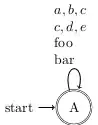
Here is with the align=center option.
\begin{tikzpicture}[shorten >=1pt,node distance=3.5cm,on grid,auto]
   \node[state, initial, initial where=left, accepting] (A) {A};
    \path[->]
    (A) edge [loop above,align=center] node {$a, b, c$ \\ $c, d, e$ \\ foo \\ bar} (A);
\end{tikzpicture}

You can even use tables inside the nodes. (But this one's overdoing it already :)
\begin{tikzpicture}[shorten >=1pt,node distance=3.5cm,on grid,auto]
   \node[state, initial, initial where=left, accepting] (A) {A};
    \path[->]
    (A) edge [loop above,text width=2cm] node {
    \begin{tabular}{@{}ccc}
    $a$,& $b$,& $c$ \\
    $c$,& $d$,& $e$ \\
    foo & & \\
    bar & &
    \end{tabular}
    } (A);
\end{tikzpicture}

You can see section 16, starting at 179 of the pgf manual for more of this.


text widthparameter of node, namelynode [text width=1cm]{...}, although this way it is not possible to explicitly set the line breaks. – guillem Oct 16 '12 at 07:03align=center/left/right/justifyto make\\work without setting the width explicitly. – Tobi Oct 16 '12 at 07:10