6

I am using this code

$$
\xymatrix{
    z\in\ar@{|->}[d] & \mathbb{C}\ar[r]^{f}\ar[d] & \overline{\mathbb{C}}\\
    {}[z]\in & \mathbb{C}/L\ar[ru]_{\hat{f}}
}
$$

to generate this diagram in LyX:
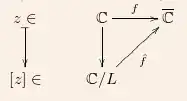
enter image description here

How can I show the arrowed circle inside the triangle (diagram) which mathematically indicates, that the diagram commutes?

David Carlisle
  • 757,742
Aufwind
  • 607

1 Answers1

11

this uses "plain" latex, but i believe that can be embedded in a lyx session.

\documentclass{article}
\usepackage{xypic}
\usepackage{amssymb}

\begin{document}
\[
\xymatrix{
  \mathbb{C} \ar[r]^f \ar[d]
  \ar@{}[dr] |{\mathstrut\raisebox{2.5ex}{$\circlearrowright$\kern1.4em}}
  & \overline{\mathbb{C}} \\
  \mathbb{C}/L \ar[ru]_{\hat{f}} & \null
}
\]
\end{document}

output of tex code

the \null is used to provide a path on which to set the arrowed circle; an empty \mbox{} would do as well. the position of the arrow is determined by experiment (starting with an educated guess).

David Carlisle
  • 757,742
  • Thanks for your reply! I tested it and it seems to work. At least I see the circled arrow. I assume, that raise box{2.5ex} is responsible for moving the box of the arrow up. Is there a way to push it to the left, too? – Aufwind Nov 04 '12 at 23:13
  • @Aufwind -- inside the box with the arrow, there is a \kern instruction to the right of the arrow. i used this trick to make the arrow "wider", which has the effect of pushing it to the left. if you want it shifted more to the left, increase the 1.4em to whatever looks good to you. (i'm not familiar with this notation, so just shifted the position until it looked reasonable to me.) – barbara beeton Nov 04 '12 at 23:23