1

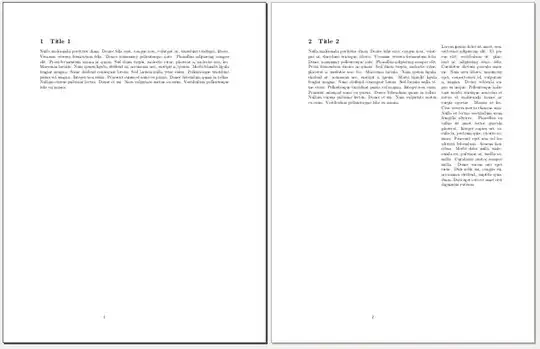
I want to be able to change the marginpar and right values for each page, depending if the page has notes or not. MWE:

\documentclass{article}
\usepackage[top=3cm, bottom=3cm, left=3cm, right=8cm, marginpar=5cm]{geometry}

\usepackage[utf8]{inputenc}
\usepackage{lipsum}
\usepackage{graphicx}
\usepackage{caption}

\begin{document}

\section{Title 1}
\lipsum[3]
\newpage

\section{Title 2}
\marginpar{%
    \lipsum[1]
}

\lipsum[3]

\end{document}

enter image description here

As you can see the problem is that the first page always has a large margin. I'm using Ubuntu 12.04 and thus using the 2009 version of texlive, and I'm unable to update it right now, so I can't use \newgeometry. Is there another option I can use?

lockstep
  • 250,273
Havok
  • 151
  • 1
    If you are willing to switch it manually, you can use the example in this question: http://tex.stackexchange.com/questions/34368/how-to-switch-between-two-margin-sizes – Andy Nov 08 '12 at 07:55
  • Simply download the new geometry package into the folder of you *.tex-file, then it will be used by pdfLaTeX instead of the old one in texmf-dist. – Keks Dose Nov 08 '12 at 13:50

1 Answers1

1

Fixed. Just had to \usepackage{changepage} and \begin{adjustwidth}{}{-5cm} the section that I don't want to have margins. MWE:

\documentclass{article}
\usepackage[top=3cm, bottom=3cm, left=3cm, right=8cm, marginpar=5cm]{geometry}

\usepackage[utf8]{inputenc}
\usepackage{lipsum}
\usepackage{graphicx}
\usepackage{caption}
\usepackage{changepage}

\begin{document}

\section{Title 1}
\begin{adjustwidth}{}{-5cm}
\lipsum[3]
\end{adjustwidth}
\newpage

\section{Title 2}
\marginpar{%
    \lipsum[1]
}

\lipsum[3]

\end{document}

Result:

MWE working

Havok
  • 151