1. csvsimple:
You can simply adjust the table head to start with an \hline:

2. booktabs:
However, the booktabs package is usually recommened to produce more professional looking tables. So, I have added a second example that uses this along with the datatool package:
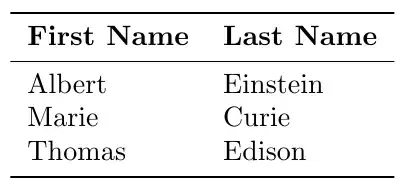
Much thanks to Nicola Talbot, who helped with proper use of booktabs here.
3. pgfplotstable:
A solution using pgfplotstable is provided at Bold one cell in table using CSV reader.
Notes:
Not sure why I needed the extra \\ before the \bottomrule which is producing the additional spacing at the bottom. To fix this I added a manual \vspace*{-12pt}, which is more of a hack.
It appears the the csvsimple package was discarding the last row as it did not have a trailing ,.
Code:
\documentclass{article}
\usepackage{datatool}
\usepackage{booktabs}
\usepackage{csvsimple}
% Make csv in question
%\usepackage{filecontents}
\begin{filecontents}{scientists2.csv}
name,surname,
Albert,Einstein,
Marie,Curie,
Thomas,Edison,
\end{filecontents}
\begin{document}
\begin{center}
    \csvreader[tabular=|l|l|,
        table head=\hline \textbf{ First Name} & \textbf{Last Name} \\hline,
        late after line = \\hline]%
    {scientists2.csv}{name=\name,surname=\surname}%
    {\name & \surname}%
\end{center}
\DTLloaddb{myDB}{scientists2.csv}
%\DTLdisplaydb{myDB}% Useful for debugging.
\begin{center}
\begin{tabular}{ll}\toprule
    \textbf{First Name} & \textbf{Last Name}%
    \DTLforeach*{myDB}{\Name=name,\Surname=surname}{%
        \DTLiffirstrow{\\cmidrule{1-2}}{\}%
        \Name & \Surname
    }%
    \\bottomrule
\end{tabular}
\end{center}
\end{document}


